I'm gonna look into setting up another install some time around. I'll see if it persists. Thanks!
2 Likes
I don't see any graphical glitches, and this is the output I get when I run snap-store from the terminal:
Gtk-Message: 09:49:23.880: Failed to load module "appmenu-gtk-module"
Gtk-Message: 09:49:23.881: Not loading module "atk-bridge": The functionality is provided by GTK natively. Please try to not load it.

(snap-store:12508): Gtk-WARNING **: 09:49:23.884: GTK+ module /snap/snap-store/1218/gnome-platform/usr/lib/gtk-2.0/modules/libcanberra-gtk-module.so cannot be loaded.
GTK+ 2.x symbols detected. Using GTK+ 2.x and GTK+ 3 in the same process is not supported.
Gtk-Message: 09:49:23.884: Failed to load module "canberra-gtk-module"
/usr/share/libdrm/amdgpu.ids: No such file or directory

(snap-store:12508): IBUS-WARNING **: 09:49:24.110: Failed to mkdir /home/username/snap/snap-store/1218/.config/ibus/bus: Not a directory
flutter: INFO snap-store: Logging to /home/username/snap/snap-store/1218/.local/share/snap-store/snap-store.log

(snap-store:12508): Gdk-CRITICAL **: 09:49:31.841: gdk_device_get_source: assertion 'GDK_IS_DEVICE (device)' failed

** (snap-store:12508): WARNING **: 09:49:49.429: atk-bridge: get_device_events_reply: unknown signature

(snap-store:12508): GLib-GObject-CRITICAL **: 09:53:01.272: ../src/gobject/gsignal.c:2777: instance '0x604d71ddf610' has no handler with id '164'

** (snap-store:12508): CRITICAL **: 09:53:01.276: void fl_view_redraw(FlView *): assertion 'FL_IS_VIEW(self)' failed

** (snap-store:12508): WARNING **: 09:53:01.406: Attempted to set message handler on an FlBinaryMessenger without an engine

** (snap-store:12508): WARNING **: 09:53:01.406: Attempted to set message handler on an FlBinaryMessenger without an engine
Given that I'm seeing the same errors and warnings, but no glitches - there is probably some other cause behind what you are seeing.
5 Likes
Probably need to raise this at Bugs : snap-store-desktop
2 Likes
I am looking at that as well, though I'm having a hard time tracking down relevant things that may have caused such unexpected behaviour. I'll see what I can do and I'd push through that if I figure things out. Thanks!
2 Likes
My best guess is it's something to do with snap-store and libdrm or direct rendering managers generally.
2 Likes
Hi Stephen,
Both @keiaa.07.05.00 and I have the same flickering of appcenter and both on an intel GPU.
It is possible that the appcenter bug is only triggered on certain chipsets/drivers, so my question is: What GPU are you using ?
3 Likes
I myself have the same exact GPU as the one: Intel WhiskeyLake-U GT2 [UHD Graphics 620] and I don't have flickering on any of Ubuntu MATE apps nor programs whatsoever - I only had basic complete install and later upgraded system as the updates came and never did have any issues
My CPU is: Intel i5-8265U (8) @ 3.900GHz and also - no problems with that as the Laptop runs fine since 2018/2019 when I bought it brand new
1 Like
I have the flickering on both Pentium N4500 and Celeron J4502
Could it be theme related ? I use an old GTK2 theme (ambiant-dark).
b.t.w. appcenter is the only app that triggers this problem.
2 Likes
Hmm Might be - I am using Yaru-MATE-Black theme and I customized panels to blend into my desktop picture which is one of the default ones that came with 24.04 - only issue in last month I had was with that Onboard (On-screen keyboard) that I must have mistakenly opened and since I turned it off I have no issues whatsoever
I like to keep things minimalist and simple so I don't experiment with themes and once I find a nice picture with mountains in the default pictures I set my desktop after install and leave it as is since I mostly look at firefox or libreoffice tabs anyways and mostly focus on text (basically any green+dark theme that is default is the one I will use I am not picky haha)
Have you tried to open app center with default theme - maybe it really is just GTK-2/GTK-3 clash that is causing the flickering
2 Likes
Good idea, I'll try it out in a few days 
2 Likes
That was also my first assumption. However, on my end, I've been using the default themes the entire time.
2 Likes
Well huh then I really don't know what to suggest - it sure is some bug but I hope it doesn't deter you from using Ubuntu MATE
1 Like
'App Center' is one of the few new-generation Ubuntu apps built using the Flutter UI framework. To narrow down the problem, I'd test other Flutter apps first.
Similar issue is discussed here (though 'glitching' is a vague term):
5 Likes
Eh... not quite. I like just about everything in Ubuntu MATE, particularly the forum we're in. That's why I decided to settle with this one. I'll just let my App Center sit there in the corner, I can do it the terminal way anyways.
Nonetheless, my dearest thanks Alarik! Have a good one.
7 Likes
I'll look into that sometime this weekend. I'll get back if I find anything notable on my end. Thanks!
4 Likes
I have the same issue:
NUC 7i5
ubuntu mate 24.04.2
2 Likes
Problem seems resolved by switching compositor off and on again.
4 Likes
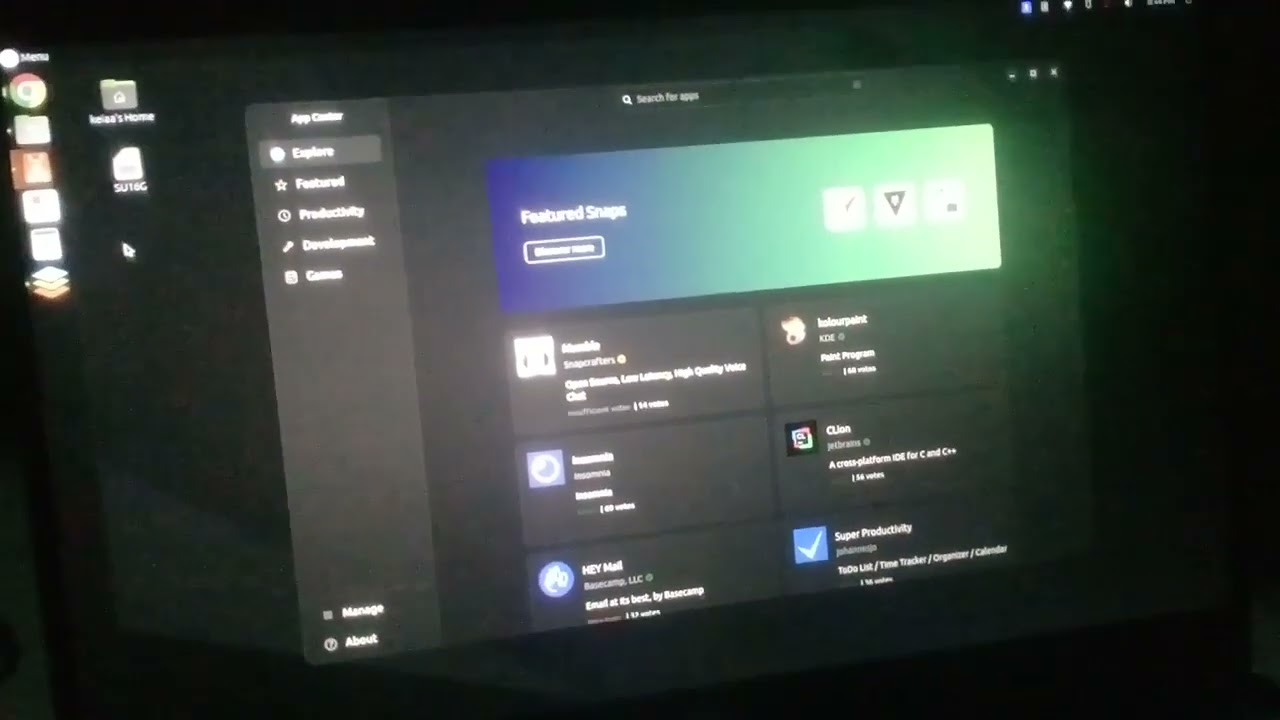
App Center seems to be graphically glitching, kind of like flickering.
With your phone, could you please share a video of this? Even if your issue is solved, we need it to help others.
4 Likes
Hi Philippe!
I don't think it's already solved on my end. I don't want to permanently disable my compositor as a workaround (my video playback looks terrible), nor I think should the compositor ever directly matter on that.
About your request, sorry it took some while. It's a bit dark here in my room too, my bad.
5 Likes
Bravo to catch up the issue.
As we see only the glitch on the app center window, we can say it's not about the display driver. I have no idea where to dig to solve it.
3 Likes