Thank you for idea! But of course I tried your suggestion before.
Now I tried it again and discovered, that not only Human and Human-Clearlooks are affected but also:
-
BlueMenta (gtk2+gtk3, from
mate-themespackage, installed by default); -
ClearlooksRe (gtk2, from
marco-commonpackage, installed by default); -
ContrastHighInverse (gtk2+gtk3, from
mate-themespackage, installed by default); -
DarkRoom (gtk2, from
human-themepackage); -
Dopple (gtk2, from
marco-commonpackage, installed by default); -
Dopple-Left (gtk2, from
marco-commonpackage, installed by default); -
Homosapien (gtk2, from
community-themespackage); -
Impression (gtk2, from
community-themespackage); -
Menta (gtk2+gtk3, from
mate-themespackage, installed by default); -
Night-Impression (gtk2, from
community-themespackage); -
Shiny (gtk2, from
mate-themespackage, installed by default); -
Spidey (gtk2, from
marco-commonpackage, installed by default); -
Spidey-Left (gtk2, from
marco-commonpackage, installed by default); -
Splint (gtk2, from
marco-commonpackage); -
Splint-Left (gtk2, from
marco-commonpackage); -
Turrican (gtk2, from
community-themespackage).
See screenshot.
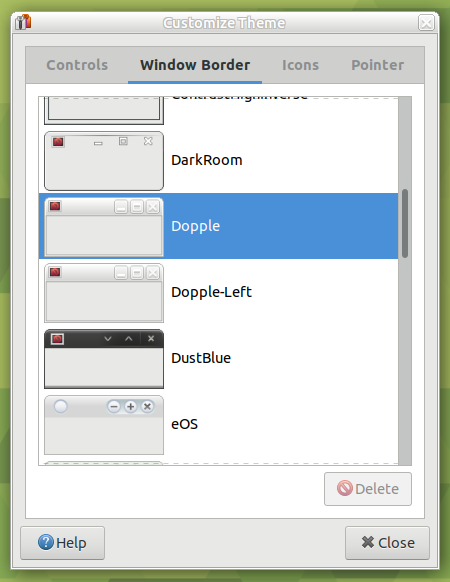
So aforementioned themes (and packages human-theme, marco-common, mate-themes, community-themes) are affected too.
Some have gray/silver background, some have low-contrast, some have wrong colors.
But problem is likely with GTK, it seems that some color defaults are hardcoded and changed since 16.04 LTS.
I tried other methods to set gtk-color-scheme for Human theme:
gsettings set org.gnome.desktop.interface gtk-color-scheme 'fg_color:#101010\nbg_color:#E6DDD5\nbase_color:#FFF\ntext_color:#1A1A1A\nselected_bg_color:#8F5F4A\nselected_fg_color:#FFF\ntooltip_bg_color:#F5F5B5\ntooltip_fg_color:#000'gsettings set org.mate.interface gtk-color-scheme 'fg_color:#101010\nbg_color:#E6DDD5\nbase_color:#FFF\ntext_color:#1A1A1A\nselected_bg_color:#8F5F4A\nselected_fg_color:#FFF\ntooltip_bg_color:#F5F5B5\ntooltip_fg_color:#000'
- both do not work.
For some users "traditional desktop experience" should be supported by traditional theming (is it correct assumption, @Wimpy ? ).
How should I check that Marco honors my ~/.gtkrc, ~/.config/gtk-2.0/gtkrc and ~/.config/gtk-3.0/settings.ini? It seems that it ignores them even in clean Ubuntu 16.04 LTS MATE and Ubuntu 18.04 LTS MATE.
If I specify theme by environment variable as
GTK2_RC_FILES=/usr/share/themes/Human/gtk-2.0/gtkrc gtk-demo
or
GTK_THEME=Human gtk-demo # just testing, I understand that this command is for GTK 3 only
it does not change window border too. What is wrong?
If I select GTK 3 based theme such as Menta the command GTK_THEME=Menta gtk3-demo works as expected. And other GTK 3 themes too (Ambiant-MATE-Dark, Ambiant-MATE, BlackMATE, BlueMenta, Blue-Submarine, ContrastHighInverse, GreenLaguna, Green-Submarine, Radiant-MATE, TraditionalGreen, TraditionalOk).
So the question remains - is it possible to use old GTK2 themes in 18.04 LTS?