It comes already compiled as an executable and I would like to add it to the top left hand corner next to Firefox and VM. But I haven't figured out how to do it as yet.
Please be easy on me, I am brand new. Thanks, Fred
I want to be sure where you’re at with Double Commander. It’s installed and working and you can start it from the menu ok? Now, you’d like to add a launcher in the panel for it placed to the right of VirtualBox?
I intentionally used the lingo “panel” and “launcher” to help with this task. Terms like this is half the battle of new technology - knowing what they call them really helps.
EDIT: Hehe… I see the appeal. I’m a Norton Commander veteran from long ago.
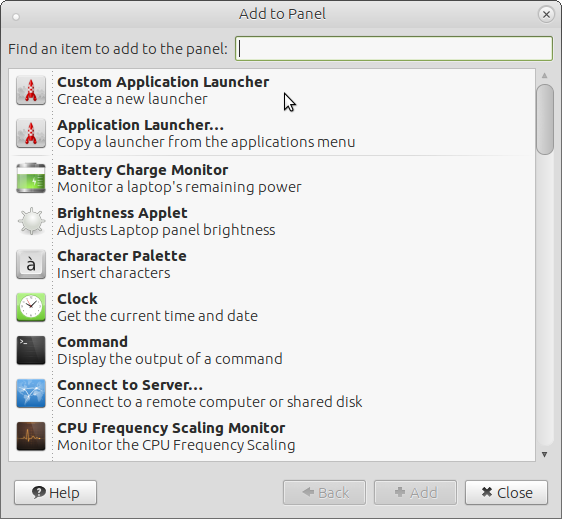
If your item is an installed application with a menu entry, you should choose "application launcher" and naviagate to the menu entry and choose it. It will then appear on your menu. After it has appeared, you can right click it to move it and/or lock it in position.
If your item is installed, but has no menu entry, then you should choose "custom application launcher".
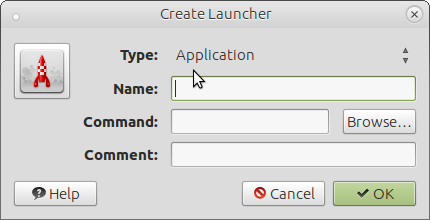
Type what you want in the "name" field
Type the specific command to launch the application in the "command" field. Or, if you know where the executable is stored, use the "browse button to navigate to that executable and choose it.
Click the icon button to choose an icon you have stored somewhere.
Then click "OK" and close. The launcher will now appear on your panel. Again , you can right click it to move it/lock it in place.
Thanks @stevecook172001 and @Bill_MI for the quick response. It just wasn't that clear to me after reading the writeup for it. Tis simple when you know what to do.
I think the "confusing" thing is that it was not "installed" it was just an executable parked in a directory I created. That was what baffled me.
But Steve's picture book led me down the primrose path.