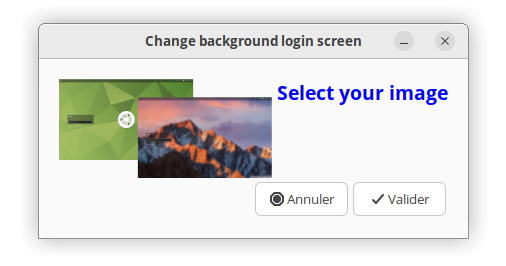
I made a script to easily change the wallpaper of the loginscreen.
It lets the user select an image and set it as the desktop background on Ubuntu MATE. It copies the image to the /usr/share/backgrounds directory, updates the background setting, and recompiles the schemas.
#!/bin/bash

# This script lets the user select an image and
# set it as the desktop background on Ubuntu MATE. It copies
# the image to the /usr/share/backgrounds directory,
# updates the background setting, and recompiles the schemas.
# Philippe734 @ 2025

# Check if YAD installed
if ! command -v yad &> /dev/null; then
    pkexec bash -c "apt install yad -y"
fi

yad --title="Change background login screen" --height=150 --width=400 --fixed --text="<span foreground='blue'><b><big><big>Select your image</big></big></b></span>" --text-align=center --center --borders=20 --image='./design.png'

if [ $? = 1 ]; then
    echo "canceled"
    exit 0
fi

DEST_DIR="/usr/share/backgrounds"
SCHEMA_FILE="/usr/share/glib-2.0/schemas/30_ubuntu-mate.gschema.override"

while true; do
    # Let the user select an image
    IMAGE_PATH=$(yad --file --center --title="Select an image" --width=600 --height=400)

    # If no image is selected, exit
    test -z "$IMAGE_PATH" && exit 1

    # Check if the selected file is an image
    MIME_TYPE=$(file --mime-type -b "$IMAGE_PATH")
    if [[ $MIME_TYPE =~ ^image/ ]]; then
        break  # Exit the loop if the file is a valid image
    else
        yad --title "Error" --width=400 --height=100 --center --button=OK:0 \
            --text "The selected file is not an image. Please select a valid image file."
    fi
done

# Get the file name without modification
IMAGE_NAME=$(basename "$IMAGE_PATH")

# Final path in /usr/share/backgrounds
FINAL_IMAGE_PATH="$DEST_DIR/$IMAGE_NAME"

# Escape the apostrophes in the image path before running pkexec
ESCAPED_IMAGE_PATH=$(echo "$FINAL_IMAGE_PATH" | sed "s/'/'\\\\''/g")

# Call pkexec to execute commands as root
pkexec bash -c "

    # Copy the image and modify the schema
    cp -f \"$IMAGE_PATH\" \"$FINAL_IMAGE_PATH\"

    # Change permissions of the copied image to make it readable by others
    chmod 644 "$FINAL_IMAGE_PATH"

    # Modify the schema file to set the new background image path
    sed -i \"s|^background=.*|background='$ESCAPED_IMAGE_PATH'|\" \"$SCHEMA_FILE\"

    # Compile the schemas
    glib-compile-schemas /usr/share/glib-2.0/schemas/
"

# Display the final result
echo "### result:"
grep "^background=" "$SCHEMA_FILE"
echo "###"

notify-send "Done" "You should logout"

exit 0
10 Likes
Excellent !!
I am just curious about the line IMAGE_NAME=$(basename "$IMAGE_PATH") since you do not use $IMAGE_NAME in the rest of the script.
1 Like
Thank you, Philippe! That was excellent.
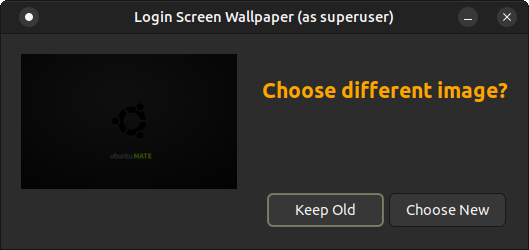
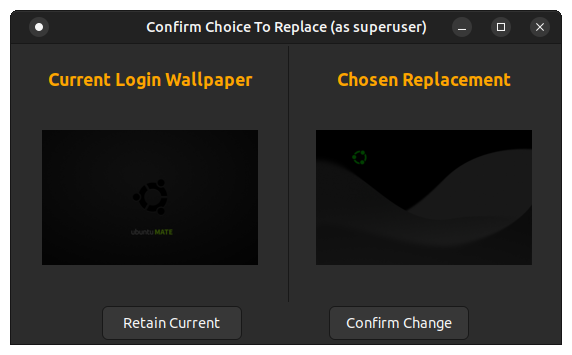
I hope you don't mind, but I have modified/extended the program, because I was expecting to see a visual of the image overlap, as you showed in you posted image, and was surprised/disappointed that I was not getting that. So, I modified the code to make it show the two choices side-by-side, before confirming a final commit.

First Dialog:
Third Dialog:
Modified code:
[Edit: Script updated with improved, more robust logic, to identify the correct relevant schema file.]
[Edit: Version 5 - Final error correction to make language-specfic customization work as intended.]
#!/bin/bash

# This script lets the user select an image and
# set it as the desktop background on Ubuntu MATE. It copies
# the image to the /usr/share/backgrounds directory,
# updates the background setting, and recompiles the schemas.
# Philippe734 @ 2025
#
#	REF:	https://ubuntu-mate.community/t/changing-wallpaper-login-screen/29222
#
# REVISED:
# 	by Eric Marceau
# 	Version 1 - Expanded logic added and dialog presentation modified
# 	Version 2 - Revised logic to make identification of relevant schema file more robust
# 	Version 3 - Revised logic to identify locale and created file allowing language-specific customization
# 	Version 4 - Corrected error of omission to load locale-driven language-specific customization
# 	Version 5 - Final error correction to make language-specfic customization work as intended
#


setupLang()
{
	scriptName=$0
	scriptLocn=$( dirname "$0" )
	scriptBase=$( basename "$0" ".sh" )

	msgStrng=( \
	"Login Screen Wallpaper" \
	"    Choose different image?" \
	"Keep Old" \
	"Choose New" \
	"Current Login Wallpaper" \
	"Chosen Replacement" \
	"Confirm Choice To Replace" \
	"Retain Current" \
	"Confirm Change" \
	"Login configuration updated." \
	"You should confirm the change by performing logout." )

	thisLocale=$( env | grep 'LANG=' | cut -f2- -d"=" | cut -f1 -d":" | cut -f1 -d"." | cut -f1 -d"_" )
	thisLocale=fr

	scriptLang="${scriptLocn}/${scriptBase}.${thisLocale}"

	if [ -s "${scriptLang}" ]
	then
		if [ -n "$( diff "${scriptLocn}/${scriptBase}.en" "${scriptLang}" | head -1 )" ]
		then
			echo "differences" >&2
			indx=0
			while read line
			do
				msgStrng[${indx}]="${line}"
				indx=$(expr ${indx} + 1 )
			done <"${scriptLang}"
		else
			echo -e "\n Please note that you can use prompt strings in your own language by replacing the strings for each line in file intended for your locale:"
			{ ls -l "${scriptLocn}/${scriptBase}.en"
			  ls -l "${scriptLang}"
			} | awk '{ printf("\t %s\n", $0 ) ; }'
			echo -e "\n The '${scriptLocn}/${scriptBase}.en' file has been provided as a baseline for the meaning of those strings.\n"
		fi
	else
		if [ ! -s "${scriptLocn}/${scriptBase}.en" ]
		then
			count=${#msgStrng[@]}
			indx=0
			while [ ${indx} -lt ${count} ]
			do
				echo "${msgStrng[${indx}]}"
				indx=$(expr ${indx} + 1 )
			done >"${scriptLocn}/${scriptBase}.en"
		fi

		if [ ! -s "${scriptLang}" ]
		then
			cp -p "${scriptLocn}/${scriptBase}.en" "${scriptLang}"
		fi
	fi

}


getThumb()
{
	local imageIn="$1"
	local imageOut="$2"
	convert ${imageIn} -resize 15% ${imageOut}
}


#########################################################################################
#########################################################################################


if [ "$1" = "--verbose" ] ; then  dbg=1 ; else  dbg=0 ; fi

destDir="/usr/share/backgrounds"

setupLang

###
###	Ensuring required functionality is available
###

if [ -z "$(which yad 2>>/dev/null)" ]
then
	echo -e "\n The required 'YAD' utility is missing.  Install? [y|N] => \c" ; read ans
	test -n "${ans}" || { ans="N" ; }
	case "${ans}" in
		y* | Y* ) ;;
		* ) echo "\n Abandonning attempt to change the Login wallpaper.\n" ; exit 1 ;;
	esac
	pkexec bash -c "apt install yad -y"
fi


###
###	Identify system's active login greeter
###

method1()
{
	###
	###	Approach which would be more generic and suited to both X-Window and Wayland
	###
	sysGreeter=$( grep "session" /var/log/syslog | head -40 | grep 'greeter' | head -1 |
		awk '{
			pos=index( $0, "comm=" ) ;
			if( pos > 0 ){
				rem=substr( $0, pos ) ;
					n=split( rem, val, "\"" ) ;
				print val[2] ;
				exit ;
				#substr( rem, pos+6, psp-2 ) ;
			} ;
		}' | sed 's+[ ]$++' )
	sysGreeter=$( basename "${sysGreeter}" )
}
method1

method2()
{
	###
	###	Alternate approach, but X-windows specific
	###
	if [ ! -s /var/log/lightdm/seat0-greeter.log ]
	then
		echo -e "\n\t LightDM does not appear to be the active Display Manager.  Unable to proceed.\n" ; exit 1
	fi

	#[+3.90s] DEBUG: arctica-greeter.vala:937: Starting main loop
	sysGreeter=$( grep '[:][ ]Starting main loop' /var/log/lightdm/seat0-greeter.log | awk '{ print $3 }' | cut -f1 -d"." )
}
#method2()

test ${dbg} -eq 1 && echo "${sysGreeter}"


###
###	Allow for local extra schema override file being distinct from default file
###
greetMatch=$( grep "${sysGreeter}" /usr/share/glib-2.0/schemas/*.gschema.override | sort -r | head -1 )
test ${dbg} -eq 1 && echo "${greetMatch}"

#schemaFile="$(ls -r /usr/share/glib-2.0/schemas/*_ubuntu-mate.gschema.override | head -1 )"
schemaFile="$( echo "${greetMatch}" | cut -f1 -d":" )"
test ${dbg} -eq 1 && echo "${schemaFile}"


###
###	Identify fullpathname to current Login Greeter background image
###

greeterSchema=$( gsettings list-schemas | grep ${sysGreeter} )
if [ -z "${greeterSchema}" ] ; then  echo -e "\n\t Unable to identify schema for greeter '${sysGreeter}'. Unable to proceed.\n" ; exit 1 ; fi

current="$( gsettings get "${greeterSchema}" background | cut -f2 -d\'  | sed 's+^file://++' )"
test ${dbg} -eq 1 && echo ${current}

tCurrent="/tmp/$$.orig" ; rm -f "${tCurrent}"

getThumb "${current}" "${tCurrent}"
test $? -eq 0 || { echo "\t Failed to create thumbnail for existing wallpaper.\n" ; exit 1 ; }
test ${dbg} -eq 1 && eom "${tCurrent}"


###
###	Prompt for selection of new wallpaper image
###

yad	--width=500 \
	--height=200 \
	--borders=20 \
	--title="${msgStrng[0]}" \
	--fixed \
	--text="<span foreground='orange'><b><big><big>\n${msgStrng[1]}</big></big></b></span>" \
	--text-align=left \
	--center \
	--button="${msgStrng[2]}":1 \
	--button="${msgStrng[3]}":0 \
	--image="${tCurrent}"

if [ $? -ne 0 ]
then
	echo -e "Login configuration specifying existing wallpaper not modified."
	exit 0
fi

while true
do
	# Let the user select an image
	newImg=$(yad --file --center --title="Select an image" --width=1000 --height=500)

	# If no image is selected, exit
	test -z "${newImg}" && exit 1

	# Check if the selected file is an image
	mimeType=$(file --mime-type -b "${newImg}")
	if [[ ${mimeType} =~ ^image/ ]]
	then
		break  # Exit the loop if the file is a valid image
	else
		yad --title "Error" --width=400 --height=100 --center --button=OK:0 \
		    --text "The selected file is not an image. Please select a valid image file."
	fi
done

newImg="${newImg}"
tNewImg="/tmp/$$.new" ; rm -f "${tNewImg}"

getThumb "${newImg}" "${tNewImg}"
test $? -eq 0 || { echo "\t Failed to create thumbnail for selected new wallpaper.\n" ; exit 1 ; }
test ${dbg} -eq 1 && eom "${tNewImg}"


###
###	Setting up compound yad pane with 2 panels, to confirm choices and final action
###

# Generate a unique key for the plug mechanism
assemblyPlugPrivKey="${RANDOM}987"
test ${dbg} -eq 1 && echo ${assemblyPlugPrivKey}

# Panel dialog for first image in plug mode in background
yad	--plug=${assemblyPlugPrivKey} \
	--tabnum=1 \
	--picture \
	--filename="${tCurrent}" \
	--size=fit \
	--text-align=center \
	--text="<span foreground='orange'><b><big>\n${msgStrng[4]}</big></b></span>" &

# Panel dialog for second image in plug mode in background
yad	--plug=${assemblyPlugPrivKey} \
	--tabnum=2 \
	--picture \
	--filename="${tNewImg}" \
	--size=fit \
	--text-align=center \
	--text="<span foreground='orange'><b><big>\n${msgStrng[5]}</big></b></span>" &

# Display combined two-paned dialog using the background dialog plugs
yad	--title="${msgStrng[6]}" \
	--paned \
	--key=${assemblyPlugPrivKey} \
	--center \
	--orient=Horizontal \
	--splitter=275 \
	--width=550 \
	--height=300 \
	--buttons-layout=spread \
	--button="${msgStrng[7]}":1 \
	--button="${msgStrng[8]}":0

if [ $? -ne 0 ]
then
	echo -e "Login configuration specifying existing wallpaper not modified."
	exit 0
fi

###
###	Update the Login Greeter configuration to apply the selected change
###

# Get the file name without modification
imageName=$(basename "${newImg}")

# Final path in /usr/share/backgrounds
finalNewImg="${destDir}/${imageName}"

# Escape the apostrophes in the image path before running pkexec
# NOTE:  maintaining single quotes in filenames is not recommended.
escapedNewImg=$(echo "${finalNewImg}" | sed "s/'/'\\\\''/g")

# Call pkexec to execute commands as root
pkexec bash -c "

	# Copy the image and modify the schema
	cp -f \"${newImg}\" \"${finalNewImg}\"

	# Change permissions of the copied image to make it readable by others
	chmod 644 "${finalNewImg}"

	# Modify the schema file to set the new background image path
	sed -i \"s|^background=.*|background='${escapedNewImg}'|\" \"${schemaFile}\"

	# Compile the schemas
	glib-compile-schemas /usr/share/glib-2.0/schemas/
"

# Display the final result
echo -e "\n Summary of applied changes:"
echo -e "\t File:     '${schemaFile}'"
echo -e "\t Revised:  $( grep "^background=" "${schemaFile}" ) \n"

notify-send "${msgStrng[9]}" "${msgStrng[10]}"

exit 0
5 Likes
Wonderful! I prefer yours!
2 Likes
The only issue I have with this script is the automatic installation of yad if it isn't present. Personally, I like and use yad, but there is no user choice given that this is going to happen. That violates what I consider being "user-friendly." I'd prefer to be given the option, i.e. a prompt that asks the user if it's alright to install yad and to bail out if the answer is 'no.'
A small nit, but my personal opinion is that the user should be made aware of attempts to modify the system in this way.
2 Likes
My bad …. I used my eyes instead of a search-word tool 

2 Likes
Good point, Fred! I've added logic to cover that and updated the script in my posting above.
2 Likes
Much better! It's always nice to be polite and considerate.
1 Like
Can anyone out there try out the new logic I thru in there to allow for string-value load for user-defined strings in locale-oriented file?
Default file for English:
Login Screen Wallpaper
    Choose different image?
Keep Old
Choose New
Current Login Wallpaper
Chosen Replacement
Confirm Choice To Replace
Retain Current
Confirm Change
Login configuration updated.
You should confirm the change by performing logout.
Sample file for French:
Fond d'écran d'accès
    Choisir une autre image ?
Conserver l'ancienne
Choisir une nouvelle
Fond d'écran actuel
Remplacement choisi
Confirmer le choix
Conserver l'actuelle
Confirmer la modification
Configuration d'acceuil a été mise à jour
Vous devriez confirmer la modification en vous déconnectant.
1 Like