Don't think it is relevant, but here is my distro version:
Distributor ID:	Ubuntu
Description:	Ubuntu 22.04.5 LTS
Release:		22.04
Codename:		jammy
I've managed to make a tweak to the colours I want to use with ls, but it is ignoring my customized colour scheme, which is defined in
~/.dircolors
as per the coding in the .bashrc file.
If I "source" the .dircolors file in my current bash shell while in my HOME directory,
. .dircolors ; ls -ltr
the ls command reacts to the specification, as expected.
But if I open a new shell, those custom definitions are ignored. 
Does anyone know how to make this work globally?
My custom assignments are for each of
- di (DIR)
- ow (OTHER_WRITABLE)
My ~/.dircolors file is as follows:
LS_COLORS='rs=0:di=01;\033[38;5;242:ln=01;36:mh=00:pi=40;33:so=01;35:do=01;35:bd=40;33;01:cd=40;33;01:or=40;31;01:mi=00:su=37;41:sg=30;43:ca=30;41:tw=30;42:ow=01;97;100:st=37;44:ex=01;32:*.tar=01;31:*.tgz=01;31:*.arc=01;31:*.arj=01;31:*.taz=01;31:*.lha=01;31:*.lz4=01;31:*.lzh=01;31:*.lzma=01;31:*.tlz=01;31:*.txz=01;31:*.tzo=01;31:*.t7z=01;31:*.zip=01;31:*.z=01;31:*.dz=01;31:*.gz=01;31:*.lrz=01;31:*.lz=01;31:*.lzo=01;31:*.xz=01;31:*.zst=01;31:*.tzst=01;31:*.bz2=01;31:*.bz=01;31:*.tbz=01;31:*.tbz2=01;31:*.tz=01;31:*.deb=01;31:*.rpm=01;31:*.jar=01;31:*.war=01;31:*.ear=01;31:*.sar=01;31:*.rar=01;31:*.alz=01;31:*.ace=01;31:*.zoo=01;31:*.cpio=01;31:*.7z=01;31:*.rz=01;31:*.cab=01;31:*.wim=01;31:*.swm=01;31:*.dwm=01;31:*.esd=01;31:*.jpg=01;35:*.jpeg=01;35:*.mjpg=01;35:*.mjpeg=01;35:*.gif=01;35:*.bmp=01;35:*.pbm=01;35:*.pgm=01;35:*.ppm=01;35:*.tga=01;35:*.xbm=01;35:*.xpm=01;35:*.tif=01;35:*.tiff=01;35:*.png=01;35:*.svg=01;35:*.svgz=01;35:*.mng=01;35:*.pcx=01;35:*.mov=01;35:*.mpg=01;35:*.mpeg=01;35:*.m2v=01;35:*.mkv=01;35:*.webm=01;35:*.webp=01;35:*.ogm=01;35:*.mp4=01;35:*.m4v=01;35:*.mp4v=01;35:*.vob=01;35:*.qt=01;35:*.nuv=01;35:*.wmv=01;35:*.asf=01;35:*.rm=01;35:*.rmvb=01;35:*.flc=01;35:*.avi=01;35:*.fli=01;35:*.flv=01;35:*.gl=01;35:*.dl=01;35:*.xcf=01;35:*.xwd=01;35:*.yuv=01;35:*.cgm=01;35:*.emf=01;35:*.ogv=01;35:*.ogx=01;35:*.aac=00;36:*.au=00;36:*.flac=00;36:*.m4a=00;36:*.mid=00;36:*.midi=00;36:*.mka=00;36:*.mp3=00;36:*.mpc=00;36:*.ogg=00;36:*.ra=00;36:*.wav=00;36:*.oga=00;36:*.opus=00;36:*.spx=00;36:*.xspf=00;36:';
export LS_COLORS
You've probably already checked this, but I note the default .bashrc adds an alias to ls. On my system, it's
# enable color support of ls and also add handy aliases
 if [ -x /usr/bin/dircolors ]; then
     test -r ~/.dircolors && eval "$(dircolors -b ~/.dircolors)" || eval "$(dircolors -b)"
     alias ls='ls --color=auto'
Depending on where you make the call to ~/.dircolors, this may be overriding it.
2 Likes
Thank you looking at that, Fred. My main issue is to identify where the System global values are stored/set. It almost seems like the only default values are hardcoded, unless users create their own definitions.
I was aware of what you pointed out.
As a test, I performed the following,
. .dircolors ; ls -ltr
which gives me the desired result. Having checked that that alias was already present, I nonetheless repeated the command at the command prompt,
alias ls='ls --color=auto'
and that did not change the outcome of my first line, still giving me the custom modified look for the two items in question,
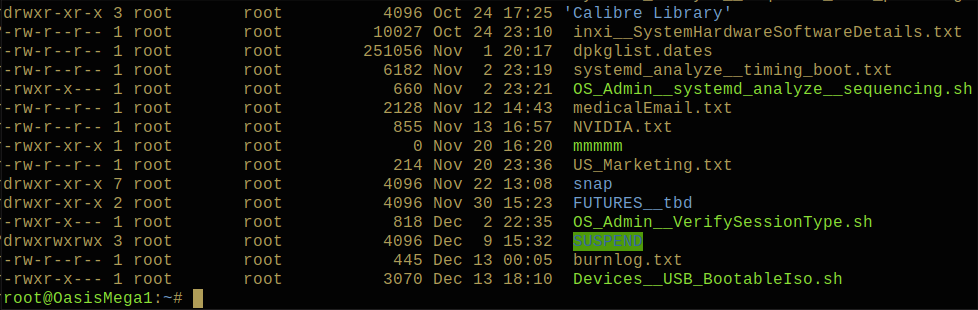
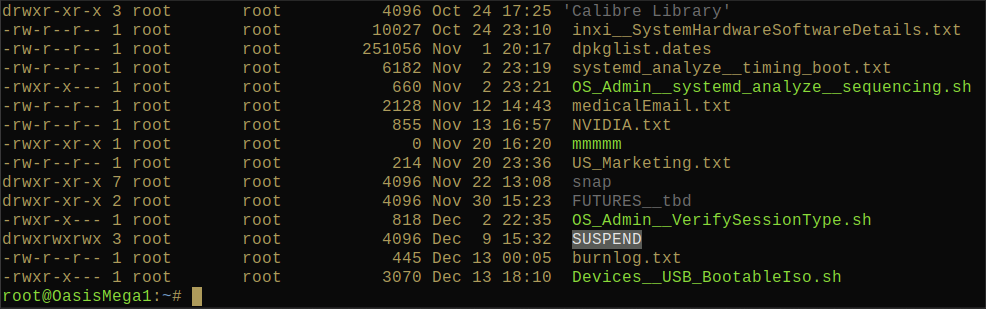
The one giving me the most issues is the ow, which is very poor contrast (see the 'SUSPEND' directory) and essentially not legible.
Appearance for system default settings:
Appearance using custom setting:
I hate the thought of having to do so, but I might need to download the source for the coreutils package and edit the source for dircolors itself!!! I really want to avoid having to do that!
1 Like
I had a similar issue a while back, and learned that the dircolors database is now stored within the command itself, having been removed from /etc/DIR_COLORS. What I've seen suggested is to create a new database and then source it:
Generate a default template:
dircolors --print-database > /etc/dircolors
Modify /etc/dircolors as needed.
Ensure /etc/bash.bashrc sources it (commonly via eval "$(dircolors)").
User-specific overrides can be placed in ~/.dircolors or ~/.dir_colors.
Maybe this will help?
2 Likes
I followed a basic guide
dircolors -p > .dircolors    (generate default set)
nano .dircolors              (edit line 57, change DIR to 01;36
                              dirs will show as cyan)

append two lines to .bashrc

eval "$(dircolors -b ~/.dircolors)"
alias ls='ls --color=auto'

. .bashrc                    (source .bashrc)

on terminal, type ls -al     (dirs should be cyan)
3 Likes
Thank you, Fred, but that didn't fix it.
1 Like
Thank you, Pavlos!
With your first line, you clarified my mistake. I was saving the bash-format output, when I should be saving the database file in its original form.
That fixed it! My tweaks are being used as desired.
You've earned another "Scout's Badge"!

BTW, Pavlos, there is no need for the following:
append two lines to .bashrc
eval "$(dircolors -b ~/.dircolors)"
alias ls='ls --color=auto'
because the system default .bashrc already has a code segment which includes those commands.
2 Likes