Hi guys.
I want to know if anyone can tell me how to disable the automatic login in Ubuntu Mate 14.04.
Thanks.
1 Like
Open a terminal.
sudo nano /etc/lightdm/lightdm.conf
It displays some text as follows:
[SeatDefaults]
greeter-session=lightdm-gtk-greeter
user-session=mate
autologin-user=username
Solution
This would be your particular user name that is automatically logged in with or without password. Delete this username and type in the administrative username or leave it blank.
Shut down the system. It will go back to the login selection screen. Just power down the system and put it on again.
2 Likes
Hi Wimpy.
Now work!!
Thank you very much.
1 Like
I have the same problem, no screen when logging in.
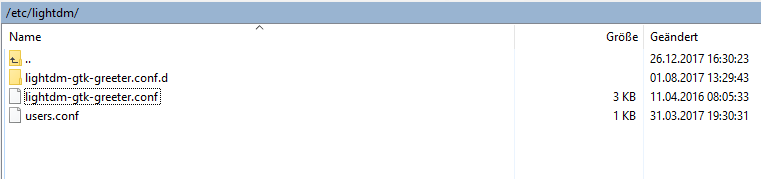
under /etc/lightdm/ I do not have a lightdm.conf file
Thank you , It's working
doing this just got me stuck on boot up screen with the message
[FAILED] to start Light Display Manager.
1 Like
i got the same issue. You got a solution ?