I found this article: How do I change microphone to mono channel rather than stereo? - Support and Help - Ubuntu Community Hub
and it helps. So I used what you wrote in ~/.config/pipewire/pipewire.conf.d/mix-dual_array_mic.conf+ this article.
But, according to it, I need to write this command all time when I run Ubuntu, but I don;t think that it would be a problem.
(Sorry for me English =) )
No - once you have created that file your PipeWire will be configured any time you are logged into your desktop.
Dont follow that article as that is only for PulseAudio and only covers how to remap temporarily.
I havent tested the file I provided, if it didnt work to create a new node in your graph, then I made a mistake somewhere. Let me know if it doesnt work and I'll see if I can fix my mistake.
2 Likes
So I tried your mix-dual_array_mic.conf and changed to control = { "Gain 1" = 0.0 "Gain 2" = 1.0 } and it didn’t help
1 Like
Can you share the full script that you are using? Along with the results of wpctl status?
Using the script I provided above (with the right target node), I see the following in qpwgraph which is basically what I expected:
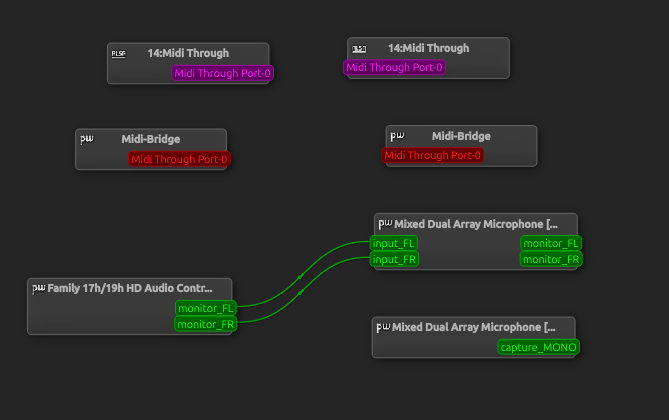
The bottom right is the new input, which I can also see in Sound Preferences (but I haven't selected):
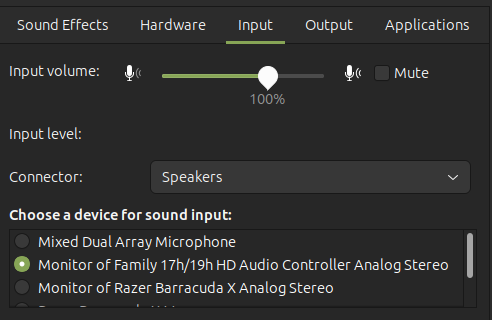
2 Likes
Here what I have in mix-dual_array_mic.conf:
~/.config/pipewire/pipewire.conf.d/mix-dual_array_mic.conf
context.modules = [{
name = libpipewire-module-filter-chain,
args = {
node.description = "Mixed Dual Array Microphone"
media.name = "Mixed Dual Array Microphone"
filter.graph = {
nodes = [
{
type = builtin
name = mixer
label = mixer
control = { "Gain 1" = 0.5 "Gain 2" = 0.5 }
}
]
inputs = [ "mixer:In 1" "mixer:In 2" ]
outputs = [ "mixer:Out" ]
}
capture.props = {
node.name = "mixer_input.dual_array_mic"
node.passive = true
target.object = "alsa_input.pci-0000_05_00.6.analog-stereo"
audio.channels = 2
audio.position = [ FL FR ]
}
playback.props = {
node.name = "mixer_output.dual_array_mic"
media.class = Audio/Source
audio.channels = 1
audio.position = [ MONO ]
}
}
}]
wptcl status:
PipeWire 'pipewire-0' [1.0.5, artem@artem-IdeaPad-Gaming-3-15ARH05, cookie:2465275615]
└─ Clients:
33. pipewire [1.0.5, artem@artem-IdeaPad-Gaming-3-15ARH05, pid:2631]
34. pipewire [1.0.5, artem@artem-IdeaPad-Gaming-3-15ARH05, pid:2638]
38. WirePlumber [1.0.5, artem@artem-IdeaPad-Gaming-3-15ARH05, pid:2637]
39. WirePlumber [export] [1.0.5, artem@artem-IdeaPad-Gaming-3-15ARH05, pid:2637]
66. GNOME Volume Control Media Keys [1.0.5, artem@artem-IdeaPad-Gaming-3-15ARH05, pid:3230]
67. gnome-shell [1.0.5, artem@artem-IdeaPad-Gaming-3-15ARH05, pid:3055]
68. GNOME Shell Volume Control [1.0.5, artem@artem-IdeaPad-Gaming-3-15ARH05, pid:3055]
69. xdg-desktop-portal [1.0.5, artem@artem-IdeaPad-Gaming-3-15ARH05, pid:3623]
70. Firefox [1.0.5, artem@artem-IdeaPad-Gaming-3-15ARH05, pid:3843]
89. Terminal [1.0.5, artem@artem-IdeaPad-Gaming-3-15ARH05, pid:12080]
92. Telegram Desktop [1.0.5, artem@artem-IdeaPad-Gaming-3-15ARH05, pid:11592]
96. Mutter [1.0.5, artem@artem-IdeaPad-Gaming-3-15ARH05, pid:3055]
99. wpctl [1.0.5, artem@artem-IdeaPad-Gaming-3-15ARH05, pid:12644]
Audio
├─ Devices:
│ 53. HDA NVidia [alsa]
│ 54. Family 17h/19h HD Audio Controller [alsa]
│ 71. Mi True Wireless EBs Basic 2 [bluez5]
│
├─ Sinks:
│ 57. Family 17h/19h HD Audio Controller Analog Stereo [vol: 0.41]
│ * 84. Mi True Wireless EBs Basic 2 [vol: 1.00]
│
├─ Sink endpoints:
│
├─ Sources:
│ * 36. Mixed Dual Array Microphone [vol: 0.56]
│ 58. Family 17h/19h HD Audio Controller Analog Stereo [vol: 0.31]
│ 78. Mi True Wireless EBs Basic 2 [vol: 0.94]
│
├─ Source endpoints:
│
└─ Streams:
35. mixer_input.dual_array_mic
60. input_FL < ALC257 Analog:capture_FL [active]
61. monitor_FL
62. input_FR < ALC257 Analog:capture_FR [active]
63. monitor_FR
73. Firefox
80. monitor_MONO
81. input_MONO < Mixed Dual Array Microphone:capture_MONO [init]
79. Firefox
74. monitor_MONO
77. input_MONO < Mixed Dual Array Microphone:capture_MONO [init]
82. Firefox
91. output_MONO > Mi True Wireless EBs Basic 2:playback_MONO [active]
86. Firefox
76. monitor_MONO
85. input_MONO < Mixed Dual Array Microphone:capture_MONO [paused]
93. Firefox
94. input_MONO < Mixed Dual Array Microphone:capture_MONO [active]
95. monitor_MONO
Video
├─ Devices:
│ 48. Integrated Camera [v4l2]
│ 49. Integrated Camera [v4l2]
│
├─ Sinks:
│
├─ Sink endpoints:
│
├─ Sources:
│ * 55. Integrated Camera (V4L2)
│
├─ Source endpoints:
│
└─ Streams:
Settings
└─ Default Configured Node Names:
0. Audio/Sink bluez_output.20_1B_88_2D_14_91.1
- Audio/Source mixer_output.dual_array_mic
Here my graph (with my headphones):
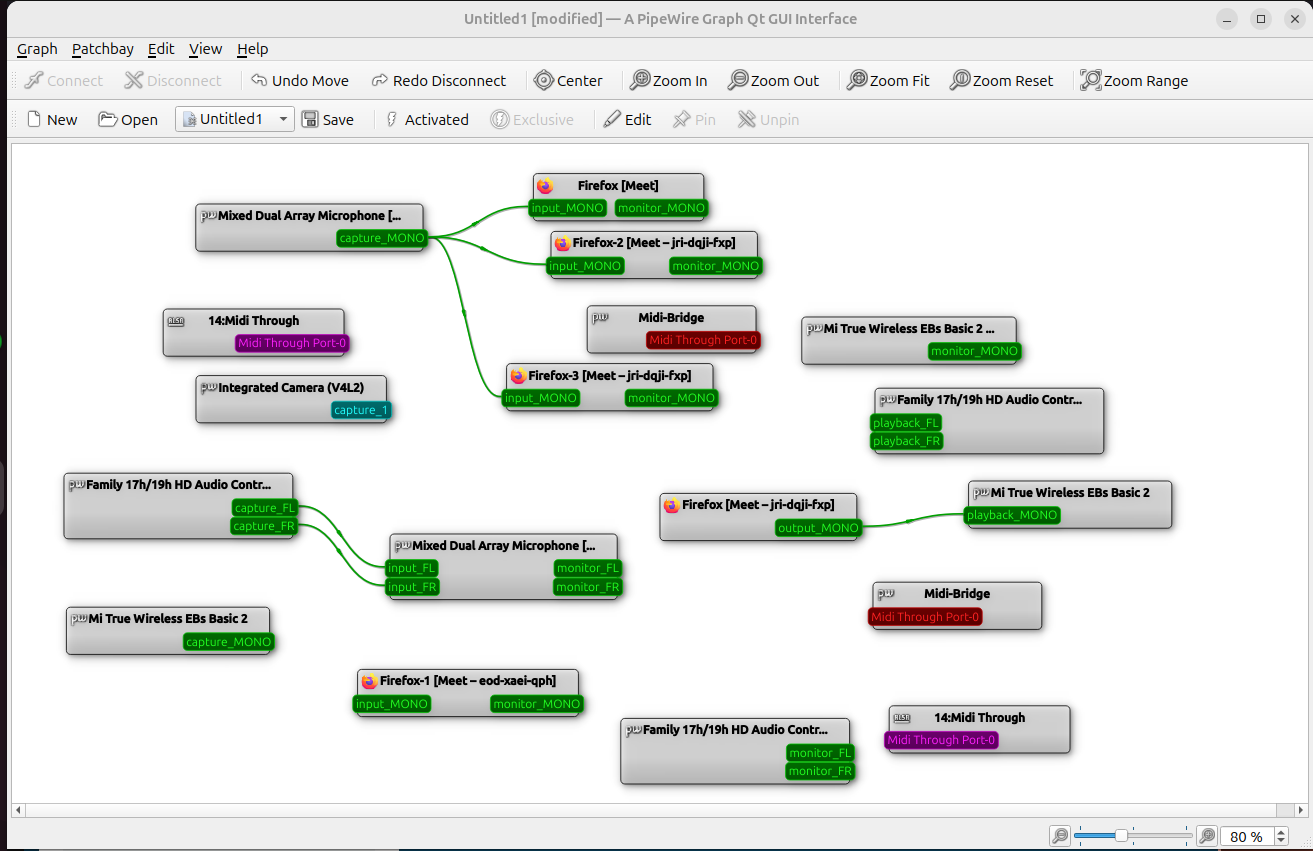
Here if I delete relation between Mixed Microphone and Firefox-3 I can’t tell anything.
If I delete relation between Mixed Microphone and Firefox-2 and Firefox it will still be an echo.
2 Likes
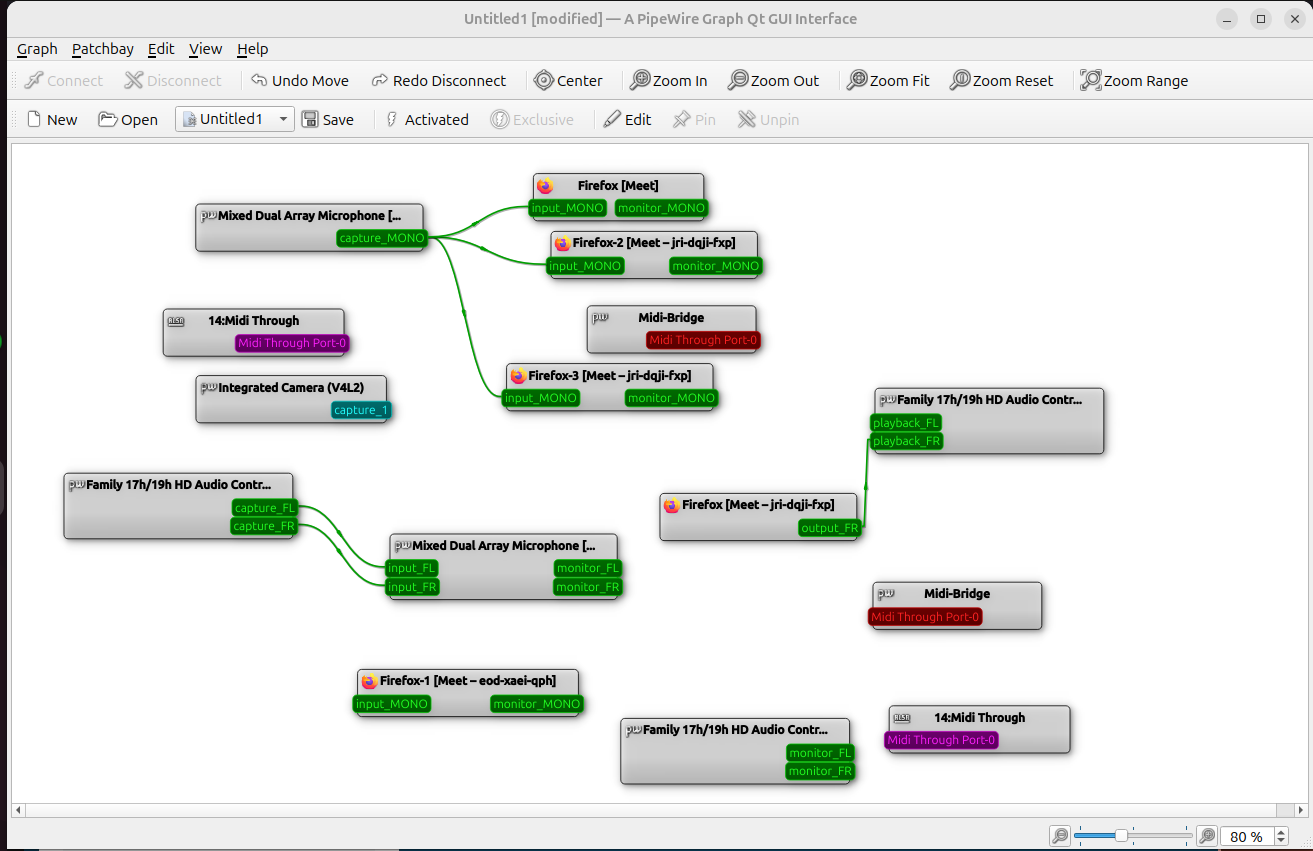
Can you confirm that this occurs outside of Firefox and these web applications? There are terminal commands like pw-record test_microphone.wav (press Ctrl-C to end recording) which will create a WAV file called test_microphone.wav that you can listen back to.
1 Like
I download ‘Recorder’ from App Center, record and it’s okay, no echo with and without headphones
2 Likes
Well then sounds like this is an issue with how Microphone is set up in Firefox or those particular web applications. You can probably get rid of all the Pipewire stuff and have a look at Firefox instead.
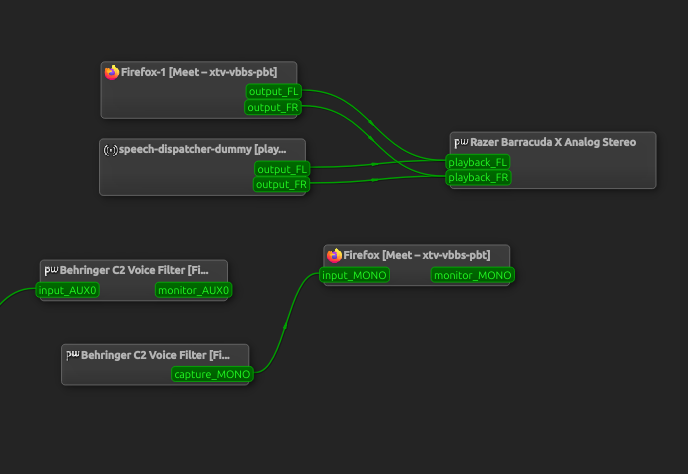
For example, my graph when I run a test meeting shows only one link from the microphone to the Meet tab in Firefox:
3 Likes