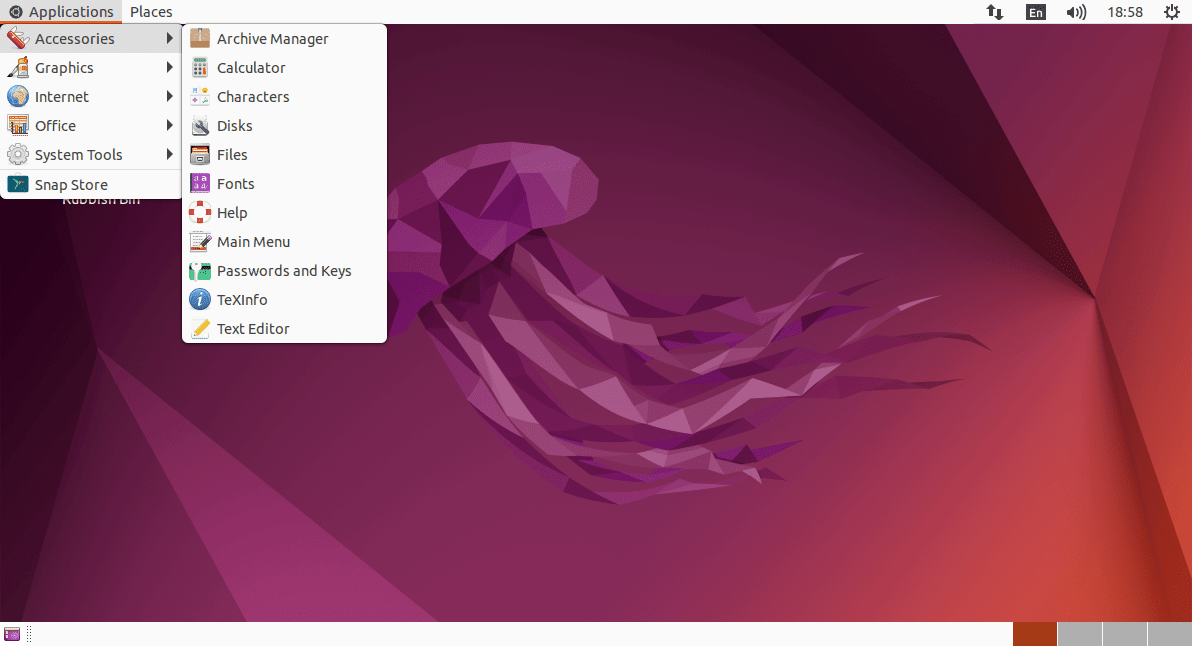
Just wondering ... for the sake of knowing.

Just wondering ... for the sake of knowing.
Hi, @ericmarceau
Other than installing the MATE Desktop Environment in “regular” Ubuntu, to make it really look like “Ubuntu MATE”, I’m guessing that the “closest” alternative available is to install and use “GNOME Flashback” (although I’ve never done that) in “regular” Ubuntu. The following tutorial looks nice:
How to Install GNOME Flashback on Ubuntu 24.04, 22.04, or 20.04 - LinuxCapable
https://linuxcapable.com/how-to-install-gnome-flashback-on-ubuntu-linux/
That tutorial includes the following screenshot that gives an idea of how “GNOME Flashback” looks in Ubuntu:
“(…) This manual selection of the desktop environment is a one-time requirement. Ubuntu will remember your choice and automatically log you into GNOME Flashback in future sessions unless you change it again.
Example of Ubuntu Flashback installed on Ubuntu
(…)”
I hope this helps
Thank you, Ricardo, but I was thinking of something simpler, more along the lines of "tweaking", or like changing the Panels and selecting different Apps for the Panels. I was not looking to replace GNOME with any other MATE-like Desktop Manager.
As I said earlier, it was more of a thought experiment than anything else.
That would involve adding extensions intended to achieve what you want, and I can’t imagine them being coded, given it is catered for via the flashback I think rather well.
I do use flashback on occasion; but I’m also using most desktops a day or so a month as I wind down each night (on a secondary multi-desktop machine).
Thank you, Chris. I have used flashback in the past ... as my transition desktop between the original Ubuntu and UbuntuMATE ... during that hiatus period where Unity was being introduced and found Unity "uncomfortable".
But, correct me if I'm wrong, flashback is not using the same GTK libraries that the latest Ubuntu-supported GNOME is using.
Let's just say that I have the impression that the only truly endorsed desktop is GNOME, being the "built-in and installed" default for the "Ubuntu Desktop".
The fact that "Flavours" only have 3-year support rather than the full 5 years for LTS versions is another issue underlying that Ubuntu bias. 
That is why I was wanting to know if the MATE-like Panel function is available under the current "standard" GNOME, and if, as such, it could be configured to replace whatever GNOME had as its current "access/alerting" GUI.
Next, I was hoping to locate Apps, that were built from the same GTK as GNOME's latest version, which would offer functionality >>similar<< to "Brisk", "Ayatana indicators" and the "Control Panel". I see everything else as less "frozen" and am open to look-alike equivalents for the others.
I hope that clarifies where I was going with this "exercise", seeing that some of the more experienced have indicated that there are fewer people, having the necessary competencies and willingness, to contribute to furthering the advancement/development of UbuntuMATE. ... and while I have no desire to "jump ship", I have been paying very close attention to all the discussion related to Flavours that might offer a somewhat graceful/acceptable migration-path alternatives to UbuntuMATE.
I am not interested in any non-Ubuntu-family Distros.
I hope that gives you a better idea of my mindspace in asking my original question.
Hi @ericmarceau ,
Probably a month back by now, I ran the “standard” Ubuntu with the GNOME desktop environment for a couple weeks, before coming back to UM.
I could somewhat emulate the MATE layout (Traditional or GNOME 2) via the following changes to the GNOME extensions:
However, in my opinion, these have zero customisability and lose part of that “MATE spirit” that way.
Hopefully this helps.
Jaymo
**EDIT: P.S. I am in complete agreement that this would be a last-ditch effort if it came to it. There really is not anything like Ubuntu MATE out there for what I am looking for (traditional approach, customisability, and speed).
Thank you, @jaymo_chicago.
So, you saw no means of adding a second panel (Window List doesn't look like the MATE App on any background Panel) ?
I am starting to think I will have to install an image of UbuntuGNOME on my 2nd internal disk ... in order to play around and see how far I can push things "at the edge"!
But first, I will rummage around on the internet ... like a squirrel ... and start doing my own research to see what turns up. To keep me on track, I will create a checklist of what needs equivalency ... and what I find that can offer those.
Hi @ericmarceau ,
Unfortunately, that’s the best I could do. That, and I could hide the dock on the left side via the GNOME Extension Manager.
GNOME 48 (the latest edition of GNOME), continuing on with the tradition borne from GNOME 3.0, is extremely limited in customisation to completely locked down, even with extensions, it is not even close to the same. I wish you the best of luck in your research.
Also, I found that GNOME was very slow compared to MATE (not unusable by any means, but with MATE I’m used to everything happening the instant I click or type it, with no delay). Just a heads up in case you haven’t use GNOME in a while.
My escape plan JUST IN CASE Ubuntu MATE may cease to exist (which I hope will never happen) is that I still have my i3 configurations that I can load up on any server distribution. However, X11 may also be a thing of the past. Hoo boy…
Jaymo
A quick look and I can see where you’re coming from, as many of the libraries are GTK3 (not GTK4), though some components are common with Ubuntu Desktop/GTK4.
I don’t have enough knowledge to provide more here sorry.
I don’t see that sorry.
Ubuntu Desktop & Servers used to have 3 years of support, just as the flavors do now. Ubuntu then announced the increase of support for specific products (Desktop, Server) to 5 years, whilst others remained at the 3 years. As this included only packages on the supported ISOs for the full 5 year guarantee; and I’ve never used Ubuntu Desktop without adding additional packages from universe etc, some of the increased support magic was never for me.
Maybe my working on the Ubuntu News team (for more than a decade) also has me reading & recognizing the actual intent in announcements & notices, as I am reading them all (and not just reading what others wrote about them)
Yes I am aware why some corporations/enterprises do limit their users to packages from main and thus don’t get the same experience (those enterprise users are the ones that appreciated Ubuntu Pro the most actually) and thus increase from 3 to 5 years was more significant, but I’m one who does like and use community sourced packages.
Myself, I’m happy to use a LTS release with universe packages for the full 5 years of standard support; whilst I’m a Ubuntu Member, thus have extra Pro/ESM options available to me without $cost, I’ve not found a need to utilize that yet either. I do watch notices, announcements etc, so I expect I’ll see when specific warnings come out (either for Ubuntu, or Debian that also hit my inbox) that may make me switch from an older-LTS to newer because of specific packages mentioned that I use on that install, but I’d be happy using gnome-flashback for the full 5 years of standard support myself.