I am a 4 month newbie to Linux – and utterly free, and wholly satisfied now. Before coming aboard a couple weeks ago, I went from Windows 7 to Mint-Cinnamon for two months, then to Mint-Xfce, Lubuntu-LXLE, and then Unity - all for progressively shorter stints; but I will be staying with Ubuntu Mate from now on. I am fine with all of them; but your gig is the zenith of comprehensive greatness. Ubuntu Mate is so near perfect that I will be becoming a patron this week, as well!
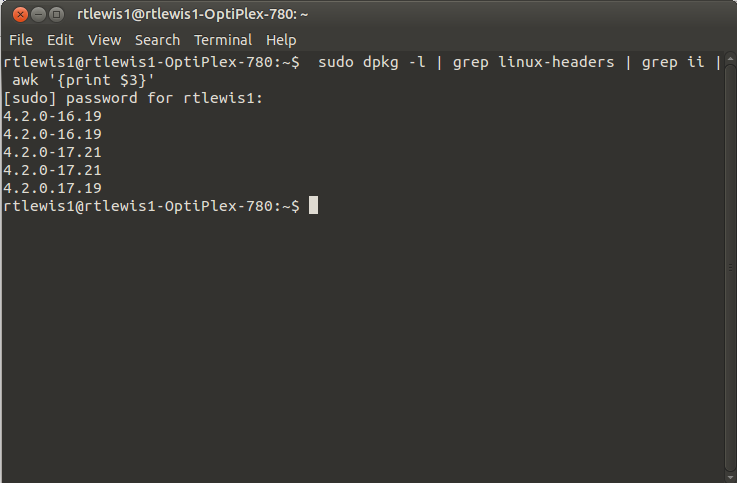
Okay, dumb Newbie question now: Based on the terminal and Synaptic PM kernel info, this is what I have installed: 4.2.0-16.19, 4.2.0-17.19, and 4.2.0-17.21. My question is: do I have one, two, or three kernels installed?
Thanks for the quick response, quonsar! I do not know what caused that; all I did is install Wily Werewolf, on a clean hard-drive, and the few, subsequent, updates were all from the Ubuntu Mate update manager.
Do I reinstall Ubuntu Mate - or take out the ones I don’t need? A slower boot, after the last update, caused me to start looking for the source; and the various blogs say that new extra kernels could, likely, be the source – and to get rid of excess kernels. Please advise.
Old kernels are suppose to auto remove. Having three kernels is not a big deal unless you run a separate /boot partition. Which is not part of the standard install unless you chose encryption. So I say just leave it for now.
Thanks, v3xx! Just to clarify, though - for the frustrating newbie: is this, perhaps, what added the five or six seconds to my boot? And, how did the multiple kernels show up on a two-week-old install - on a clean hard drive?
Yes, you can grep the headers or just look in /boot.
Your good. You can store many kernels without causing any issues. There is a limit that will break apt-get when reached. Something like 15 or 20 kernels, but auto-remove this will not allow this to happen.