Just a point of clarification, because I never noticed before.
I was trying to figure out which Theme I had last selected for my active Appearance theme, when I stumbled accross one of the theme choices with the UM Icon showing.
Does the presence of that roundel Icon identify which is the base Theme for the current Appearance state?
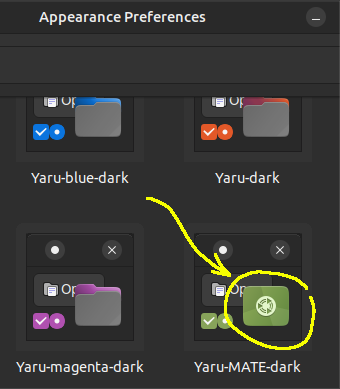
I dug in a bit further, and discovered that Icon only signifies the Distro Default theme. So, I came up with the following mini-script to report
-
the relevant file name (most recently modified/saved), and
-
the contents identifying the various Themes that are currently selected and used.
Script to report Themes file and relevant details:
#!/bin/sh

themes="$(stat --format "%y|%n" ${HOME}/.themes/*/* | sort -nr | head -1 | cut -f2- -d\| )"

echo "Themes File:\n\t| '${themes}'\n"

echo "Themes Configuration:"
awk '{ printf("\t| %s\n", $0 ) ; }' <"${themes}"
That will look like this:
Themes File:
	| '/home/ericthered/.themes/A1 - BlackMATE-border/index.theme'

Themes Configuration:
	| [Desktop Entry]
	| Name=A1 - BlackMATE-border
	| Type=X-GNOME-Metatheme
	| Comment=
	|
	| [X-GNOME-Metatheme]
	| GtkTheme=Yaru-bark-dark
	| MetacityTheme=BlackMATE-border
	| IconTheme=Humanity-Dark
	| GtkColorScheme=tooltip_fg_color:#f7f7f7,tooltip_bg_color:#353535
	| CursorTheme=Yaru
	| CursorSize=24
	| BackgroundImage=/Local/LIBRARY__Backgrounds/BG__Desktop_01__Blackish_3D_RoundelOnly_BasicClean_1440x900.png