I was frustrated the other day when the menu in libreoffice disappeared.. The icons remain but the typed menu above the icons went away. I have uninstalled and reinstalled LO many times and also looked on the Net for a fix. Nothing. My computer froze today and I logged out and then logged back into the Ubuntu DE just for kicks. I opened Libreoffice writer and the menus were there. Why do they show in Ubuntu and not in Mate. They used to show.
If you are on the same computer for both, with the same OS image, but only selected a different Desktop Manager, then the ${HOME} has two separate locations for storing the saved customizations related to libreoffice, one for each of GNOME, and one for MATE.
I don't know enough to say if this would be safe, but if you overwrote the "libreoffice settings" under the MATE config, by those from the GNOME config, would that resolve, or worsen, the situation. (IMPORTANT: Keep a snapshot of the MATE settings before ovewriting them!!!)
1 Like
Has the menu bar (File, Edit, View, Help...) disappeared in all your other programs too? Like Caja (File Manager) or Pluma (Text Editor)?
If so, it might be because there's a MATE layout that's using the Global menu. That feature moves the menu bar out of apps into a panel somewhere.
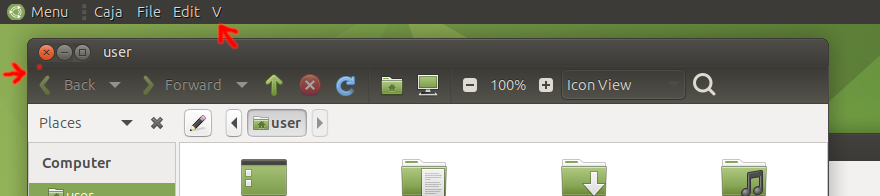
If this is the case and you don't mind losing your panel customisations, open MATE Tweak → Panel → then select a different one (that isn't "Contemporary", try "Traditional"). This should reset the menus.
4 Likes
Ok. This gave me the menus again. I am going to learn more about panels. I am not really familiar with Global menus and where they show up. I had been trying different distros last week and must have changed a panel setting and lost the menu. Thanks for the help. You fixed it.
3 Likes