Hello good people of ubuntu mate,
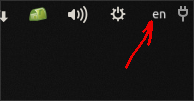
I have lost the keyboard layout switcher applet in my top panel after I reset the panel.
How do I add it back?
When I click on “Add to Panel”, that applet isn’t available on the list.
Thanks for all your help!
Hello good people of ubuntu mate,
I have lost the keyboard layout switcher applet in my top panel after I reset the panel.
How do I add it back?
When I click on “Add to Panel”, that applet isn’t available on the list.
Thanks for all your help!
Is that the white man in a blue square? I added one more, it appeared in the center of the panel, selected reset all panels, back to the original panel. um24.04
BEFORE
AFTER
AFTER RESET
same as first
you could use Control Center | MATE Tweak to change your panel.
Keyboard Layout switcher
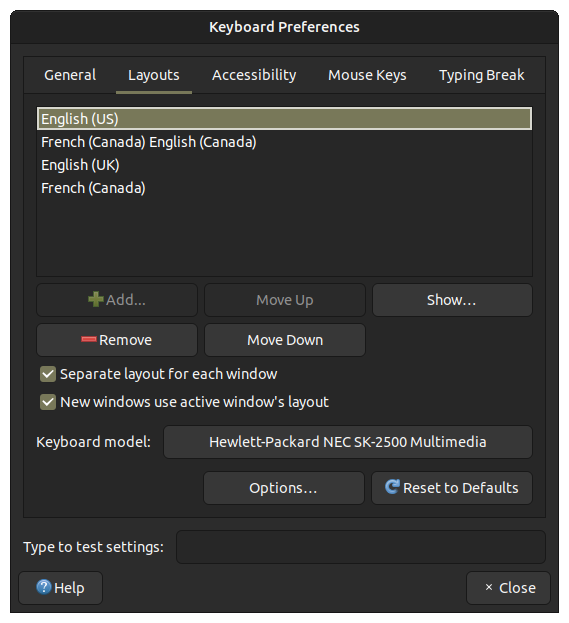
is associated with multiple languages. If you have only one language specified in your list of options, the panel will not show that selector icon.
To correct that, you need to click on the +Add button and make the desired selections to expand your choices.
Yeah I’m missing that US flag icon in the top panel now, that’s the icon I used to click to change the keyboard layout from US to Serbian and vice versa. The white man in the blue square is also missing now as well.
I checked, the 2 layouts are still there. It’s just that the flag switcher icon is missing and I don’t know how to re-add it.
Since the switcher is an indicator, and linked to the indicator applet, have you considered performing the following sequence:
Hopefully, that will reset the linkage to the switcher App for display.
I have just done that now and that hasn’t fixed the problem. The indicator for the keyboard switcher hasn’t returned. Do you have any other suggestions? I have tried to change the layout manually with Super + Space and even that doesn’t work.
I was researching this issue yesterday for about an hour and there’s not much info about this on forums or any other help pages, that’s why I had no choice but to ask the question here.
Have you verified that you have the following settings:
org.mate.peripherals-keyboard-xkb.general disable-indicator false

org.mate.peripherals-keyboard-xkb.indicator show-flags true
The full set of flags referencing the "peripherals-keyboard-xkb" schema, and which might play into that indicator display, are the following:
org.mate.peripherals-keyboard-xkb.general default-group -1
org.mate.peripherals-keyboard-xkb.general disable-indicator false
org.mate.peripherals-keyboard-xkb.general disable-sysconfig-changed-warning false
org.mate.peripherals-keyboard-xkb.general duplicate-leds false
org.mate.peripherals-keyboard-xkb.general group-per-window true
org.mate.peripherals-keyboard-xkb.general handle-indicators false
org.mate.peripherals-keyboard-xkb.general known-file-list @as []
org.mate.peripherals-keyboard-xkb.general layout-names-as-group-names true
org.mate.peripherals-keyboard-xkb.general load-extra-items false
org.mate.peripherals-keyboard-xkb.general update-handlers @as []
org.mate.peripherals-keyboard-xkb.indicator background-color ''
org.mate.peripherals-keyboard-xkb.indicator font-family ''
org.mate.peripherals-keyboard-xkb.indicator foreground-color ''
org.mate.peripherals-keyboard-xkb.indicator secondary 0
org.mate.peripherals-keyboard-xkb.indicator show-flags true
org.mate.peripherals-keyboard-xkb.kbd layouts ['us', 'ca', 'ca', 'ca']
org.mate.peripherals-keyboard-xkb.kbd model ''
org.mate.peripherals-keyboard-xkb.kbd options @as []
org.mate.peripherals-keyboard-xkb.preview height -1
org.mate.peripherals-keyboard-xkb.preview width -1
org.mate.peripherals-keyboard-xkb.preview x -1
org.mate.peripherals-keyboard-xkb.preview y -1
I just checked, all of those settings are fine.
What solved the problem was re-installing ayatana-indicator-keyboardand now I can change keyboard layouts with the blue keyboard icon:

I still don’t have the flags icon to change keyboard layouts but at least I can change the layout now! Which is a huge relief 
If you have any thoughts about this quirk, let me know 
Glad that is resolved!
Please mark the checkbox on you posting as identifying the solution that worked, for the benefit of the Community.
Thanks again Eric and Pavlos for helping me troubleshoot this issue, really appreciate it