All 64 gig and smaller USB flash Drives I have bought come formatted to FAT32. I have had trouble putting some files on them, thinking the file was to big to fit on the drive, like the new maps for my Garmin GPS unit, that said you needed at least an 8 gig USB flash drive, then said the drive was to small.
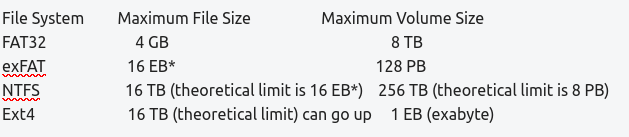
After some research I found out the drive was not to small, but that Fat32 only supports a file size of 4 gigs so any file over that size say 5 gigs cannot be supported. I never knew that. So reformatting the drive to exFAT is the answer.
I am sure some of you know this, but others less technical like myself might not, so here are the file sizes for different formats:
The max file size table offered by this source, dated dated Dec 2024, is giving a slightly different (more comprehensive) view of capabilities for each filesystem type.
Unfortunately, the units have got muddled up to history.
Once, a very long time ago: 1024 KB = 1 MB (Windows is notorious for still using this in drive properties, a 1 TB drive shows as 931 GB)
That's the SI prefix (decimal) now: 1000 MB = 1 GB
The IEC prefix (binary) is: 1024 MiB = 1 GiB (with the 'i')
So, different manufacturers and tools may use the wrong prefix. A true 8 GB drive (8000 MB) would be smaller then a 8 GiB (8192 MiB) drive. It's just something to bear in mind when size is a limitation.
My training and career was as an engineer, and when I came across the 1024 factor for the first time, I was numbstruck! I eventually came to understand the logic, but it was VERY MUCH against the grain for an engineer!
HOWEVER .. when trying to size partitions using GParted, unless you use the 1024 factor for scaling multiples of 1K bytes, the partitions always end up being "mis-aligned" or not ending on a physical sector boundary, which impacts read/write performance at the low-level.
I wouldn't doubt that as it was a Duck AI answer to the question I asked when I found out FAT32 wouldn't support a file size over 4 gigs. I have been playing with Duck AI for a bit but the answers are not always totally accurate which I then challenge it with the new facts. Yet this was close enough for my purposes.
I will only use Duck AI to even play with as it says it doesn't collect data on you and you can immediately delete your history, which I do at the end of every visit. Is that true? No way to know but that is their pledge on their search engine too and regardless I believe it is collecting less data than Google, MS or Musk’s which all could care less about your privacy.
Coming into “personal” computers at assembly language on an Cromemco S100 system, binary sizes always made sense to me. So 1K =1024 bytes as a shorthand was “natural” and 1M being 1Kx1K = 1024x1024 etc. seemed a “logical and consistent” analogy or shorthand. I looked at the 1M = 10^6 bytes as “shrinkflation” so drive makers can advertise bigger numbers. But I can be charitable and say it was so they could use the extra binary bytes the user doesn’t get to use for bad sector replacement or appending error correcting codes to the binary sectors.
Kind of like the half a**ed metrification in the US where meat and produce stayed in lbs, because half a kilo would be 10% more, but wine and booze quickly went metric as a “fifth” (the traditional one fifth of a gallon bottle) was like 760 ml so we now 3/4 liter bottles instead of “fifths”.
Just an update. I went to format 32 gig USB drive to exFAT today and the option was not available on Gnome Disks and grayed out on Gparted. I did a search and found out there was a missing piece of software needed to accomplish formatting to exFAT.
For GParted version v1.2.0 and above (Ubuntu 21.10 and above)
exFAT support was added in version 1.2.0 of GParted. To use exFAT you must install the exfatprogs package (and NOT exfat-utils). Installing exfatprogs will uninstall exfat-utils.
I added exfatprogs logged in and out and was able to format to exFAT.