Does anyone know why Mint's defaults as considered more "sane" than Ubuntu's or UbuntuMATE's???
The only thing I can think of is the default position of the Brisk-equivalent menu at the lower-left corner, instead of the much more intuitive upper left corner, but that it conforms by that placement more closely to the Windows-default location for the "Start" menu.
Anyone else have opinions or actual survey results to compare why Mint over Ubuntu(MATE)?
I recently read an article (I forget the source; it wasn't very informative) about how now might be the time to replace Windows with Linux, and offered MATE as one example. The author, most likely a Windows bigot, decried MATE's positioning of the panel at the top of the screen and not the bottom. He went on to suggest removing the panel altogether and replacing it with Plank.
Reading the article, I thought to myself that as a Mac user, I like the menus at the top of the screen, feeling that pulling down a menu felt more natural than pulling UP a menu. Different strokes for different folks, and all. But customizing the Linux look-and-feel is far easier than on either Mac or Windows. À chacun son goût, as they say.
Having the "Start" at the upper left corner, as you said, is absolutely more instinctive and natural, which we could say quite categorically, was confirmed by Apple's (and Xerox's) User Interface designers, by the fact that it was their choice for implementation!
While I do not prefer using a Mac for a desktop environment, it was my desktop environment in my early professional career as a sysadmin for engineering systems (with xterm and VT-100 terminal emulators) at Nortel in London, Ontario. From that experience, I will grant that MacOS is the most instinctively natural GUI.
BUT ... I still prefer UbuntuMATE as the happiest blend of features derived from each of Windows and Mac!
Jack Wallen: addition of some nice additions, such as sane defaults
I read it as opinion and of subsequently limited value, unless my needs/requirements and tastes are identical to the author (Jack), which I doubt.
I re-read the article, and it doesn't do much for me at all; ie. one of the strengths of Ubuntu was the choice of LTS or non-LTS but that & other benefits don't get a mention. The details were so few, without depth and thus meaningless outside of giving Jack's opinion.
We didn't include it in the Ubuntu Weekly Newsletter despite it mentioning Ubuntu, as content in my opinion didn't warrant it, but the non-inclusion decision wasn't initially made by me either.
What is sane in the opinion of the writer is probably purely an out of the box install matched what Jack as an end-user would require, config or setup of menus etc matching the way he would be happy to operate. I don't care there anyway; I like exploring what a new system has setup, and working out if the 'imaginary user' they've targeted matches my own needs, before I spend 10-15 minutes adding my package/apps and configuring the system to exactly what I need anyway. That personal customization to me isn't a chore; it's easy & I feel I accomplish something when it turns into something that I want to work with.
I use Mint on one of my other laptops and it is pretty slick. The interface is sharper and cleaner and everything just snaps. I am not a fan of the Flatpak install process, but I was pretty quickly able to get it up and running and customized like I like it. I was even able to use the Yaru icons so it still feels a bit like MATE. Editing the panels is a whole lot easier in Mint and you can add some great applets to the panels and each panel can be unique on multiple screens. I know you can do all of that on MATE, but it was super easy to modify in MINT. You might remember the struggle I had getting my panel in MATE to work the way I wanted to. In MINT it took just a few minutes to get it the way I wanted it.
I don’t know if I like it better than MATE, but I can say MATE seems outdated when comparing it to MINT, but I could not give you any specifics why I feel that way... I just do. Although if I am honest with myself, I think it feels a lot like Windows but better and that may be a part of it. It makes the jump from Windows for people, like me, who have spent their lives on Windows, a bit easier to manage.
MATE is still my daily driver, but I use MINT for my server and I can see the appeal. Next, I think I am going to brave Arch linux.
I sure wasn't worried, in fact I needed to re-read it to write that reply, as I'd remembered nothing of it since first read. I just moved on & it wasn't included in the UWN.
Jack Wallen does write some stuff I/we appreciate, and we do include in UWN, that wasn't one of those (thus my ending comment of if being felt that was written to get clicks).
I used Mint Mate as my daily driver for over a year. The forum didn’t impress me. Also the laptop battery applet fails to load and crashes all the time. A lot of the Ayatana Indicators didn’t work correctly for me. I didn’t see much difference otherwise so I came back to Ubuntu Mate.
The Mint community does suck. A few of the MODs are terrible which reflects on the site and the forum is an old school phpBB3 forum which was excellent in 2000 but now… not so much.
People tend to like what they are used to and they find this “intuitive”. I was most used to Windows and at the University, I had some exposure to MacOS 9. So when I started to experiment with Linux more than 15 years ago, I liked KDE and Gnome. They were intuitive to me. On the other hand, I did not like Unity and so I switched to Ubuntu MATE and I just skipped Windows 8.
Generally it is not a good idea to shift the same old features in new corners and force people to adopt this. In Ubuntu you could at least install gnome and then everything was as before. (Until they started to e.g. put buttons on the left side and made it hard to change that.) For Windows 8, you needed the 3rd party tool “Classic Shell” to get rid of that “touchscreen surface” and MS never sold a lot of these.
What matters more to me than whether the “Startbutton” is in the upper or lower left corner: Whether the system is STABLE. And that’s why my Linuxmint-VMs all got deleted after a while. I tried Linuxmint several times over the years, but every time the desktop got broken soon, or it wouldn’t work anymore after upgrading Virtualbox… so I deleted it. I was used to more than that. Ubuntu MATE “just worked” and allowed for quite some customization.
Up to now, that is. Never since 14.04 did I spend so much time resolving issues and getting back the look and feel that I am used to after an upgrade. The Nouveau driver and it’s present issues might be something Ubuntu MATE is not responsible for, but this dysfunctional “Arctica Greeter” which just ignores settings made in Control Center—>Login Window and which is like that since 22.04… that’s not what I am used to from this OS. And having to register for Ubuntu PRO in order to get all available security patches is also, well… unique.
I wouldn’t switch to Linuxmint though. A lightweight, very stable VM with a highly customizable GUI and lots of utilities which replace cryptic command lines by simple mouseclicks? Try MX Linux 23 XFCE! It can be made very “Windows-like” and good looking, although that’s not what it is “out of the box”. It took me 3 evenings until it looked right to me. But I only needed additional artwork for that - no tools other than the ones it came with. And it took all this without getting buggy even once. I din’t give MX Linux a try on a “real” machine yet, but one day I might.
Strange, Ayatana-indicators are rock-solid for me, and have always been and on every version, even on 24.04 and 25.10.
This contrary to the old panel indicators (that you install by right clicking on the panel)which sometimes drop off, stop reacting , turn invisible or crash the panel
I could be mistaken, what are the default panel indicator, particularly “app indicator complete” these are the ones that are crap for me 22.04 (my and my wife’s daily driver) and 24.04 (although not used a lot). If Ayatana indicators are not the default ones installed I’ll give them a try. I don’t care much about these dodads unless they don’t work as expected.
Shows network status and allows connection management.
Battery
Displays battery status and power management options.
Volume
Controls audio settings and volume levels.
Date/Time
Shows the current date and time.
Session
Provides options for logging out or shutting down.
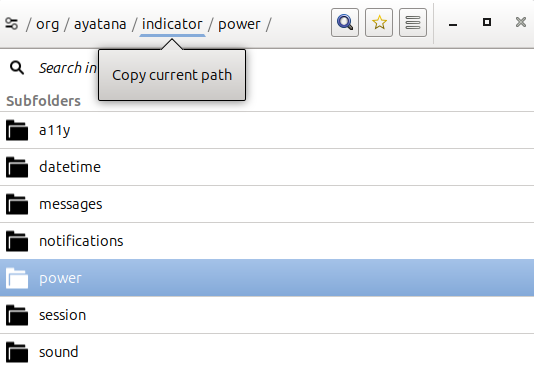
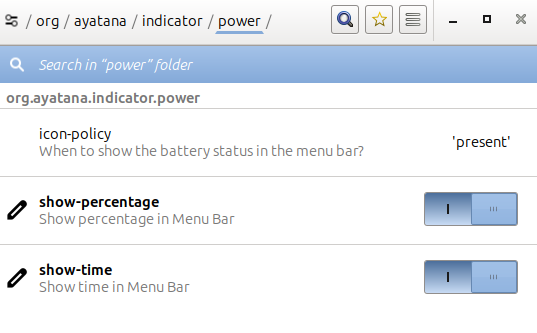
I shut off notifications, session and date/time using dconf editor. I modify battery to show both time and percent. I use the extra ‘add to panel’ clock because I want the time and date at the end of my panel. I also add the separate brightness, quit program and desktop switcher.
Mint is considered superior not just because of UI which is really important for newcomers, but also cuz its the only distro where most thing “just works” out of the box, i remember when i first started my distro hoping about 3-4 years ago and mint was theonly one kept me for more than a month.
Among all distros out there can you name 1 distro which has more compability, familiarity, accessibility more than mint? Even zorin lacks in compability department.
yes I was making a usb for a friend and when I tested it Mint found my Brother and installed the drivers out of the box. Still I would install the Brother software package linux-brprinter-installer-2.2.4-1 so I could enable the scanner and be able to see the ink levels and clean the heads.