On my just set up dual boot dual SSD Ubuntu Mate/Windows 10 setup…. the windows drive shows under Devices as “ 175GB Volume”.
This seems dangerously vague…for an easily confused novice like me.
I have used Disks to name the partition I set up on my external backup HDD for Timeshift snapshots…….BUT if I name the “ 175GB Volume” in Disks ( aka Windows C: drive) ….will that stuff up Windows ?
….or is there a way to always hide the Windows volume when using Ubuntu Mate?
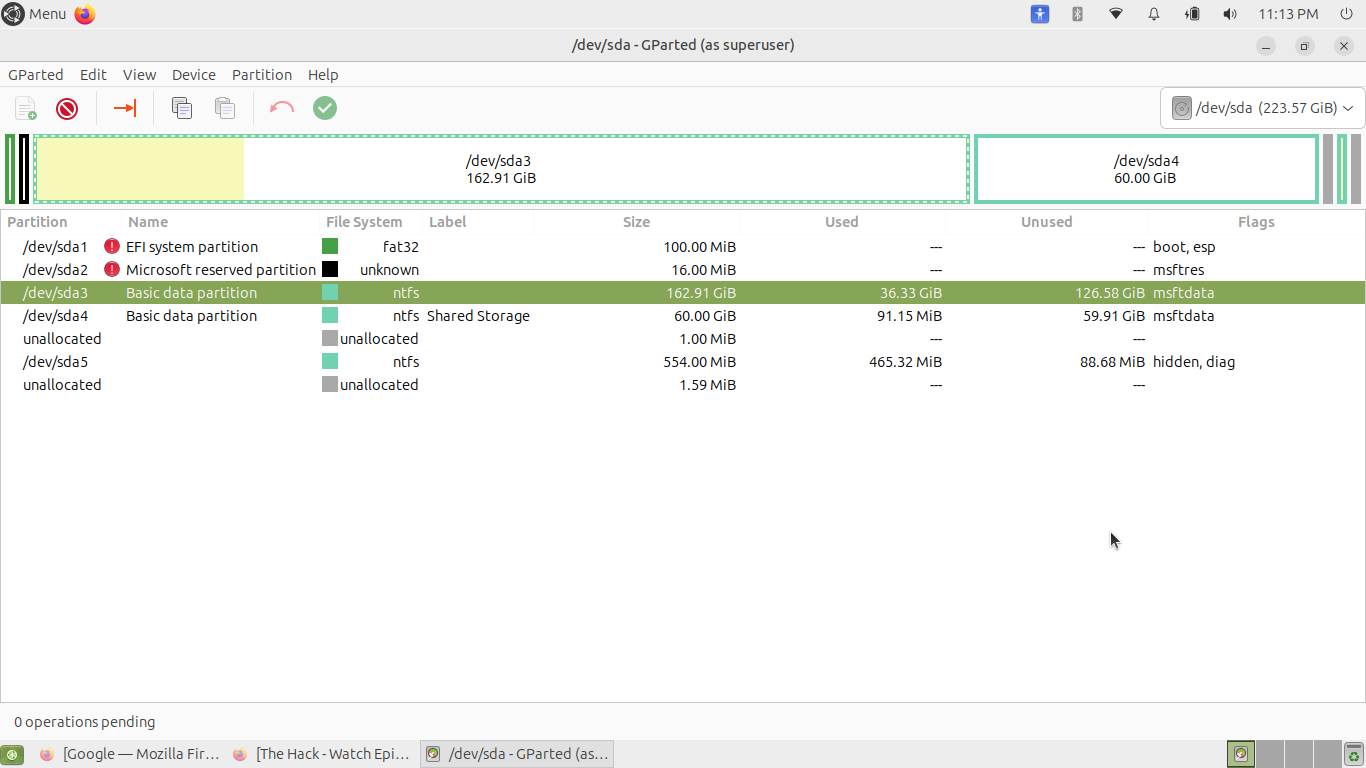
Can you post a snapshot of what is shown using Gparted when looking at the list of partitions on the device?
1 Like
Open the Disks utility, select the Windows (NTFS) partition, click the gear icon for Additional partition options, then choose Edit Mount Options and uncheck "Show in user interface" to remove it from the file manager's sidebar and desktop view.
Also, uncheck "Mount at system startup" to prevent it from being mounted automatically.
2 Likes
I attach the snapshot for Eric…..with the windows partition highlighted ( although it shows as 175GB when in Ubuntu) ( Ubuntu install & Grub on sdb)
Looks like pavlos_kairis’s advice will stop it showing…..so this is what I shall probably do tomorrow.
I don' know if you lean more towards Windows or Linux.
However, I don't like having partitions that do not have their own distinct PARTITION_LABEL.
Before doing anything else, make sure you have a complete backup of your Windows drive, not just your Windows boot partition.
If you unmount the partitions in question, you can then choose the GParted Edit function to assign a partition label.
To avoid possible Windows issues, I would limit such labels to only 8 characters, alphanumeric, starting with alpha.
Hidden and not mounted. ( I’m liking Disks).
But, based on Eric’s comment I may change a partition label
Many Thanks
2 Likes
I’ve used “disks” to edit the file-system label on Windows7 & Windows 10 dual boot setups and never “stuffed” anything up. The one I setup with Ubuntu-Mate 24.04.3 I had previously changed the label to “Win10” on Mate 20.04 and when I made it triple boot with Win10, 20.04 and 24.04 everything still worked.
If you are really concerned, change the C: disk’s label in Windows and it should be there next time you boot Linux.
2 Likes
Re labels …to avoid problems with the Windows backup…does alphanumeric mean no space, as I’ve labelled a partition as “shared storage” ( for user files/doc accessible for both OS’s).
So shorten label to 8…and remove the space?
so no spaces.
On sda I created a partition for user files/docs that
I've seen cases where the labels had spaces, but it is safer using "_" where you want a space.
1 Like
I think I might be almost there with a set up to use ( and migrate docs/data from my old win 10 only setup)
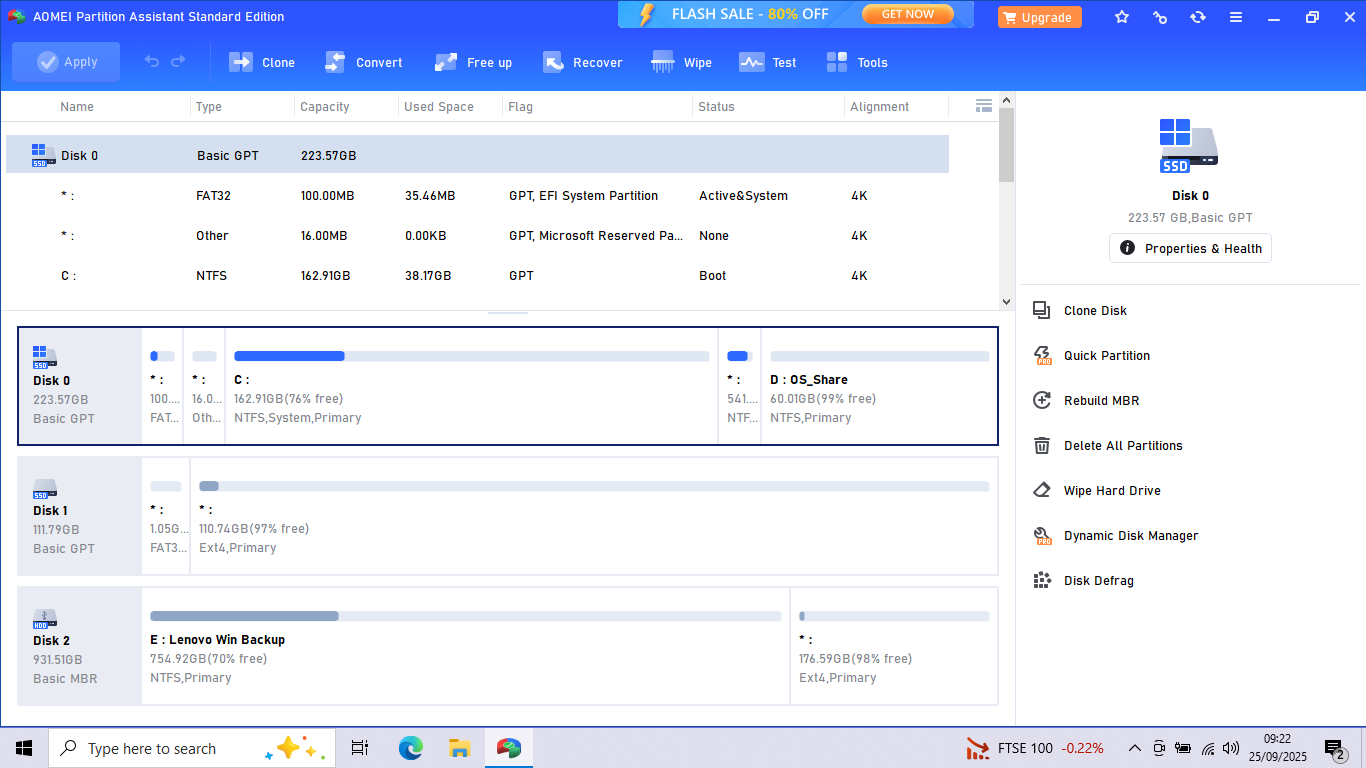
Windows C:\ partition now hidden and not mounted in Ubuntu
Saw somewhere that the Windows Recovery partition should be directly next to the system partition, so moved and renamed the partition I set up for user data/docs shared between OS systems. ( May not need 60GB but will see and hopefully can use AOMEI re-liberate to C:\ drive if needed)
My external backup HDD ( Disk 2) now partitioned for windows and Ubuntu backup. Have used Timeshift to save snapshot to both external HDD and on Ubuntu system drive. Haven’t decided how often to do snapshots on each yet.
( should I also rename the Disk 2 “ Lenovo Win Backup” partition label) if it both source and sink locations for the back up that need as “safer” name
I'm afraid I can't comment on anything Windows-specific, because my last experience was on my HP 9870 Pavilion having Windows/Me, which I cast aside for my first intro to Ubuntu back in 2007.
My only recommendation is to keep any Windows disk as pure Windows, without GRUB (i.e. no "intra-mural" conflicts with Linux) and Linux, with GRUB, on its own physical disk, but with update-grub (from Linux) building the GRUB menu that offers (because it was detected) to boot Windows if selected from (likely bottom) of the menu of offerings, if you have the following parameter specified in your /etc/default/grub file:
GRUB_TIMEOUT_STYLE="menu"
1 Like