Hi
I recently bought a Lenovo laptop (IdeaPad Slim 3 Gen 8)
Brief specs are:
AMD Ryzen 7520M, Graphics AMD Radeon 610M, 16 Gb RAM, 512 Gb SSD, WiFi 6 and Bluetooth 5.2.
I tried to install Ubuntu Mate 25.10 booting from a USB stick, but when I tried to connect to home network (only WiFi, this laptop hasn't any LAN port) I found that no network was available. Networking was on and wireless networking was on too, but no way to find a network.
I tried to install Elementary OS in the same way and everything was fine. I cancelled the installation because I prefer to work with Ubuntu Mate, so I'll keep on trying.
Should I try with 25.04 or previous versions, like LTS?
Thank you in advance.
2 Likes
Welcome, Ricardo!
I think you may have answered your own question. 25.10 is the latest GA release, and as such may still have unknowns when it comes to hardware. Since the cost of trying an earlier version (in this case 25.04) is only a download, you might try that and then do an in-place upgrade.
I tend to stick with LTS releases, so Iso I’m not there, yet. Let us know what you decide and how it works.
1 Like
Ubuntu [MATE] 25.10 uses the 6.17 kernel, you mention an OS where it worked but gave no specifics there (in particular kernel stack; esp. given Elementary OS doesn't use its own kernels but Ubuntu kernels; thus if it works that is useful detail I'd contrast what actually worked with the 6.17 you didn't have success with).
Ubuntu [MATE] 25.04 is only days away from EOL, so I'm not sure you'd gain much by trying that (unless you wanted to test the 6.14 kernel it has, but that kernel exists on other media anyway)
Ubuntu [MATE] 24.04 LTS being a LTS release has kernel stack choice; GA is 6.8 whilst HWE is 6.14 (at 24.04.3, it'll soon move to 6.17 anyway as .4 is getting close). The Ubuntu MATE 24.04.3 LTS ISO is easy to find & download, so that will allow you to try 6.14, but finding 24.04 ISO with 6.11 or 6.8 will be harder (6.8 given it's still supported is always an option; but you can change kernel stack post-install; but that does require package installs, so you need internet, OR you to download on another box, copy to media & walk to the intended device and install there)
As drivers are actually kernel modules; I'd be exploring what worked (ie. your elementary was using what??) for clues... My own opinion is once you've found one GNU/Linux that works; you have all details you need to make any other GNU/Linux system work; and Elementary being Ubuntu based makes it super easy in that regard too. As I understand it, Elementary also only use the Ubuntu LTS as their base, so once you work out what Elementary [version] you used, its Ubuntu kernel stack (GA or HWE) you have what you need to know to make Ubuntu-MATE install & work perfectly too.
6 Likes
Hi, @Ricardo_Figueira and welcome to the Ubuntu MATE Community!
2 Likes
This laptop uses the Realtek 8852BE chip, there are some linux drivers for it.
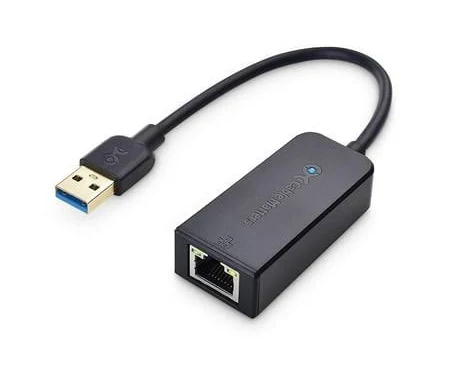
My suggestion: buy a usb3 to rj45 gigabit adapter
See GitHub - lwfinger/rtw89: Driver for Realtek 8852AE, an 802.11ax device
1 Like