I've installed Ubuntu Mate 20.04 on my Pi 4, and I don't seem to have HDMI sound.
I've tried ScummVM and YouTube and neither work. Looking at other posts, I've added the below to my usercfg.txt, from reading other threads they seemed to help some people.
hdmi_force_hotplug=1
config_hdmi_boost=4
But still no joy.
I have the following in my config.txt by default:
param=audio=on
hdmi_drive=2
Any help would be appreciated. I have sound working on RetroPie and Raspian.
I've found that, by default i get no sound even tho' I'm connected to the pi hdmi1 port (nearest to the power socket.
To get it working I select sound preferences (from the volume icon on top bar), select 'hardware'and perform speaker test.
When that gives no output,select the other option, and repeat the test - should get sound now.
You may also need to select the other device under the output tab.
Don't quit preferences, or you lose the setting!.
It will also be necessary to repeat after a reboot.
I don't yet know how to make this selection default!
HTH
Derek
what i have done because i don't use headphone jack;
disable headphone jack
you can do it in soud setting: hardware tab put the 1st one off (this is the headphone jack)
Result: one HDMI stay's active
Test: reboot and sound comes out on HDMI
My system
RPi4 4 Gb
Ubuntu mate 20.4 raspi 64 bit
OS 5.4.0-1015-raspi
just give a try
if later on you want to use sound on headphone jack you can enable it again
This error is not about the command to install it. You may have some error in the sources of your system. I will help you to fix this. Can you show us the output of:
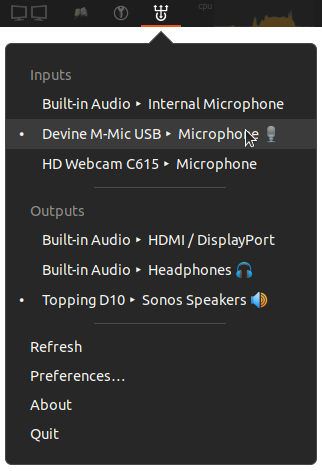
About the tool indicator-sound-switcher, to open it, search it in the Menu of apps. To start it with the system:
Control center > Startup Applications > Add entry to this command: indicator-sound-switcher
I'm away from my Pi at the moment, but I will look into this when I am able to. Thank you for taking the time to respond.
I can currently find indicator-sound-switcher in the Apps Menu but it simply doesn't open. Nothing happens when I click on it (although if I put it onto my Desktop, I do get an "Opening Sound Switcher Indicator" entry on my bottom Panel for about 10 seconds, which then disappears). It is in my Startup Applications, but again, I just can't seem to see it open anywhere on screen.....
When open indicator-sound-switcher, there is no window, just an icon appears in notification aera, near the sound indicator. Click on the icon of indicator-sound-switcher and select HDMI output.
How would I go about switching the repository to the default? It seems weird that anything is non-default really, I haven't looked to change anything in this area.