OS simply ignores me when I try to set a non-admin user's language to a different language

Are you back to English? Make sure the language and regional tabs match language. Make sure both are applied system wide first

Get your system completely back to English first.

Okay I have duplicated it on my old Dell Dell Inspiron after having done it on my System 76 so it works and is not a bug. I have logged in and out several times and rebooted and it is preserved.

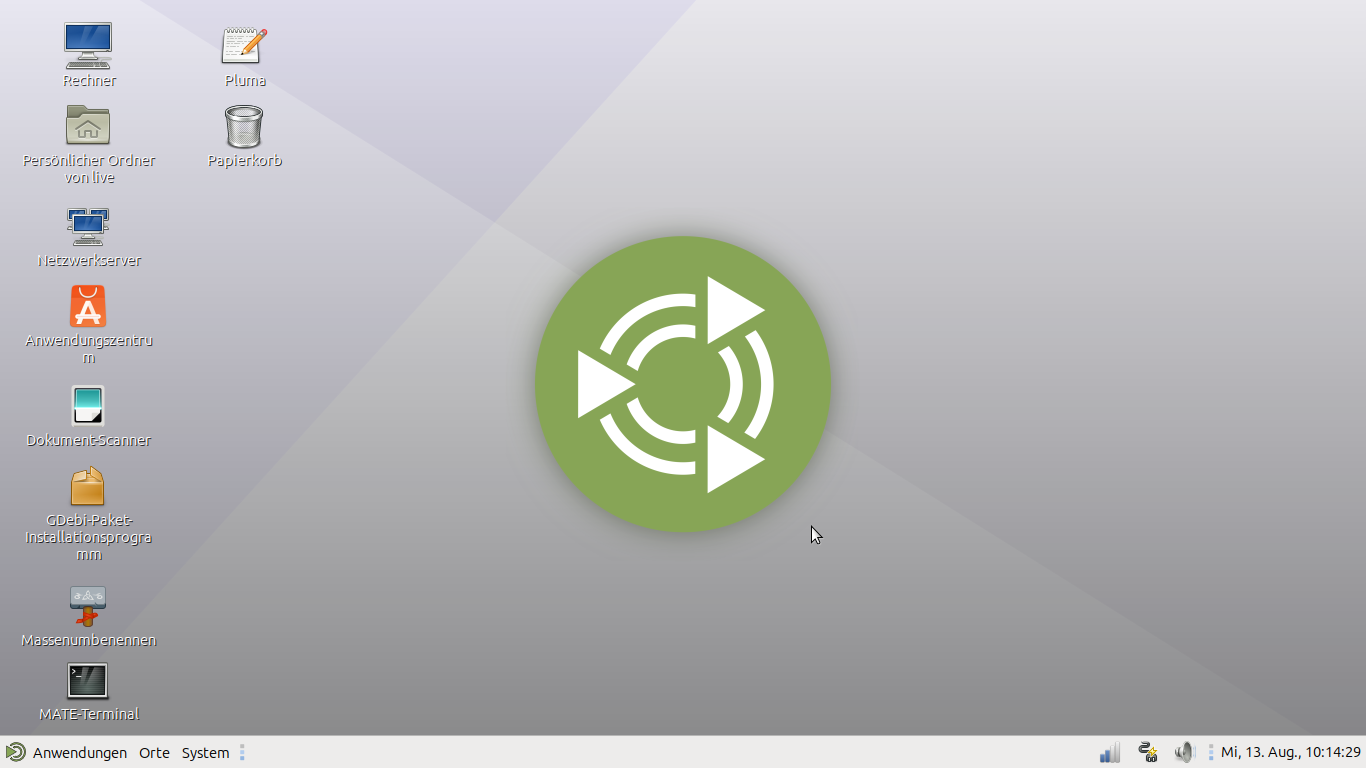
Screenshot time is 10:14:29

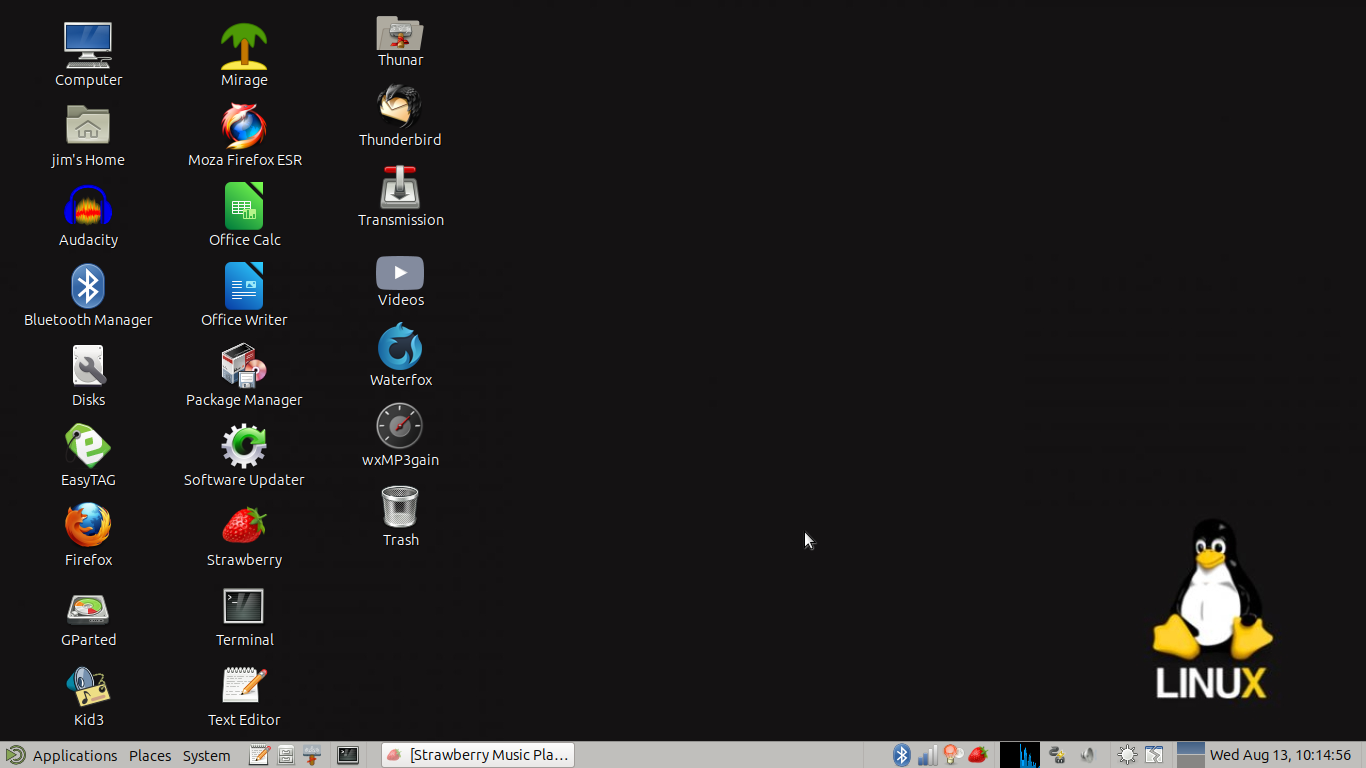
Screenshot time is 10:14:56

27 seconds to log out of live and back into jim and set up and take the screenshot.

  1. Again set Raphael to English on the language tab and apply system wide.
  2. Now set Raphael to English on the Regional Formats tab and apply system wide. Reboot.
  3. Again set German User to English on the language tab and apply system wide.
  4. Now set German User to English on the Regional Formats tab and apply system wide. Reboot.

You should now have English system wide.

I might even consider deleting German User1 and making German User2 in case something in the config file is messing you up. If you have alot of data back it up or delete the user but not the home folder to access later.

Check both users are now on English.

Login to German user>settings>open Language support.

Under language Drag German to the top it should be highlighted.

Click on Regional format tab, from the drop down select the same German language. The the tab should gray out and the cursor spin for some seconds. If it does not, you have a different problem.

Now reboot and German user should be in the German language.

If all that fails or the cursor spins endlessly, I would suggest reinstalling again. Then making your new user and immediately follow the same steps to set the language to German.

I guess it all depends on how badly you need the two languages to work. Good luck.

1 Like

I tried to do that. The latest development is that now the OS won’t even let me change the system-wide language back to English again.

At one point during my attempts, the language selector window gave me this rotating circle thingy that means that I should wait for a task to finish. I waited for fifteen minutes. Yes, literally. Then I lost patience and rebooted, and of course, everything is still in German.

Something is deeply, deeply broken about the language selection tools in Ubuntu Mate 25.04 . I don’t know what it is. I don’t know if it’s coming from the Ubuntu side, from the Mate side, or from the Ubuntu Mate side.

All I know is that, whenever I try to tell people about it, they apparently either assume I must be too stupid to follow very simple instructions about moving names of languages on lists around, or they assume that I’m simply some kind of raving madman who is best ignored.

Read my above post from while you where posting. Again if the config files are to messed up you may have to reinstall.

When I get some extra time I will write a tutorial on this and post it under tutorials for others so they don’t mess up their config files needlessly.

1 Like

Again set Raphael to English on the language tab and apply system wide.

Now set Raphael to English on the Regional Formats tab and apply system wide. Reboot.

Again set German User to English on the language tab and apply system wide.

Now set German User to English on the Regional Formats tab and apply system wide. Reboot.

I might even consider deleting German User1 and making German User2 in case something in the config file is messing you up. If you have alot of data back it up or delete the user but not the home folder to access later.

Check both users are now on English.

No. They aren’t.

And

Again if the config files are to messed up you may have to reinstall.

I already did one reinstall over all this, and it didn’t do any good. My interest in doing even more reinstalls over this is very limited at the moment.

Sorry for taking so long to get back to you.

For my own system, I get

GDM_LANG=en_CA
LANG=en_CA.UTF-8
LANGUAGE=en_CA:en
        LANG | LC_*)

To me, that appears consistent.

(will add more later)

1 Like

Hopefully Eric can help you. I know how frustrating it can be when you can’t get what you want. I did learn a lot about configuring languages trying to help you.

Good Luck I hope you get it fixed

1 Like

I can confirm @Raphael's findings. In Plucky Puffin (25.04) it is impossible to change the language whatever the method used.

@Raphael, I can not find your bugreport on launchpad. Did you set it private ?
I would like to add a "this affects me too" flag.
Can you share a link to your bugreport ?

EDIT: Nevermind, forget I asked ! :slight_smile: I found it and added a "me too" flag

3 Likes

Thank you for confirming that I’m not going crazy, and for adding the flag.

You can still change the overall system language through

sudo dpkg-reconfigure locales

but that might mess with system config files you might not want to mess with, and won’t allow you to assign different users different languages.

4 Likes

That is right, the 'dpkg' command shouldn't be be needed in the first place.
Changing language always worked by changing the settings in 'mate-control-center -> Language'. In 25.04 it doesn't. This is definitely a bug.

On my older Ubuntu Mate versions it works like it should so I wonder how they broke it.

4 Likes

This is a good example of why computer specs and what version of the operating system of Ubuntu Mate should be included in the first post.

It is also why I use LTS versions. Less bugs.

3 Likes

I always have LTS versions on my main rig, work laptop and mediacenter.
I consider the intermediate versions as somewhat experimental :slight_smile:

3 Likes

Then again, the fact that tkn and me discovered this bug in 25.04 might mean that it’s a bit less likely that it’ll end up in 26.04 .

I used the DuckDuckGo search assistant and it printed me quite a good synopsis of this thread, including workarounds so I copy it here verbatim:


Language Settings Issues in Ubuntu

Common Language Bugs

  1. Language Not Changing

Users have reported that selecting a language other than English during the installation or in the Welcome Screen does not apply the changes across the live environment. This issue has been noted in versions like Ubuntu 23.10 Beta, where the keyboard layout also remains unchanged.

  1. Locale Problems

After installation, some users find that the system date and other settings display in a language that does not match their selection. This can occur even if English was chosen during installation.

Fixing Language Settings

  1. Changing Language in Settings

To change the language, go to Settings > System > Region & Language. Here, you can select your preferred language and region. After making changes, a restart is required for them to take effect.

  1. Editing Locale Files

If issues persist, you may need to manually edit the locale configuration file located at /etc/default/locale. Change the language settings to your desired language (e.g., LANG="en_US.UTF-8"). After saving the changes, log out and log back in.

  1. Keyboard Layout Issues

If the keyboard layout does not switch as expected, you can reorder the languages in the Region & Language settings. Sometimes, toggling the order of languages can resolve the issue temporarily.

Additional Considerations

  1. Ensure that the necessary language packs are installed for your desired language.
  2. If problems continue, consider reporting the bug to the Ubuntu development team for further assistance.
2 Likes

Before attempting anything, make sure all of the desired language packs (packages) have been installed.


That will set the base system (shared multi-user) default language. It will not let you choose a per User language different from the default.

This manages the content of the file

/etc/default/locale


There are references pointing to the following files, but I deferred any attempts using those:

~/.dmrc

~/.xsessionrc

/etc/environment


A while back, I had created a second "throw-away" user for testing, so I decided to use that to experiment.

There was a reference that pointed to the user's linchpin settings file as being

~/.profile

That file originally had no locale-related variables at all, so the Graphical Display Manager defaulted (as verified from any terminal session opened) to

en_CA.UTF-8

In "~/.profile", I added all the "locale-specific" variables that I want to set different from the system defaults. The inserted code, just after the first comment block in ".profile" is as follows:

####################################################################################################
####################################################################################################

###	LANGUAGE SETTINGS
###	REF:	https://superuser.com/questions/1716239/setting-the-language-and-locale-in-gnome-on-debian-bullseye-has-no-effect

	LANG="fr_CA.UTF-8"
	LANGUAGE="fr_CA.UTF-8:fr_FR.UTF-8:fr_CH.UTF-8:fr_BE.UTF-8:fr_LU.UTF-8:fr"
	LC_CTYPE="fr_CA.UTF-8"
	LC_NUMERIC="fr_CA.UTF-8"
	LC_TIME="fr_CA.UTF-8"
	LC_COLLATE="fr_CA.UTF-8"
	LC_MONETARY="fr_CA.UTF-8"
	LC_MESSAGES="fr_CA.UTF-8"
	LC_PAPER="fr_CA.UTF-8"
	LC_NAME="fr_CA.UTF-8"
	LC_ADDRESS="fr_CA.UTF-8"
	LC_TELEPHONE="fr_CA.UTF-8"
	LC_MEASUREMENT="fr_CA.UTF-8"
	LC_IDENTIFICATION="fr_CA.UTF-8"
	LC_ALL=

	export LANG
	export LANGUAGE
	export LC_CTYPE
	export LC_NUMERIC
	export LC_TIME
	export LC_COLLATE
	export LC_MONETARY
	export LC_MESSAGES
	export LC_PAPER
	export LC_NAME
	export LC_ADDRESS
	export LC_TELEPHONE
	export LC_MEASUREMENT
	export LC_IDENTIFICATION
	export LC_ALL

####################################################################################################
####################################################################################################

IF you do not have the locale file for fr_CA.UTF-8, then there is a process to create that file and to generate the required files, using the command

locale-gen fr_CA

After creating that, and after doing any customizations to either standard locale files, or a user-created custom-modified version of that file, there is a need to make the system aware of those changes, and that can only be accomplished with the command

update-grub

Once that is done, you "sync" your system and reboot.

After reboot, you can log in as the user for which you modified the language setting.

You should immediately see the new user-specific language having been applied.

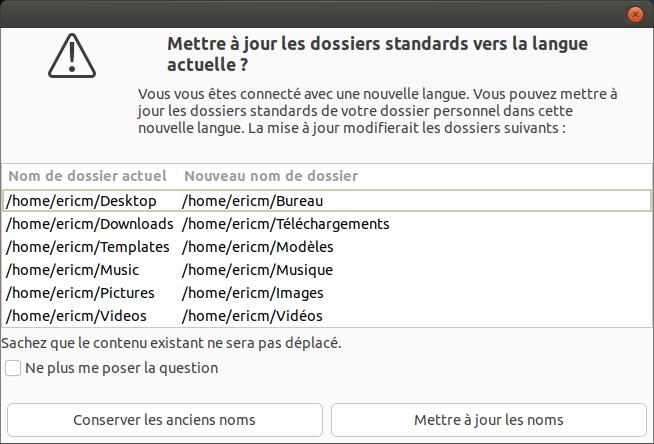
If the setting for language was changed after an earlier initial installation and configuration for another language, you will be prompted by a window (see below) telling you the language has been changed and asking if you want to change the names of default directories like Downloads, Documents, etc. to the new name corresponding to the language that the environment has been changed to.

You should be good at this point, unless you want to go back and tweak the .profile for that modified used (namely, not the same language for everything, but only for some aspects).


One important point (bug?):

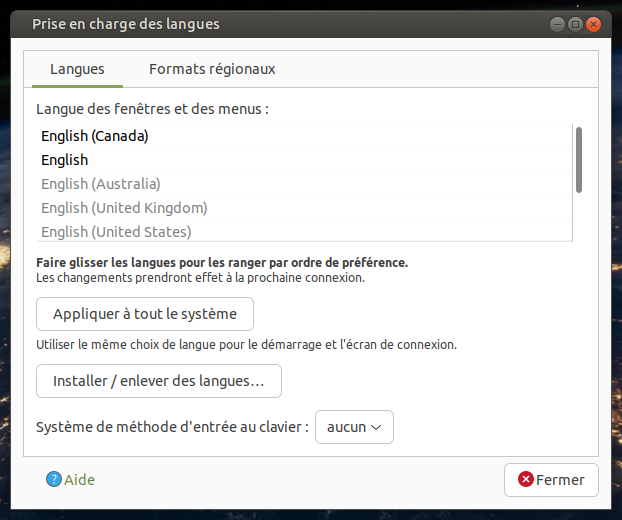
The gnome-language-selector tool doesn't behave correctly, in my view. The App presents a window as seen here:

The problem with that is that, regardless of any attempts on my part, there is NO way to "drag+place" a lower language specification option into any other "relative ranking" position, which the App claims that we should be able to do, let alone moving it all the way to the top to take precedence over everything else.
6 Likes

Did you do all that on 25.04? Does it work there?

My system is UM 22.04, but the precedence role of the .profile for the environment of both the GDM and the User shells is the same regardless of version.

I am sure that Thom (@tkn) will be able to confirm that.

3 Likes

I’ll try it out now. Thank you very much! Barring unforeseen events, I’ll get back and report how it went later.

3 Likes

It works! Thank you so much, ericmarceau!

6 Likes

Raphael just confirmd :+1:

4 Likes

I want to apologize to you Raphael. It was pointed out to me that it said 25.04 in tags and I admit that I seldom pay attention to tags. I will try to be more observant on that from now on. Just glad you were able to get what you wanted.

5 Likes