Problem to mount 2 partitions

Dear community,

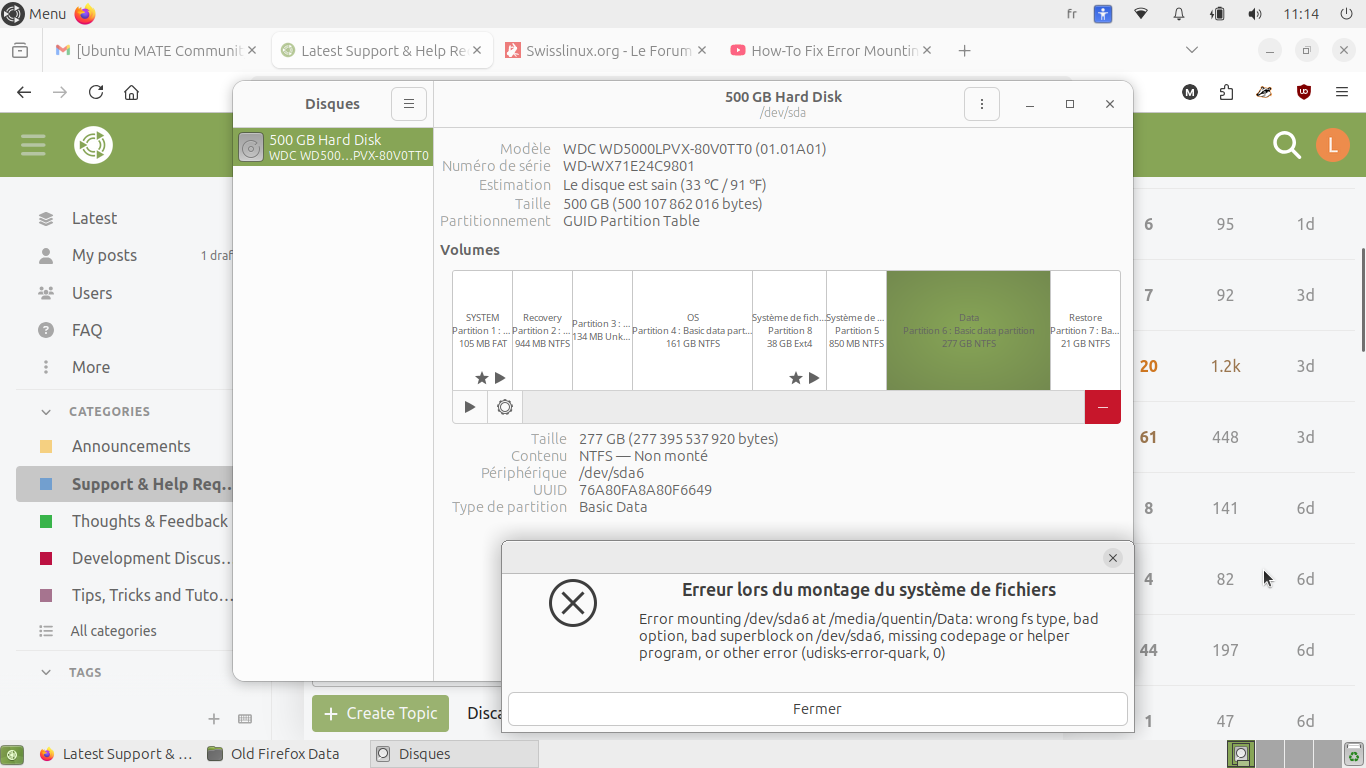
I have transform my old Pc to an ubuntu mate computer two years ago. I still have double boot windows 10 and ubuntu mate. I have a problem to mount two NTFS partitions (partition 4 and partition 6) with ubuntu.

Error mounting/dev/sda6 : wrong.fs type, bad option, bad superblock on/dev/sda6,missing code page or helper program, or other error. (udisk-error-quark, 0)

It used to work well and for a few weeks it doesn’t work anymore. I updated my ubuntu mate version. And i also opened my windows so I don’t know which change caused the problem.

Under Windows i precise that hibernate and fast start are disabled.

Thank you for you help and have a nice day!

1 Like

Hi, @Loutron and welcome to the Ubuntu MATE Community!

There is always a chance of the real hardware failure. I'd suggest to check disk for errors before investigating anything else. Thankfully, it is simple and not that time consuming operation.

2 Likes

@Bombilla Thank you! It is indeed my first post in the community. Even if I already found lot of help trough it till now.

@ugnvs Thank you for you answer. I did smart data and auto test. The results seem good. And i can access the partitions when i am with windows. Should I test something else?

1 Like

I assume you have ntfs-3g installed.

sudo apt-get install ntfs-3g fuse

example: sudo mount -t ntfs-3g /dev/sdb1 /mnt/windows

post output of blkid

2 Likes

The next step might be checking disk partitions for their structure corruption using chkdsk in Windows and/or fsck in Linux.

There may be problems with different ntfs driver implementations as @pavlos_kairis answer probably implies. I vaguely remember that such the problems have been discussed at the forum more than once. Could you please search for the forum's relevant topics?

2 Likes

This is one of those posts, and how to switch to the ntfs-3g driver :slight_smile:

3 Likes

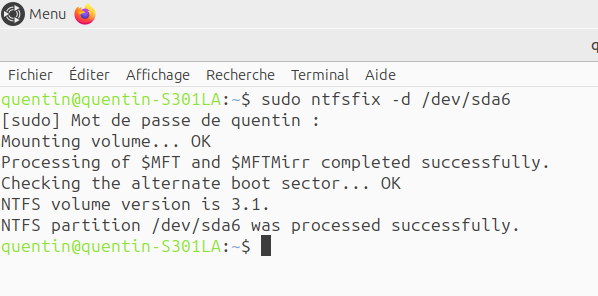
If sudo dmesg says Volume is dirty, you could use a utility, ntfsfix, to clear up the dirty flag.
Need to adjust your partition to 4 or 6. example: sudo ntfsfix -d /dev/sda6
__
make sure you have backups!

1 Like

Hello, it gave that:

1 Like

so the output of blkid is:

quentin@quentin-S301LA:\~$ blkid
/dev/sda8: UUID="f1a54acc-9f39-4298-a7b1-faf7f6f706ae" BLOCK_SIZE="4096" TYPE="ext4" PARTUUID="4317268c-11cb-4f70-9546-4dccb6456540"
/dev/sda6: LABEL="Data" BLOCK_SIZE="512" UUID="76A80FA8A80F6649" TYPE="ntfs" PARTLABEL="Basic data partition" PARTUUID="953be35a-e7dc-4221-a9e9-7bc1cbb11959"
/dev/loop1: BLOCK_SIZE="131072" TYPE="squashfs"
/dev/loop17: BLOCK_SIZE="131072" TYPE="squashfs"
/dev/loop8: BLOCK_SIZE="131072" TYPE="squashfs"
/dev/loop15: BLOCK_SIZE="131072" TYPE="squashfs"
/dev/loop6: BLOCK_SIZE="131072" TYPE="squashfs"
/dev/loop13: BLOCK_SIZE="131072" TYPE="squashfs"
/dev/loop4: BLOCK_SIZE="131072" TYPE="squashfs"
/dev/loop11: BLOCK_SIZE="131072" TYPE="squashfs"
/dev/loop2: BLOCK_SIZE="131072" TYPE="squashfs"
/dev/loop0: BLOCK_SIZE="131072" TYPE="squashfs"
/dev/loop9: BLOCK_SIZE="131072" TYPE="squashfs"
/dev/loop16: BLOCK_SIZE="131072" TYPE="squashfs"
/dev/loop7: BLOCK_SIZE="131072" TYPE="squashfs"
/dev/sda4: LABEL="OS" BLOCK_SIZE="512" UUID="88920DE1920DD51A" TYPE="ntfs" PARTLABEL="Basic data partition" PARTUUID="7a2bcf69-db07-4374-9a0e-88835cb874f2"
/dev/sda2: LABEL="Recovery" BLOCK_SIZE="512" UUID="F8180A99180A5752" TYPE="ntfs" PARTLABEL="Basic data partition" PARTUUID="3e80ab0f-bf50-4f22-8c02-3c22ee1a6bb4"
/dev/sda7: LABEL="Restore" BLOCK_SIZE="512" UUID="B864119F64116204" TYPE="ntfs" PARTLABEL="Basic data partition" PARTUUID="436d9e19-7fb5-4350-864c-86573ec335b2"
/dev/sda5: BLOCK_SIZE="512" UUID="9AD61B52D61B2E4F" TYPE="ntfs" PARTUUID="238e4e28-6944-4f7e-9bf2-3556e4a984ed"
/dev/sda1: LABEL_FATBOOT="SYSTEM" LABEL="SYSTEM" UUID="6A7D-0254" BLOCK_SIZE="512" TYPE="vfat" PARTLABEL="EFI system partition" PARTUUID="775a3156-463a-4f2d-b73f-2536efdda3d9"
/dev/loop14: BLOCK_SIZE="131072" TYPE="squashfs"
/dev/loop5: BLOCK_SIZE="131072" TYPE="squashfs"
/dev/loop12: BLOCK_SIZE="131072" TYPE="squashfs"
/dev/loop3: BLOCK_SIZE="131072" TYPE="squashfs"
/dev/loop10: BLOCK_SIZE="131072" TYPE="squashfs"

And

quentin@quentin-S301LA:\~$ sudo mount -t ntfs-3g /dev/sda6
\[sudo\] Mot de passe de quentin :
mount: /dev/sda6: impossible à trouver dans /etc/fstab.
1 Like

It would be nice if you could format the output of blkid using CODE </> and exclude squashfs

/dev/sda1: LABEL_FATBOOT="SYSTEM" LABEL="SYSTEM" UUID="6A7D-0254" BLOCK_SIZE="512" TYPE="vfat" PARTLABEL="EFI system partition" PARTUUID="775a3156-463a-4f2d-b73f-2536efdda3d9"
/dev/sda2: LABEL="Recovery" BLOCK_SIZE="512" UUID="F8180A99180A5752" TYPE="ntfs" PARTLABEL="Basic data partition" PARTUUID="3e80ab0f-bf50-4f22-8c02-3c22ee1a6bb4"
/dev/sda4: LABEL="OS" BLOCK_SIZE="512" UUID="88920DE1920DD51A" TYPE="ntfs" PARTLABEL="Basic data partition" PARTUUID="7a2bcf69-db07-4374-9a0e-88835cb874f2"
/dev/sda5: BLOCK_SIZE="512" UUID="9AD61B52D61B2E4F" TYPE="ntfs" PARTUUID="238e4e28-6944-4f7e-9bf2-3556e4a984ed"
/dev/sda6: LABEL="Data" BLOCK_SIZE="512" UUID="76A80FA8A80F6649" TYPE="ntfs" PARTLABEL="Basic data partition" PARTUUID="953be35a-e7dc-4221-a9e9-7bc1cbb11959"
/dev/sda7: LABEL="Restore" BLOCK_SIZE="512" UUID="B864119F64116204" TYPE="ntfs" PARTLABEL="Basic data partition" PARTUUID="436d9e19-7fb5-4350-864c-86573ec335b2"
/dev/sda8: UUID="f1a54acc-9f39-4298-a7b1-faf7f6f706ae" BLOCK_SIZE="4096" TYPE="ext4" PARTUUID="4317268c-11cb-4f70-9546-4dccb6456540"

quentin@quentin-S301LA:~$ sudo mount -t ntfs-3g /dev/sda6

where is the mount point?
sudo mount -t ntfs-3g /dev/sda6 /mnt/windows

this assumes you made a dir, /mnt/windows

Also, partition 3 shows as 134 MB, unknown. Any idea what happened?

blkid -o list will give you formatted output.

1 Like