Firefox 142 again lost my bookmarks.
It lost my history, so I have to again look for the site that has earlier versions of Firefox
Luckily I had a bookmarks file backed up.
I want to revert to an earlier version.
Firefox 142 again lost my bookmarks.
It lost my history, so I have to again look for the site that has earlier versions of Firefox
Luckily I had a bookmarks file backed up.
I want to revert to an earlier version.
Going to the "source", the Debian package is available directly from Mozilla at
I don't mean to confuse you, but if you want to get into the larger discussion of avoiding SNAP packages, the following posting is only one of many on the topic, may provide some insights:
I'm not sure that it is "safe" to remove all SNAPs, but that is up to you to decide.
On the topic of Firefox, Thom ( @tkn ) has raised the idea of Librewolf as being a possible better Firefox "clone", which is what I am looking into for myself.
I just started to look at that, and it may take me a while before I decide, so I hope you won't be waiting on me to come back and report on a yea or nea on a possible Librewolf adoption. 
I am trying to revert to version 139.
Firefox has "gone to the dark side"
I have removed all versions of Firefox.
Snaps, etc.
I can not install version 139 it because of Firefox 142.
I think Mozilla is ahead of the curve in comparison to virus writers.
Here is a NON-MOZILLA site that apparently has all the older releases of Firefox Debian bundles:
I found that URL here:
But I also located the Mozilla FTP site for all builds, but the Debian bundle is only available under the en_US directory for each version:
Is it possible that you are not understanding some of my posts because you are a tad bit busy?
I talked to some friends where I volunteer. (Salvation Army)
The first day there, I noticed everyone running around in "fast motion."
(We get excited helping homeless and low income folks.)
I think I said something to a boss lady like, "You might want to take a chill pill."
We are very good friends.
Back to Ubuntu Mate business.
Firefox will not absolutely let me install it.
I love to learn.
P.S. I apologize that I often condense my posts.
Sometimes the pain is very tough.
I once went here.
I ditched Firefox for Brave. It’s a pain to sync it with other devices, but I have zero issues with it.
My response was generic, giving you a path to install ANY version of Firefox you decided to install, not just a single version.
I follow the principle ...
"Give a man a fish ... feed him for a day!
Teach a man how to fish ... feed him for a lifetime!"
I posted at the MozillaZine forum about F.F. not letting me "downgrade" to an earlier non-beta version.
I will wait for a response.
If necessary, I will hook up with an assembly language forum that I used to
frequent.
I recall some assembly programs were about 1/10 the size of a C program.
IF you’re using the Snap version and want to install a specific version number then run this command to get a list of version numbers:
snap list <snap-name> --all
Once you’ve found the version number you want to revert to run this command:
sudo snap revert <snap-name> --revision=<revision-number>
It is critical for me to be able to export bookmarks.
Seamonkey is superior to Firefox in my opinion.
But my bank will not work with it.
Re: I want to revert back to Firefox 139 (Linux)
Post by ditto_z » Today, 8:37 am
linux wont let you, you have to grab the DEB yourself and install it with manual action
https://support.mozilla.org/en-US/kb/in ... inux:fx139for the issue, there exist 3 bugzilla tickets, no further replies from issue invoker.
this issue seems to rare, i have read only once about, you are the second.1988372 - After updating to Firefox 142.0, my entire browsing history was silently overwritten without warning or recovery options, leaving only a hollow 'places.sqlite' file and no restore point, despite years of continuous use.
1985129 - I updated to ver 142 and all my bookmarks are GONE
1984741 - the latest update (8/19/25) made all my bookmarks disappear & won't let me add new onesnot all will fit your issue, but you should respond there to help find the culprit which is unknown.
for your wanted solution - you need to disable updates with a policies file. but 139 has serious issues.
Proudly running: Mozilla/5.0 (Windows NT 10.0; Win64; x64; rv:142.0) Gecko/20100101 Firefox/142.0
I wonder why Ubuntu-Mate Community does not "take" Seamonkey ?
What browsers are accepted here ?
Sorry ... what is UMC ?
If the Debian package installer is fighting you, then maybe do what I did last time, which is to install by compiling the tarball, instead of using a Debian package.
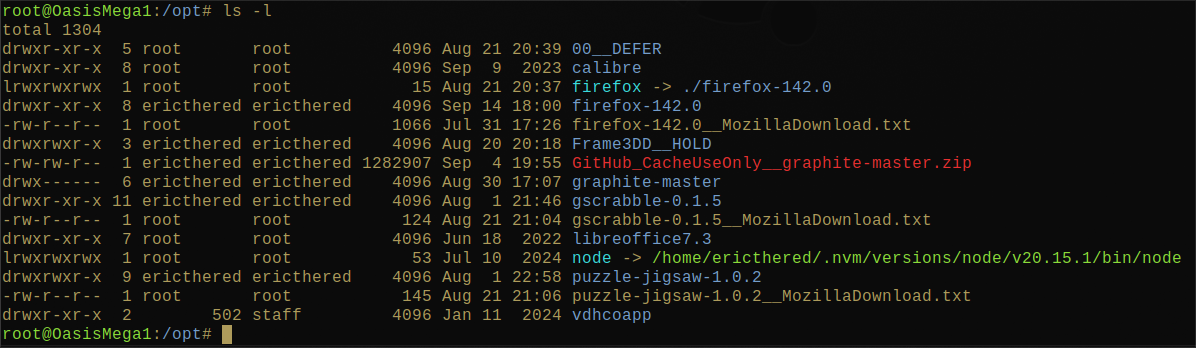
I've installed my latest firefox under "/opt".
[1] Download the tarball from the Mozilla site:
[2] Save your bookmarks and links for the Mozilla reference for each of your plugins.
[3] Un-install (not completely) the Firefox package from your system using your preferred package manager (mine is Synaptic).
[4] Move the tarball to /opt, then extract the contents into a version specific directory, similar to what is displayed below:
NOTE: I have the version number in the name of the application directory. Also, I have a symlink pointing from the generic "firefox" to the specific folder containing the version code. But ... you don't need to have that setup. You can leave the code folder as-is.
[5] Confirm that the binary for Firefox is present and executable inside the application folder (/opt/firefox?).
[6] If you have /opt in your default PATH, before /bin, you are good to go. Otherwise, you need to
rm -vf /bin/firefox
ln -s /opt/firefox/firefox /bin/firefox
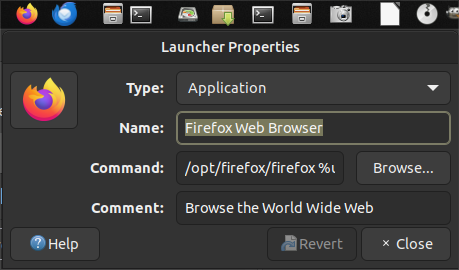
[7] Check that your launcher is actually pointing to "/bin/firefox" in the Command box:
(In my case, I removed the /bin/firefox and added /opt to my PATH. )
I fixed my post. I am very tired.
I've added a lot of details in my previous posting.
I know nothing about Seamonkey; only that it is an early product from Mozilla.
MozillaZine said that version had a lot of bugs.
Maybe the guys and gals running this establishment will have mercy and change things so I can use Seamonkey.
I'm confused! I thought you said that you had 139 and that you were happy with it ... i.e. no problems.
Why is someone telling you that there are problems?
Is it an earlier version version of 139 which you had?
Do your backups have that older version to examine the files that were installed back then?
The full set of releases are available on the "ftp" server at
Maybe try different ones, starting with the most recent, then work your way back to the one that worked for you:
From what I can tell, the most recent version is 139.0.4
My friend Eric.
Firefox 142 will NOT let me install an earlier version.
So you and the developers can help me by making it so I can use Seamonkey on this site.
Did that make sense?
Sorry, I don't mean to be obtuse, but can you please explain what you mean by "will NOT let me install"?
I had 139 installed myself for a long time!
If you unbundled that 139.04 version under /opt and run the command directly using the full path "/opt/firefox/firefox", will it work?
Also,
Is Firefox 142 still installed on the machine?
Is your ~/.mozilla/firefox still where you always had it, and not moved to something else?
I agree I run Waterfox installed from a tarball in opt. You could do that with Seamonkey or Firefox.
The Ubuntuzilla version of Seamonkey can also be installed from their repository.
You can run all three Firefox, Firefox ESR and Seamonkey if you want. They all have separate profiles from Ubuntuzilla. I have used Ubuntuzilla for about a decade with no issues. It lets me avoid snaps too.
Thanks.
I am installing Waterfox.