I am not sure if anyone else has had the problem of not being able to find a setting in the control center or anywhere to switch your indicator clock on your panel between 12h and 24h format, but I have found a solution. If you were struggling like I was all you have to do is open up your terminal and type in gsettings set org.ayatana.indicator.datetime time-format '24-hour' or gsettings set org.ayatana.indicator.datetime time-format '12-hour' depending on how you are trying to set it. I spent more time than necessary digging through the schemas and whatnot with gsettings given that I am from Michigan and I only go by 24 hour format because I like it! I hope maybe this saves someone else some time!
2 Likes
Hi Tyler,
Thanks for your input, it's appreciated 
Did you know that there is also a graphical frontend to edit these values ? It's called dconf-editor and it looks like this:
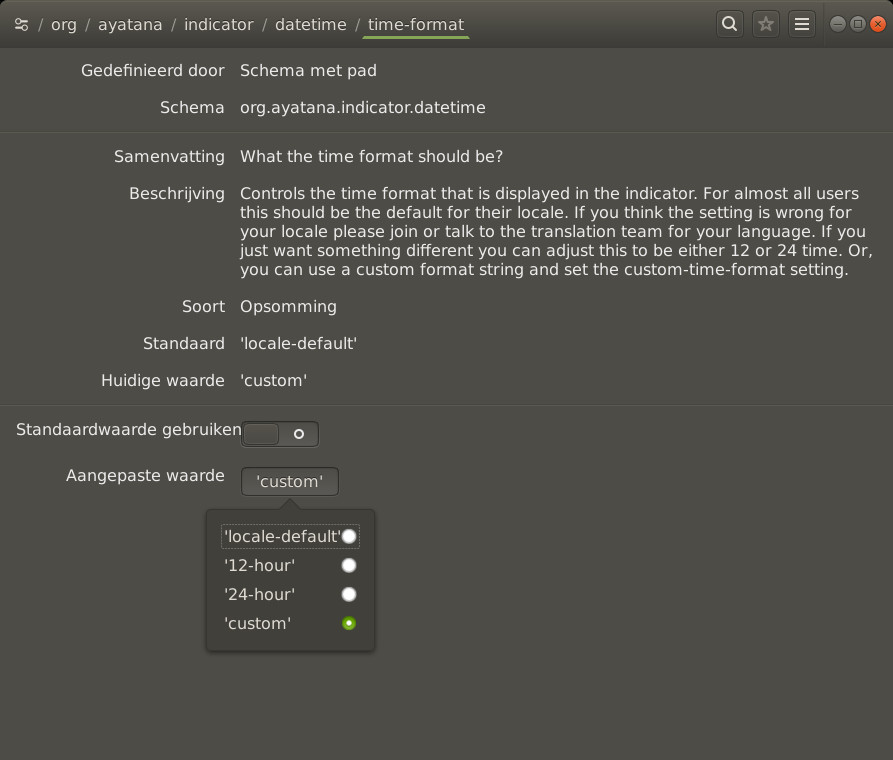
2 Likes
Hi, @tkeeeezy and welcome to the Ubuntu MATE Community!
Tkeeezy
You can find the dconf-editor in Software and install.
What TKN refers to here is simple.
But some other ways to use dconf-editorneed one to be careful. Easy to screw up if one doesn’t really what is to be done. Just elementary prudence.
W
2 Likes