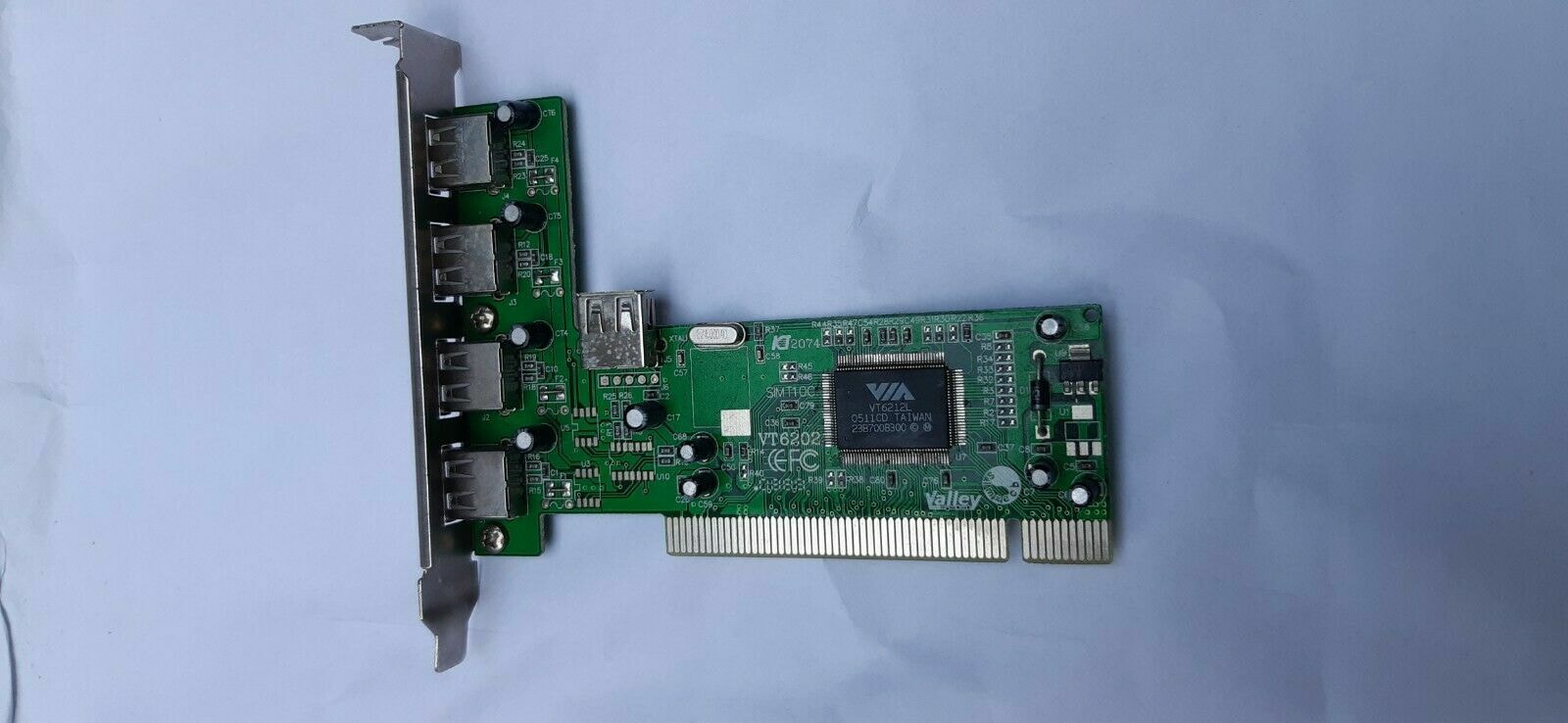
To be 100% clear - my mainboard is pre-usb3 & I neither need nor desire it.
What I did want is to reuse a pci usb2 card to add more ports - so I installed it & upon restarting…nothing - it remains unrecognized & inactive.
I have a couple of these & they seem identical except that 1 is marked with the Rosewill brand & the other is unmarked - the chip on both is a Via VT6212L.
Is there something I can do to get this working, please ??
Regarding PCI - in the 2nd PCI slot is a parallel port card which works just fine - therefore & since I see no setting for those slots in CMOS settings, the slot must be active, yes ??
02:05.0 USB controller: VIA Technologies, Inc. USB 2.0 (rev 62) 02:05.1 Unassigned class [ffff]: VIA Technologies, Inc. VT82xx/62xx UHCI USB 1.1 Controller (rev 62) 02:05.2 USB controller: Duet Technologies Device 3104 (rev 62) 02:05.3 Unassigned class [ffff]: Duet Technologies Device 3038 (rev ff)
From sudo dmidecode -t slot:
dmidecode 3.1

Getting SMBIOS data from sysfs.
SMBIOS 2.7 present.
MB is Biostar TA970 .
As to the slot & card used - yes - I carefully made sure all was spotless & dust free - and though it may be misunderstood by me, I see that lspci shows VT62xx which seems like it is there…somehow ??
Perhaps worthy of note is that the MB’s USB does function.
Quite possible the rosewill card is not supported, there is no driver for it, it assigns a generic FFFF address. This m/b shows 6 usb2 (black) and 2 usb3 (blue), you need more?
Reading just the firmware of a card (VT62xx) does not mean it works.
My living space is like that of an RV - very tight, full & cramped - so getting at the back of the PC to connect things is a big nuisance.
I gave up on USB3 after seeing that some things (like even USB sticks…) worked & many did not.
Thus, my goal has been to connect & use this device:
So thus far I just used the only working USB pin header on the MB & got it working OK.
What I’d really prefer is to find & get a USB2 card very much like the ones I’ve got, but that works under Linux - which seems unlikely at this late date.
I looked up an image of the m/b, at the bottom there are two usb connectors, F_USB1 and F_USB2, then PANEL1. So you could connect what you posted, either on USB1 or USB2.
If you have unused slots (5.25) in your case, this looks good but I cannot verify that it works under Linux. Most PCI cards work but since I don't have the exact h/w I cannot 100%.
Did you try to swap the parallel card with the Rosewill card and see if it works? that way we know if the rosewill card is bad.
I have that exact device installed & working, connected via F_USB1 - F_USB2 seems dead, so I wanted a PCI USB2 card in case F_USB1 also goes dead - wanting to use this MB as long as humanly possible.
As of this minute it looks like I should just give up on this quest & resign myself to an eventual MB change.
When I still lived in an apartment with much more space, I always had a 2nd display & enough room etc. to set up a 2nd PC to work on - but those days are gone.
To enable F_USB2 (front panel USB) or general USB headers on a Biostar motherboard, enter the BIOS by pressing Delete during POST, navigate to Advanced > USB Configuration, and ensure all USB controllers and Legacy USB Support are enabled. Save and exit (F10).
Troubleshooting USB Power/Functionality:
USB Wakeup: To enable USB devices to wake the system, go to Advanced > Power Configuration and set USB Wakeup From S3/S4 to Enabled.
Power Issue: If USB ports do not work, ensure EuP/ErP is disabled in the BIOS, as this cuts power to USB ports during shutdown.
Fast Startup: Disable Fast Startup in Windows 10/11 Power Options if USB devices fail to initialize.
I’ve used ONLY this model of MB for myself & my clients since it came out with great results.
Please don’t bother yourself digging for more info to help me with this !?!
I’ve got several powered USB hubs & a whole, identical PC in storage someplace - what I DO NOT have here is space - every square inch of this 72 INCH wide room is in use & full so I have ZERO place for a table to work on things.
My goal here was to use the 7-port front panel device via a PCI (not pcie) USB2 card, but search results INSIST upon USB3 pcie cards since USB2 is ‘old hat’.
you could swap the plug that goes to F_USB1 and connect it to F_USB2. If your case ports still work, that means F_USB2 works.
It is unlikely that Biostar made a m/b TX970 with USB1 and USB2 but did nothing to the bios to enable/disable those ports.
The other test discussed here was to swap the parallel card with the Rosewill card to see if it works. We know the parallel card works on PCI slot 1. Move the parallel card to PCI slot 2. Does it still work? that means both PCI slots work so probably the rosewill card does not.
OK - we’ve gone into the realm of absurdity here !!
So=>
Yes, I swapped around F_USB1 & F_USB2 MULTIPLE TIMES. The case ports ONLY worked with F_USB1 PERIOD.
If you DO NOT have & use the Biostar TA970 mainboards YOURSELF, then how can you claim to be familiar with it ?!? (I have several as well as my clients getting them from me.)
Yes I swapped the parallel card with the Rosewill card & the parallel card works in BOTH PCI slots.
I marked this thread solved AND asked for you to stop replying Pavlos_kairis - please stop this now.