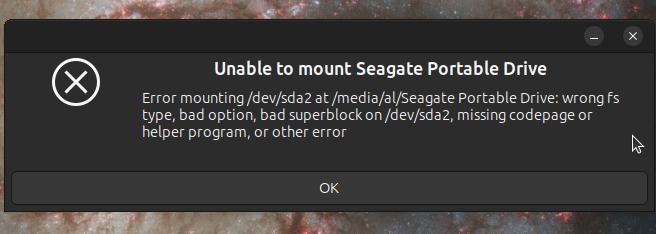
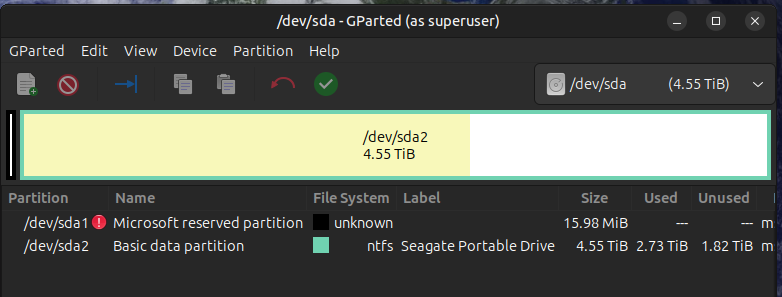
After transferring some files on my Seagate One Touch I remove drive on the right click on the mouse and it did not unmount soon enough and I unplugged it. I got a message saying something about not able to unmount the drive and I shut my computer off. I try to mount It And I get this messge
Error mounting /dev/sda2 at /media/al/Seagate portable drive:wrong fs type, bad option, bad superblock on /dev/sda2, missing codepage or helper program, or other error
Is there anything I can do to fix this problem? I’m not experienced with the command line. Thanks in advanced
When doing an unmount, you MUST wait for it to complete normally, because it may still be doing disk writes in the background.
If it wasn't finished "fast enough", the last thing you should do is to turn off the computer! The writing process that was likely happening was probably "interrupted" by loss of power, thereby creating potential corruption.
For future situations, the best thing to make sure that all writing actions are complete, including journaling, be sure to enter a sync at the command prompt.
For your Seagate drive, I don't have enough experience with that specific hardware to say what likelihood of success you might have with attempting the only option I think you have left:
attempt repair with the appropriate fsck tool, specifically suited to the filesystem type of your Seagate partition
Just make darn sure that you correctly identify the required tool, then don't let auto-determination happen, use the specific one directly from those that are available:
fsck.cramfs (8)      - fsck compressed ROM file system
fsck.exfat (8)       - check an exFAT file system
fsck.ext2 (8)        - check a Linux ext2/ext3/ext4 file system
fsck.ext3 (8)        - check a Linux ext2/ext3/ext4 file system
fsck.ext4 (8)        - check a Linux ext2/ext3/ext4 file system
fsck.fat (8)         - check and repair MS-DOS FAT filesystems
fsck.jfs (8)         - initiate replay of the JFS transaction log, and check and repair a JFS formatted device
fsck.minix (8)       - check consistency of Minix filesystem
fsck.msdos (8)       - check and repair MS-DOS FAT filesystems
fsck.reiser4 (8)     - the program for checking and repairing reiser4 filesystem.
fsck.reiserfs (8)    - The checking tool for the ReiserFS filesystem.
fsck.vfat (8)        - check and repair MS-DOS FAT filesystems
fsck.xfs (8)         - do nothing, successfully
Other than that, I don't know if any of the "disk repair" tools intended for recovering a "broken" OS might have tools specific to repairing a data-only drive.
connect the seagate drive via usb, start Disks app, under the partitions, select additional partitions options (icon is two gears), then select repair filesystem. It MAY work.
It happened to me long ago, and this is what fixed it for me:
Although I must say, at least in my case, it seems to be fixed because the error message doesn’t show up anymore; but when I plug in the disk into a newly installed system (both Xubuntu and Ubuntu MATE) the error message shows up again and I’ve got to apply the fix again and it’s all good.
A few days ago I plugged the disk in to a new Linux Mint install, and it works right away, no error message.
I used fsck and it said ntfs not found on the drive. According to disks it has ntfs file system and what I have tried in the Foss article it seems that fsck can’t repair ntfs. Am i right to assume that?
There is ntfsfix for ntfs drives. Make sure you have multiple backups ( I keep 4)
Also, it would help if the OP was, I has a Seagate usb drive, formatted ntfs, which I use with both Windows and Linux. I pulled the usb plug before the backup finished, can I fix the drive?
If my earlier post fixed it, mark it as solution (for others).
al@al-ThinkPad-T16-Gen-2:~$ sudo fsck /dev/sda2
[sudo: authenticate] Password:
fsck from util-linux 2.41
Mounting volume... OK
Processing of $MFT and $MFTMirr completed successfully.
Checking the alternate boot sector... OK
NTFS volume version is 3.1.
NTFS partition /dev/sda2 was processed successfully
ran ntfsfix
al@al-ThinkPad-T16-Gen-2:~$ sudo ntfsfix /dev/sda2
Mounting volume... OK
Processing of $MFT and $MFTMirr completed successfully.
Checking the alternate boot sector... OK
NTFS volume version is 3.1.
NTFS partition /dev/sda2 was processed successfully.
Either gparted (GUI) or parted will work but ... here's my test: I have a win10 usb drive.
I plug it in to a linuxmint and it mounts it w/o issue. I plug the same drive to um24 and it fails with the error Al posted. um24 reports there is a 'dirty' bit and force is not set. I don't know much about windows. Maybe Mint has a different automount thing.
sudo fsck /dev/sda should work but make sure /dev/sda is NOT mounted.
The NTFS file format standard is proprietary and it isn't fully documented. This means that the Linux NTFS module is always going to have problems.
al@al-ThinkPad-T16-Gen-2:~$ sudo ntfsfix /dev/sda1
Mounting volume... NTFS signature is missing.
FAILED
Attempting to correct errors... NTFS signature is missing.
FAILED
Failed to startup volume: Invalid argument
NTFS signature is missing.
Trying the alternate boot sector
Unrecoverable error
Volume is corrupt. You should run chkdsk.
chkdsk, isn’t that a Windows program? In Gparted, couldn’t I format sda1 to ntfs?
If you don't care about the data already on that drive, you should go ahead and perform the following:
use gparted to create a new msdos Partition Table on that device (verify that it is indeed /dev/sda based on the reported partitions and sizes),
and
again using gparted, create the "ntfs" partition.
If you have no plans to share that with a Windows box, it might be best to go with either "ext3" or "ext4" partition, depending on whether you are doing "serving" (ext4 for highly dynamic) or just "data backup" (ext3 for relatively static).
If you do need to preserve the /dev/sda2 partition, then your safest route is indeed to perform chkdskfrom a Windows box.
I’d loose the data on the drive i I.d format the sda1 15.89 MiB partition? I don’t want to do that. I’ll wait till I get home over the weekend and use my wife’s windows computer and try chkdsk
So, Pavlos, do you leave your USB drives permanently attached to the NAS, thereby only having to deal with the issue the first time the drive is plugged, and isolating that issue from the network-based users accessing the drive thru that NAS gateway?
I dont use usb drives since my NAS has plenty of room to save files, backups, iso's, etc. And the NAS is backed up to 2-3 other servers. Have as many backup points as you can.
I have share points created, [public] and [test].
From linux I can r/w to //nas/public From windows \\nas\public
The issue, let's say you make a drive ntfs from linux, you are able to r/w. Then you connect it to windows, windows r/w via ntfs. You bring back the drive to Linux, bad fs type.
Windows ntfs is proprietary, if the usb drive or volume is unexpectedly disconnected, a 'dirty' bit is set to indicate inconsistency. On Windows, CHKDSK fixes that. On linux, ntfsfix (in ntfs-3g pkg) but it does not always work.
it did work for me on a basic 2GB usb memory disk, but I just got the same problem on a 1To storage disk(Toshiba) with loads of data I don’t want to lose and unfortunately not saved elsewhere. Do you think it would work? apart from losing all data what are the risks?
I suggest use Windows for ntfs data. If you need to use same data with linux, configure samba so you can share data. Using Linux ntfs may/not work. And please make backups, lots of them.
Using Disks or ntfsfix will not lose your data, they are trying to fix the partition table. It is like someone removed all the Chapter X pages in a book and trying to recreate chapter pages.
I got home (Truck driver) With my wife’s Windows computer ran chkdsk on my Seagate backup. Didn’t find any errors. Plugged it into my laptop and it works again. Thank you everyone for the help!