Have trouble to see if my chip supported ftdi checked there wesite have ubuntu 24.04.3 lts with linux kernel 14.0.37 have lots of other pgms for ham up jut cant get FT8 working had usb port 3 with windows. Martin NV5D allen,tx
1 Like
when you plug in an ftdi chip, lsusb should list it.
You can also try sudo dmesg which will tell you the port it connected (/dev/ttyUSB0)
ftdi chips are used to program ESP32 controllers.
1 Like
Hi, @Martin and welcome to the Ubuntu MATE Community!
Thanks here are the resultssudo: lsub: command not found
dell@dell-Latitude-7490:~$ lsub
Command 'lsub' not found, did you mean:
command 'lsusb' from deb usbutils (1:017-1)
command 'qsub' from deb gridengine-client (8.1.9+dfsg-11)
command 'qsub' from deb slurm-wlm-torque (23.02.6-1ubuntu2)
Try: sudo apt install
dell@dell-Latitude-7490:~$ sudo apt install FTDI
Reading package lists... Done
Building dependency tree... Done
Reading state information... Done
E: Unable to locate package FTDI
dell@dell-Latitude-7490:~$
the command is lsusb
l s u s b (el-es- you-es-be) list usb devices
there is a similar lspci to list pci devices
2 Likes
I looked up wsjt-x, I got 2.7.0 from this page, WSJT-X User Guide section 3.2
I looked up TS480 ... The Kenwood TS-480 series (TS-480SAT & TS-480HX) are popular, compact HF/50MHz all-mode amateur (ham) radio transceivers
An FDTI cable connects USB to serial port so that commands can be sent/received.
I'm not a Ham Radio Op; others in the know can help.
1 Like
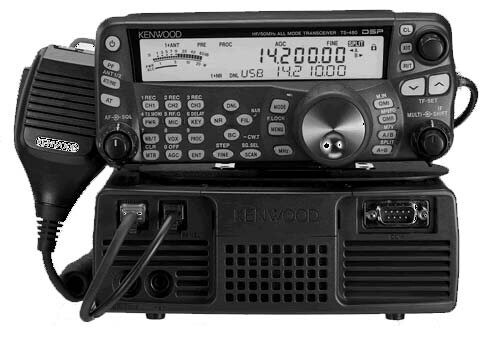
this is the Kenwood TS 480, it looks like the back panel has an RS-232 port to interface with the pc and some software, probably wsjtx. In that software you configure the serial port to talk to COM1, or COM5 or ...
2 Likes
Pavlos thanks for the help
dell@dell-Latitude-7490:~$ lsusb
Bus 001 Device 001: ID 1d6b:0002 Linux Foundation 2.0 root hub
Bus 001 Device 002: ID 0424:2513 Microchip Technology, Inc. (formerly SMSC) 2.0 Hub
Bus 001 Device 003: ID 1bcf:2b96 Sunplus Innovation Technology Inc. Integrated_Webcam_HD
Bus 001 Device 004: ID 0d8c:0012 C-Media Electronics, Inc. USB Audio Device
Bus 001 Device 005: ID 8087:0a2b Intel Corp. Bluetooth wireless interface
Bus 001 Device 006: ID 0403:6001 Future Technology Devices International, Ltd FT232 Serial (UART) IC
Bus 001 Device 007: ID 0a5c:5834 Broadcom Corp. 5880
Bus 002 Device 001: ID 1d6b:0003 Linux Foundation 3.0 root hub
dell@dell-Latitude-7490:~$
found chip and address tty/USB0
now seems that hamlib is old and does not have my radio. As you can tell not very good at command line yet this is what I get when trying to connect radio to wsjtx
Hamlib error: rig_token_lookup called for no_xchg
rig_confparam_lookup called for no_xchg
1:rig.c(817):rig_open entered
rig_settings_get_path: path=/home/dell/.config/hamlib_settings
rig_settings_load_all: settings_file (/home/dell/.config/hamlib_settings): No such file or directory
rig_open: cwd=/home/dell
rig_open: /home/dell/hamlib_settings does not exist
rig_open: async_data_enable=1, async_data_supported=0
serial_open: /dev/ttyUSB0
serial_open(229): open failed#1
serial_open(229): open failed#2
serial_open(229): open failed#3
serial_open(229): open failed#4
serial_open: Unable to open /dev/ttyUSB0 - No such file or directory
port_open: serial_open(/dev/ttyUSB0) status=-6, err=No such file or directory
rig_open: rs->comm_state==0?=0
1:rig.c(1023):rig_open returning(-6) IO error
IO error
IO error
while opening connection to rig
1 Like
you need to add your username to the dialout group
before: tell me the output of id
sudo adduser martin dialout
logout, login,
after: tell me the output of id
you should have 20(dialout) in the list
_
in my um24.04 (my username is user)
before: uid=1000(user) gid=1000(user) groups=1000(user),4(adm),24(cdrom),27(sudo),30(dip),46(plugdev),121(lpadmin),136(lxd),137(sambashare)
after: uid=1000(user) gid=1000(user) groups=1000(user),4(adm),20(dialout),24(cdrom),27(sudo),30(dip),46(plugdev),121(lpadmin),136(lxd),137(sambashare)
1 Like
out of id before
dell@dell-Latitude-7490:~$ id
uid=1000(dell) gid=1000(dell) groups=1000(dell),4(adm),24(cdrom),27(sudo),30(dip),46(plugdev),100(users),114(lpadmin
out after
dell@dell-Latitude-7490:~$ id
uid=1000(dell) gid=1000(dell) groups=1000(dell),4(adm),24(cdrom),27(sudo),30(dip),46(plugdev),100(users),114(lpadmin)
dell@dell-Latitude-7490:~$ ^C
dell@dell-Latitude-7490:~$ sudo adduser martin dialout
[sudo] password for dell:
fatal: The user `martin' does not exist.
dell@dell-Latitude-7490:~$ logout,login
logout,login: command not found
dell@dell-Latitude-7490:~$
dell@dell-Latitude-7490:~$ id
uid=1000(dell) gid=1000(dell) groups=1000(dell),4(adm),24(cdrom),27(sudo),30(dip),46(plugdev),100(users),114(lpadmin)
dell@dell-Latitude-7490:~$
1 Like
your username is dell, not martin. I used martin as an example.
sudo adduser dell dialout
logout, login
id
1 Like
found this, it may help you. https://www.qsl.net/n9lmv/
1 Like
Thanks for the help did not get far using del for name I have thought of trying to use wine have several books so plenty of work left for me to do. Got most ham programs to work so was surprised at how difficult wsjtx was to get up, visited several ham communities and all have similar poroblems. Have great New Year
1 Like