My terminal settings include thousand lines scrolling buffer. And clear and <ctrl>-l actually clear only visible part of of this buffer, i.e. terminal height lines. That is why I use terminal menu Terminal > Reset and clear option.
4 Likes
Just got used to it, but I guess I'll use that more often now 
3 Likes
I often use clear in conjunction with another command (e.g., clear;eza --long --header) so I accomplish a clear screen before the output of the subsequent command.
Also, I use xrdp to connect my Mac to my MATE server, and keyboard mappings don't always translate the expected way.
4 Likes
204 ls
112 cd
67 seek
50 sudo
44 mkdir
44 7z
26 strings
23 mv
20 whereis
20 df
seek is a bash script that recursively searches for directories and files using any substring of names, and reports the results as full paths relative to the current directory. I like it a lot.
#!/bin/bash
#echo "$1"
tree -a -i -f | grep -i --color=always "$1" | less -R
1 Like
Well, we can still fix it. Somethink like: “Script by Matherus Richard.”?
My top ten commands ...
... as 'root' (.bash_history of 25636 lines):
5085 ls
2666 cd
2537 sync
2046 gvim
1225 .
1213 man
632 Admin.sh
527 more
444 cp
383 grep
... as my regular user (.bash_history of 7487 lines):
1752 ls
652 sync
618 cd
607 gvim
385 .
237 vi
199 mv
172 rm
137 more
133 man
As you can see from above, I spend most of my terminal time as root, not my regular user.
I understand, and appreciate, the intent/function of sudo. I just don't like using it myself. 
You must all be wondering why, unlike others, I have the . in my top ten, as both root and basic user. The answer is that I create scripts that have a short-term intent or purpose, and want to keep those around (with the .sh suffix as identifier) but do not want to leave them lying around with execution privileges. This is to prevent accidentally triggering a PATH-precedence conflict as to which version of a script might be executed (if more than one instance resulting from re-use of a temporary but meaningful filename).
It is also a security measure, seeing that I wear the 'root suit' most of the time. Habits of discipline!
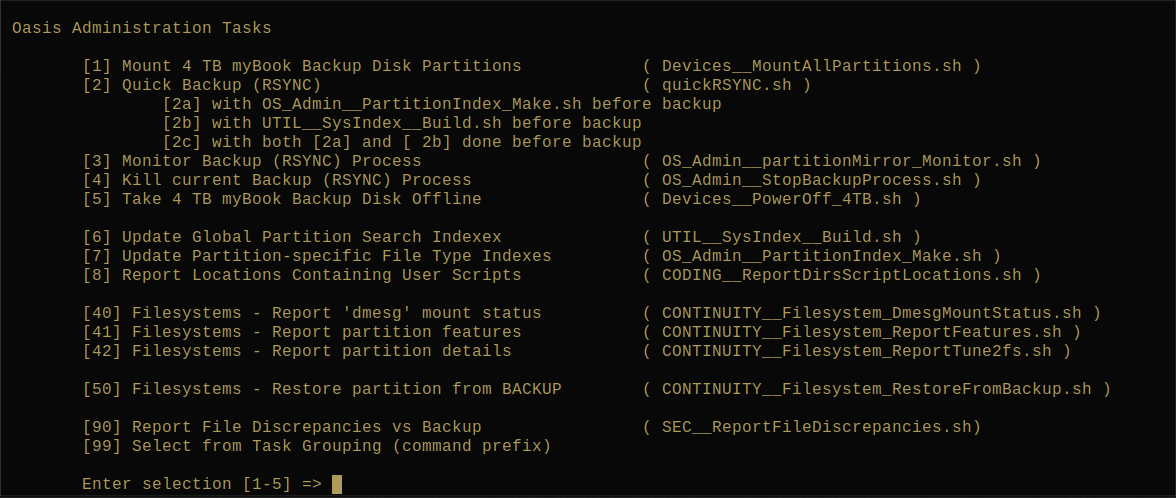
For those who are wondering, the following is a snapshot of my terminal session showing the menu that comes up when I run the Admin.sh script:
2 Likes
Old, can’t remember much and a poor typist and proof reader, but here they are, don’t laugh:
42 sudo
10 pkill
2 pkil (spelled pkill wrong)
2 ls (no idea what the command is, probably read it somewhere and tried it)
2 iftop (no idea what the command is, probably read it somewhere and tried it)
2 cd (installing my printer)
1 su
1 reboot
1 lsblk (no idea what the command is, probably read it somewhere and tried it)
1 ****** (accidentally put my password in the wrong place in the terminal)
Yet I love and use Linux. Anyone that says they can’t just isn’t trying.
4 Likes
Especially true is your comment:
1 Like