Stephen ( @GeekBone ) indicated a location of
~/.conky/gotham
I hate to contradict anyone, but on my system (UM 22.04), that configuration directory is located at
~/.config/conky/
I believe that is where you should drop the "gotham" file.
Also, for conky to recognize the specification, that file should be named
conky.conf
However, I have multiple "attempts" of that stored as different files, so to switch from one to the other, I use a symbolic link to point to the "active" file:
ericthered@OasisMega1:~/.config/conky$ ls -l
total 288
drwxr-xr-x 3 ericthered ericthered   4096 Jan 11  2025 CONF__Harvested
lrwxrwxrwx 1 ericthered ericthered     51 Jan 10  2025 conky.conf -> ./conky.conf.TEST5__Modernized__conky.rc__ZeissIcon
lrwxrwxrwx 1 ericthered ericthered     35 Jan 14  2025 conky.conf20 -> ./conky.conf.TEST20__MineHorizontal
-rw-r--r-- 1 ericthered ericthered   2335 Jan  9  2025 conky.conf.DISTRO
-rw-r--r-- 1 ericthered ericthered   2337 Jan  9  2025 conky.conf.TEST1__distro
-rw-rw-r-- 1 ericthered ericthered   7770 Jan 15  2025 conky.conf.TEST20__MineHorizontal
-rw-rw-r-- 1 ericthered ericthered   9391 Jan 10  2025 conky.conf.TEST2__conky_Gist_slinkyvagabond__YPBConky.rc
-rw-rw-r-- 1 ericthered ericthered   6668 Jan 10  2025 conky.conf.TEST3__conky_Reddit__DeCo59__conky.rc
-rw-rw-r-- 1 ericthered ericthered   6044 Jan 10  2025 conky.conf.TEST4__conky.rc__ZeissIcon
-rw-rw-r-- 1 ericthered ericthered   7499 Jan 15  2025 conky.conf.TEST5__Modernized__conky.rc__ZeissIcon
-rw-rw-r-- 1 ericthered ericthered   7118 Jan 13  2025 conky.conf.TEST6__Garuda_MrDhobbs
-rw-rw-r-- 1 ericthered ericthered 100081 Jan 13  2025 conky.conf.TEST6__Garuda_MrDhobbs.jpeg
-rw-r--r-- 1 ericthered ericthered   2337 Jan  9  2025 conky.conf.WORK
-rw-rw-r-- 1 ericthered ericthered  23205 Jan 13  2025 conky_Garuda__Yamato_conky.conf
-rw-rw-r-- 1 ericthered ericthered  11102 Jan 13  2025 conky_Garuda__Yamato_conky.conf_clockRings
-rw-rw-r-- 1 ericthered ericthered   7669 Jan 13  2025 conky_Garuda__Yamato_conky.conf_mediaPlayer
-rwxr-x--- 1 ericthered ericthered     19 Jan 11  2025 conkyIp
-rwxr-x--- 1 ericthered ericthered     19 Jan 11  2025 conkyIpHOLD.txt
-rw-rw-r-- 1 ericthered ericthered   4861 Jan 13  2025 conky_Manjaro__rabcor_conky.conf
-rw-rw-r-- 1 ericthered ericthered  15535 Jan 13  2025 conky_Manjaro__rabcor_seamod_rings.lua
-rwxr-x--- 1 ericthered ericthered    424 Jan 11  2025 myConky.sh
-rw-rw-r-- 1 ericthered ericthered  16927 Jan 10  2025 wttr.in__Weather_Ottawa.png
-rw-rw-r-- 1 ericthered ericthered  17125 Jan 10  2025 wttr.png
ericthered@OasisMega1:~/.config/conky$
The script I use to start conky is the following:
(EDIT: Note the script has been updated for an option to choose from a number of pre-programmed defined behaviour definitions, which I will call "panels", which can be placed at different locations on the screen. It allows one option for, again pre-programmed, choosing a multiple-panel behaviour.  )
)
(EDIT 2: I had forgotten to add a default value for "mode" when I added my last changes. Sorry for the oversight! That is now fixed. )
#!/bin/sh

####################################################################################################
###
###	Script to manage conky reporting display.
###	The script will kill any running instance of 'conky',
###	then restart unless the '--off' option is used at script execution.
###
###	To start conky:
###		$ myConky.sh
###
###	To stop conky
###		$ myConky.sh --off
###
###	To run conky such that it reports extra messaging in you startup terminal
###		$ myConky.sh --debug
###
###	To run force a prompt with a "panel" selection prompt, enter
###		$ myConky.sh --choices
###
####################################################################################################

option0()
{
	config="${configDir}/conky.conf.TEST5__Modernized__conky.rc__ZeissIcon"
	eval conky -c "${config}" ${debug} &
}

option1()
{
	#config="${configDir}/Gotham_Geekbone__conky.rc"
	config="${configDir}/Gotham.conkyrc"
	eval conky -c "${config}" ${debug} &
}

chooseAlternateConfig()
{
	doLoop=1
	while [ ${doLoop} -eq 1 ]
	do
		echo "\n Choose an alternative Conky behaviour\n
	[0]	Default (global system reporting)
	[1]	Geekbone's clock\n
	[9]	Dual panel - [0] & [1]\n
	Enter selection => \c" ; read mode <&2

	test -n "$(echo "${mode}" | grep -v '[2-8]' )" && {
		doLoop=0 ; } || {
		echo "\n Invalid selection entered.  Please limit responses to one of [0|1|9] ..." ;
	}
	done
} #chooseAlternateConfig()

####################################################################################################


#pid="dum"
debug=">>/dev/null"
doExit=0
doSelect=0
configDir="/home/ericthered/.config/conky"
config="${configDir}/conky.conf.TEST5__Modernized__conky.rc__ZeissIcon"
mode=0

while [ $# -gt 0 ]
do
	case "$1" in
		"--debug" ) debug="" ; shift ;;
		"--off" ) doExit=1 ; shift ;;
		"--choices" ) doSelect=1 ; shift ;;
	esac
done

if [ ${doSelect} -eq 1 ]
then
	chooseAlternateConfig
fi

while [ true ]
do
	pid=$(ps -ef | grep conky | awk '{ if( $8 == "conky" ){ print $2 ; } ; }' | head -1 )
	test -n "${pid}" || { break ; }
	echo ${pid}
	test -n "${pid}" && { kill -9 ${pid} ; }
done

test ${doExit} -eq 1 && { exit ; }

case "${mode}" in
	0 )	option0 ;;
	1 )	option1 ;;
	9 )	option0 ; option1 ;;
esac
One thing you need to keep in mind is that a lot of the component "placement" is "referential", meaning relative to other components. That can be tricky, which is why it usually takes time to "tweak" it to what any individual wants. It is a grind, but it is worth it, once you're done!
My current conky configuration gives me the following look:
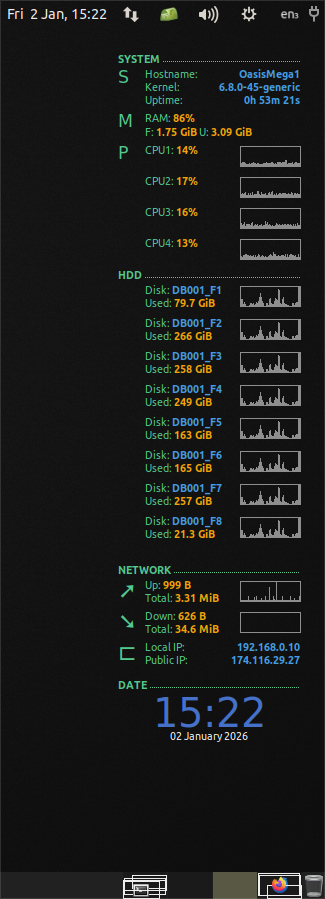
Forgot to add the conky config file for my running version:
conky.config = {
background = true,
update_interval = 3,
total_run_times = 0,
net_avg_samples = 1,
cpu_avg_samples = 1,
if_up_strictness = 'link',
imlib_cache_size = 0,
double_buffer = true,
no_buffers = true,
format_human_readable,

use_xft = true,
xftfont = 'Ubuntu:size=8',
font = 'Ubuntu:size=8',
font1 = 'Ubuntu:size=8',
font2 = 'Ubuntu:bold:size=8',
font3 = 'Poky:size=13',
font4 = 'Arial Black:size=28',
font5 = 'Ubuntu:size=7',
font6 = 'Webdings:size=17',
font7 = 'Webdings:size=16',
font8 = 'Wingdings:size=20',
font9 = 'Poky:bold:size=13',
override_utf8_locale = true,
text_buffer_size = 2048,

own_window = true,
own_window_type = 'desktop',
own_window_argb_visual = true,
own_window_transparent = true,
own_window_hints = 'undecorated,below,sticky,skip_taskbar,skip_pager',
alignment = 'top_right',
gap_x = 25,
gap_y = 40,
minimum_size = "200 600",
maximum_width = 200,
default_bar_size = "60 8",

draw_shades = false,
default_color = '4FCF8F',
color0 = 'white',
color1 = 'orange',
color2 = 'yellow',
color3 = '3F6FCF',
color4 = '3F9FEF',
color7 = '8F8F8F',
color8 = 'BFBF6F',
color9 = 'AF8FBF',

};

conky.text = [[

##############
# - SYSTEM - #
##############
${font2}SYSTEM $stippled_hr${font1}
${voffset 0}${offset 0}${color}${font3}S
${goto 32}${voffset -27}${font1}${color}Hostname: ${alignr}${font2}${color4}${nodename}
${goto 32}${font1}${color}Kernel: ${alignr}${font2}${color4}${kernel}
${goto 32}${font1}${color}Uptime: ${alignr}${font2}${color4}${uptime}
# |--MEM
${voffset 3}${offset 0}${color}${font3}M
${goto 32}${voffset -27}${font1}${color}RAM: ${font2}${color1}$memperc%
${goto 32}${voffset 1}${offset 0}${font1}${color}F: ${font2}${color1}${memeasyfree}${color}${font1} U: ${font2}${color1}${mem}
# |--CPU	#${goto 32}CPU1: ${font2}${color1}${cpu cpu1}%${color}${font1} ${alignr}${color0}${cpugraph cpu1 20,60 77507B 5C3566}${color}
${voffset 3}${offset 0}${color}${font3}P
${goto 32}${voffset -27}${offset 0}${font1}${color}CPU1: ${font2}${color1}${cpu cpu1}%${color} ${voffset -2}${alignr}${color7}${cpugraph cpu1 20,60 ${color8} ${color9}}
${goto 32}${font1}${color}CPU2: ${font2}${color1}${cpu cpu2}%${color} ${voffset -2}${alignr}${color7}${cpugraph cpu2 20,60 ${color8} 5C3566}
${goto 32}${font1}${color}CPU3: ${font2}${color1}${cpu cpu3}%${color} ${voffset -2}${alignr}${color7}${cpugraph cpu3 20,60 ${color8} 5C3566}
${goto 32}${font1}${color}CPU4: ${font2}${color1}${cpu cpu4}%${color} ${voffset -2}${alignr}${color7}${cpugraph cpu4 20,60 ${color8} 5C3566}

##########
# - HD - #
##########
${voffset -12}${color}${font2}HDD $stippled_hr
${offset 27}${voffset 2}${font1}${color}Disk: ${font2}${color4}DB001_F1
${offset 27}${font1}${color}Used: ${font2}${color1}${fs_used /}
${voffset -28}${font1}${offset 122}${color7}${diskiograph 20,60 ${color8} ${color9}}
${offset 27}${voffset 2}${font1}${color}Disk: ${font2}${color4}DB001_F2
${offset 27}${font1}${color}Used: ${font2}${color1}${fs_used /DB001_F2}
${voffset -28}${font1}${offset 122}${color7}${diskiograph 20,60 ${color8} ${color9}}
${offset 27}${voffset 2}${font1}${color}Disk: ${font2}${color4}DB001_F3
${offset 27}${font1}${color}Used: ${font2}${color1}${fs_used /DB001_F3}
${voffset -28}${font1}${offset 122}${color7}${diskiograph 20,60 ${color8} ${color9}}
${offset 27}${voffset 2}${font1}${color}Disk: ${font2}${color4}DB001_F4
${offset 27}${font1}${color}Used: ${font2}${color1}${fs_used /DB001_F4}
${voffset -28}${font1}${offset 122}${color7}${diskiograph 20,60 ${color8} ${color9}}
${offset 27}${voffset 2}${font1}${color}Disk: ${font2}${color4}DB001_F5
${offset 27}${font1}${color}Used: ${font2}${color1}${fs_used /DB001_F5}
${voffset -28}${font1}${offset 122}${color7}${diskiograph 20,60 ${color8} ${color9}}
${offset 27}${voffset 2}${font1}${color}Disk: ${font2}${color4}DB001_F6
${offset 27}${font1}${color}Used: ${font2}${color1}${fs_used /DB001_F6}
${voffset -28}${font1}${offset 122}${color7}${diskiograph 20,60 ${color8} ${color9}}
${offset 27}${voffset 2}${font1}${color}Disk: ${font2}${color4}DB001_F7
${offset 27}${font1}${color}Used: ${font2}${color1}${fs_used /DB001_F7}
${voffset -28}${font1}${offset 122}${color7}${diskiograph 20,60 ${color8} ${color9}}
${offset 27}${voffset 2}${font1}${color}Disk: ${font2}${color4}DB001_F8
${offset 27}${font1}${color}Used: ${font2}${color1}${fs_used /DB001_F8}
${voffset -28}${font1}${offset 122}${color7}${diskiograph 20,60 ${color8} ${color9}}


###############
# - NETWORK - #
#		⇗ ⇘ ➚ ➘ ⟰ ⟱ ⤴ ⤵ ⬈ ⬊ ⬆ ⬇ 🠉 🠋 🠝 🠟 🡅 🡇 🢁 🢃 🢅 🢆
#		⊏ ⯶ 🎘 🔌 🖧 ¬
###############
${voffset -8}${color}${font2}NETWORK $stippled_hr${font1}
# |--ETH0
${if_up enp2s0}\
${voffset -1}${color}${font6}➚${font1}${color}
${goto 32}${voffset -22}Up: ${font2}${color1}${upspeed enp2s0}${color}
${goto 32}${font1}Total: ${font2}${color1}${totalup enp2s0}${color}
${voffset -28}${font1} ${alignr}${color7}${upspeedgraph enp2s0 20,60 ${color8} ${color9}}${color}
${voffset -3}${color}${font6}➘${font1}${color}
${goto 32}${voffset -22}Down: ${font2}${color1}${downspeed enp2s0}${color}
${goto 32}${font1}Total: ${font2}${color1}${totaldown enp2s0}${color}
${voffset -28}${font1} ${alignr}${color7}${downspeedgraph eth0 20,60 ${color8} ${color9}}${color}
${voffset -3}${color}${font6}⊏${font1}${color}
${goto 32}${voffset -22}Local IP: ${alignr}${font2}${color4}${addr enp2s0}${color}
${goto 32}${font1}Public IP: ${alignr}${font2}${color4}${exec ~/.config/conky/conkyIp}${color}
${endif}

#############
# - CLOCK - #
#############
${voffset -14}${font2}DATE $stippled_hr${font1}
${voffset -3}${alignc}${color3}${font Arial Black:size=30}${time %H:%M}${font1}
${alignc}${color0}${time %d %B %Y}${font1}

 ]];

--[[
## |--WLAN0
#${else}${if_up WLAN0}
#${voffset -5}${color0}${font6}”${font1}${color}${goto 32}${voffset -5}Up: ${font2}${color1}${upspeed WLAN0}${color}${font1} ${alignr}${color2}${upspeedgraph WLAN0 8,60 77507B 5C3566}${color}
#${goto 32}Total: ${font2}${color2}${totalup WLAN0}${color}${font1}
#${voffset 2}${color0}${font6}“${font1}${color}${goto 32}${voffset -5}Down: ${font2}${color1}${downspeed WLAN0}${color}${font1} ${alignr}${color2}${downspeedgraph WLAN0 8,60 77507B 5C3566}${color}
#${goto 32}Total: ${font2}${color2}${totaldown WLAN0}${color}${font1}
#${voffset 2}${color0}${font3}Y${font1}${color}${goto 32}${voffset -2}Signal: ${font2}${color1}${wireless_link_qual_perc WLAN0}%${color}${font1} ${alignr}${color2}${wireless_link_bar 8,60 WLAN0}${color}
#${voffset 2}${color0}${font7}¬${font1}${color}${goto 32}${voffset -8}Local IP: ${alignr}${color2}${addr WLAN0}${color}
#${goto 32}Public IP: ${alignr}${color2}${execi 10800 ~/.conky/conkyIp}${color}
## |--PPP0
#${else}${if_up ppp0}
#${voffset -5}${color0}${font6}”${font1}${color}${goto 32}${voffset -5}Up: ${font2}${color1}${upspeed ppp0}${color}${font1} ${alignr}${color2}${upspeedgraph ppp0 8,60 77507B 5C3566}${color}
#${goto 32}Total: ${font2}${color2}${totalup ppp0}${color}${font1}
#${voffset 2}${color0}${font6}“${font1}${color}${goto 32}${voffset -5}Down: ${font2}${color1}${downspeed ppp0}${color}${font1} ${alignr}${color2}${downspeedgraph ppp0 8,60 77507B 5C3566}${color}
#${goto 32}Total: ${font2}${color2}${totaldown ppp0}${color}${font1}
#${voffset 2}${color0}${font7}¬${font1}${color}${goto 32}${voffset -4}Local IP: ${alignr}${color2}${addr ppp0}${color}
#${else}${voffset 4}${offset 4}${color0}${font8}N${font1}${color}${voffset -6}${goto 32}Network Unavailable${voffset 14}${endif}${endif}

]];