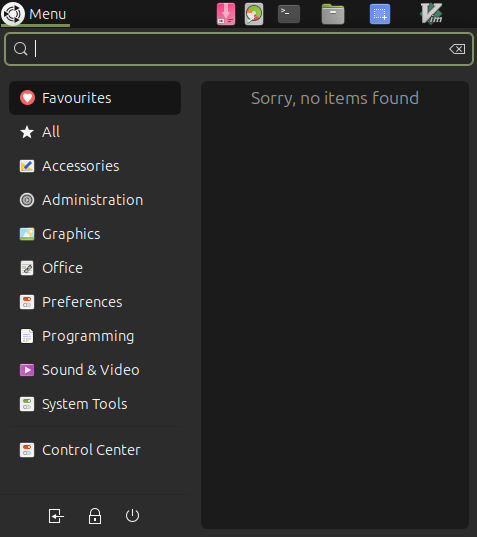
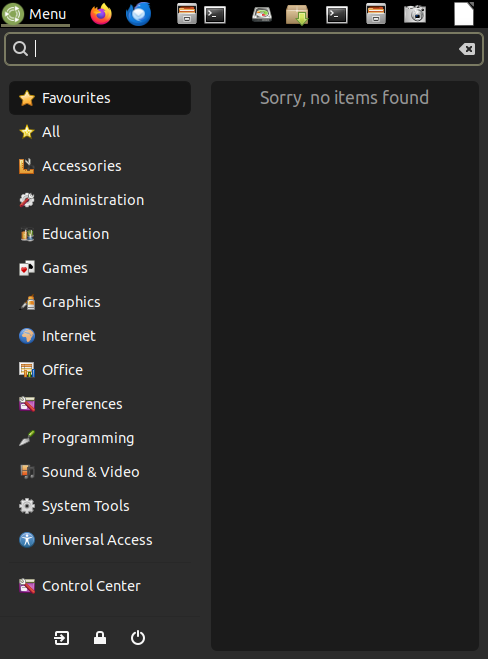
So, I've come across the reference to
Looking at the contents of those, I dug around and found various *.directory files located in
- /usr/share/desktop-directories/
- /usr/share/mate/desktop-directories/
- /var/lib/menu-xdg/desktop-directories/menu-xdg/
Files in "/usr/share/desktop-directories" :
/usr/share/desktop-directories # grep '^Name=' *.directory

ActionGames.directory:Name=Action
AdventureGames.directory:Name=Adventure
ArcadeGames.directory:Name=Arcade
AudioVideo.directory:Name=Sound & Video
BlocksGames.directory:Name=Falling blocks
BoardGames.directory:Name=Board
CardGames.directory:Name=Cards
Debian.directory:Name=Debian
Development.directory:Name=Programming
Education.directory:Name=Education
Game.directory:Name=Games
GnomeScience.directory:Name=Science
Graphics.directory:Name=Graphics
Hardware.directory:Name=Hardware
KidsGames.directory:Name=Kids
LogicGames.directory:Name=Logic
lxde-audio-video.directory:Name=Sound & Video
lxde-debian.directory:Name=Debian
lxde-development.directory:Name=Programming
lxde-education.directory:Name=Education
lxde-game.directory:Name=Games
lxde-graphics.directory:Name=Graphics
lxde-hardware.directory:Name=Hardware
lxde-internet-and-network.directory:Name=Internet and Network
lxde-look-and-feel.directory:Name=Look and Feel
lxde-menu-applications.directory:Name=Applications
lxde-menu-system.directory:Name=System
lxde-network.directory:Name=Internet
lxde-office.directory:Name=Office
lxde-other.directory:Name=Other
lxde-personal.directory:Name=Personal
lxde-science-math.directory:Name=Science & Math
lxde-settings.directory:Name=Preferences
lxde-settings-system.directory:Name=Administration
lxde-system.directory:Name=System
lxde-system-tools.directory:Name=System Tools
lxde-utility-accessibility.directory:Name=Universal Access
lxde-utility.directory:Name=Accessories
matecc.directory:Name=Control Center
mate-screensaver.directory:Name=Screensavers
Network.directory:Name=Internet
Office.directory:Name=Office
Personal.directory:Name=Personal
RolePlayingGames.directory:Name=Role playing
Settings.directory:Name=Preferences
Settings-System.directory:Name=Administration
SimulationGames.directory:Name=Simulation
SportsGames.directory:Name=Sports
StrategyGames.directory:Name=Strategy
System.directory:Name=System
System-Tools.directory:Name=System Tools
Utility-Accessibility.directory:Name=Universal Access
Utility.directory:Name=Accessories
X-GNOME-Menu-Applications.directory:Name=Applications
X-GNOME-Other.directory:Name=Other
X-GNOME-Sundry.directory:Name=Sundry
X-GNOME-SystemSettings.directory:Name=System Settings
X-GNOME-Utilities.directory:Name=Utilities
X-GNOME-WebApplications.directory:Name=Web Applications
Files in "/usr/share/mate/desktop-directories" :
/usr/share/mate/desktop-directories # grep '^Name=' *.directory

mate-audio-video.directory:Name=Sound & Video
mate-collection.directory:Name=Collection
mate-development.directory:Name=Programming
mate-education.directory:Name=Education
mate-game.directory:Name=Games
mate-graphics.directory:Name=Graphics
mate-hardware.directory:Name=Hardware
mate-internet-and-network.directory:Name=Internet and Network
mate-look-and-feel.directory:Name=Look and Feel
mate-menu-applications.directory:Name=Applications
mate-menu-system.directory:Name=System
mate-network.directory:Name=Internet
mate-office.directory:Name=Office
mate-other.directory:Name=Other
mate-personal.directory:Name=Personal
mate-settings.directory:Name=Preferences
mate-settings-system.directory:Name=Administration
mate-system.directory:Name=System
mate-system-tools.directory:Name=System Tools
mate-utility-accessibility.directory:Name=Universal Access
mate-utility.directory:Name=Accessories
Files in "/var/lib/menu-xdg/desktop-directories/menu-xdg" :
/var/lib/menu-xdg/desktop-directories/menu-xdg # grep '^Name=' *.directory

debian-applications-accessibility.directory:Name=Accessibility
debian-applications-data-management.directory:Name=Data Management
debian-applications.directory:Name=Applications
debian-applications-editors.directory:Name=Editors
debian-applications-graphics.directory:Name=Graphics
debian-applications-network-communication.directory:Name=Communication
debian-applications-network.directory:Name=Network
debian-applications-network-file-transfer.directory:Name=File Transfer
debian-applications-network-web-browsing.directory:Name=Web Browsing
debian-applications-programming.directory:Name=Programming
debian-applications-science.directory:Name=Science
debian-applications-science-mathematics.directory:Name=Mathematics
debian-applications-shells.directory:Name=Shells
debian-applications-sound.directory:Name=Sound
debian-applications-system-administration.directory:Name=Administration
debian-applications-system.directory:Name=System
debian-applications-system-hardware.directory:Name=Hardware
debian-applications-system-monitoring.directory:Name=Monitoring
debian-applications-system-package-management.directory:Name=Package Management
debian-applications-system-security.directory:Name=Security
debian-applications-text.directory:Name=Text
debian-applications-video.directory:Name=Video
debian-applications-viewers.directory:Name=Viewers
debian-games-action.directory:Name=Action
debian-games.directory:Name=Games
debian-games-toys.directory:Name=Toys
debian-help.directory:Name=Help
What I don't know is those are pre-built as part of UbuntuMATE, pre-built as part of Ubuntu Desktop,
or
if there is/are package(s) that need to be installed to build those on the fly, based on the process of installing an Application such as Firefox, LibreOffice, Synaptic, Geany, etc.

As for context, I don't know why Ubuntu Server did not create the appropriate category in Brisk, nor, obviously, deposit the launcher for Firefox under the required/expected "Internet" category.
Could someone please clarify my next steps?
Also, again for the Ubuntu Server base, I did figure out that what was required was most of the "Ayatana" packages. I will try to determine what would be a "reasonable" minimum set that would be acceptable to all. So far, what I have is this, but I may reduce that set, unless others feel the is a need for all, and possibly more.
Package: ayatana-greeter-badges
Package: ayatana-indicator-application
Package: ayatana-indicator-common
Package: ayatana-indicator-datetime-common
Package: ayatana-indicator-display
Package: ayatana-indicator-keyboard
Package: ayatana-indicator-messages
Package: ayatana-indicator-notifications
Package: ayatana-indicator-power
Package: ayatana-indicator-session
Package: ayatana-indicator-sound
Package: ayatana-settings
Package: libayatana-appindicator3-1
Package: libayatana-common0
Package: libayatana-ido3-0.4-0
Package: libayatana-indicator3-7
Thank you in advance for any feedback, which can be either by posting a reply or a private message if that is preferred.