How can I get my desktop system to use a GeForce GTX 1050 card?

First, you install kernel 6.8 on your pc.

reboot and press shift to get to the grub menu and select kernel 6.8 instead of 6.14

verify with uname -r that the kernel you have is 6.8

remove kernel 6.14 and reboot again.

pc should boot to kernel 6.8

sudo apt-mark hold 6.8.0-87-generic (this will hold the kernel from updating to 6.14)

Others may have suggestions.

1 Like

Andy, don't do it, I don't want to be blamed if your pc is unusable.

1 Like

What do you think ?

I removed the old kernel.

andy@7:~$ uname -r
6.8.0-060800-generic

andy@7:~$ sudo apt-mark hold 6.8.0-060800-generic
linux-headers-6.8.0-060800-generic set on hold.
linux-image-unsigned-6.8.0-060800-generic set on hold.
linux-modules-6.8.0-060800-generic set on hold.

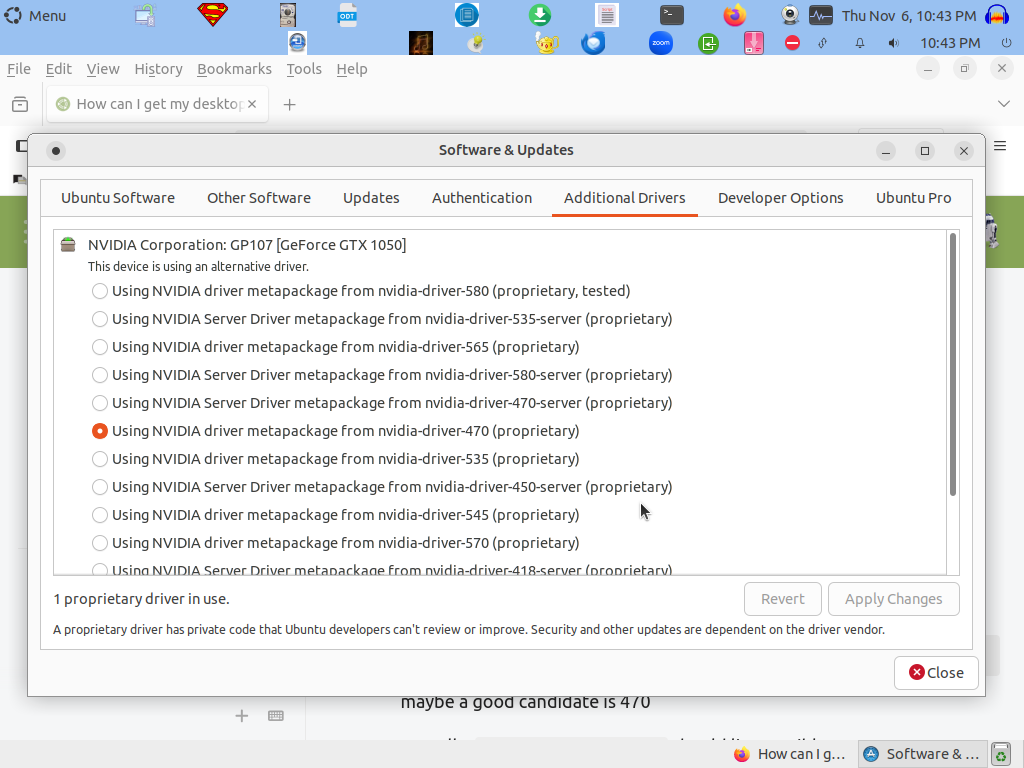
Control Panel | Additional Drivers

Is there a suggestion based on your GTX 1050 which nvidia driver to install?

Things are working well.

I could not get Furmark #2 to work.

How do I know if my system is using the Nvidia graphics card ?

inxi -G will show you details.

this is my output
first line driver: nvidia 535
you can try nvidia-smi and nvtop

Graphics:
  Device-1: NVIDIA GM206 [GeForce GTX 960] driver: nvidia v: 535.274.02
  Device-2: Microdia USB 2.0 Camera type: USB
    driver: snd-usb-audio,uvcvideo
  Display: x11 server: X.Org v: 1.21.1.4 driver: X: loaded: nouveau
    unloaded: fbdev,modesetting,vesa failed: nvidia gpu: nvidia resolution:
    1: 1920x1080~60Hz 2: 1920x1080~60Hz 3: 1920x1080~60Hz
  OpenGL: renderer: NVIDIA GeForce GTX 960/PCIe/SSE2
    v: 4.6.0 NVIDIA 535.274.02
user@cw:~$
1 Like

inxi -G
Graphics:
Device-1: NVIDIA GP107 [GeForce GTX 1050] driver: N/A
Device-2: Microsoft LifeCam HD-5000 type: USB
driver: snd-usb-audio,uvcvideo
Display: x11 server: X.Org v: 1.21.1.4 driver: X:
loaded: modesetting,nouveau,vesa unloaded: fbdev gpu: N/A
resolution: 1024x768~60Hz resolution: 1024x768~60Hz
OpenGL: renderer: llvmpipe (LLVM 15.0.7 256 bits)
v: 4.5 Mesa 23.2.1-1ubuntu3.1~22.04.3

I will deal with this tomorrow.

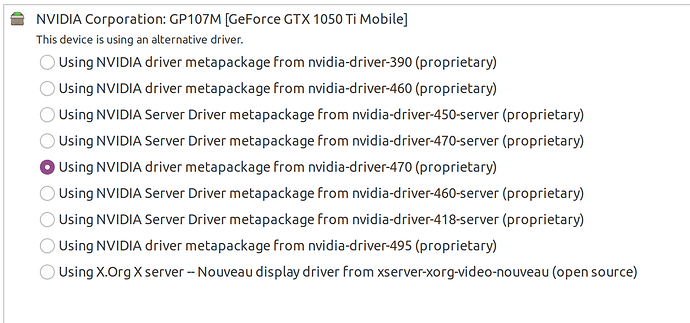
the additional drivers should show a window like this:

maybe a good candidate is 470

Actually, ubuntu-drivers devices should list possible drivers.

2 Likes

I got this. I will persevere and keep going on this.

ubuntu-drivers devices
== /sys/devices/pci0000:00/0000:00:02.1/0000:01:00.0 ==
modalias : pci:v000010DEd00001C81sv00001458sd00003765bc03sc00i00
vendor : NVIDIA Corporation
model : GP107 [GeForce GTX 1050]
driver : nvidia-driver-580 - distro non-free recommended
driver : nvidia-driver-390 - distro non-free
driver : nvidia-driver-450-server - distro non-free
driver : nvidia-driver-570-server - distro non-free
driver : nvidia-driver-580-server - distro non-free
driver : nvidia-driver-470-server - distro non-free
driver : nvidia-driver-545 - distro non-free
driver : nvidia-driver-418-server - distro non-free
driver : nvidia-driver-535 - distro non-free
driver : nvidia-driver-535-server - distro non-free
driver : nvidia-driver-470 - distro non-free
driver : nvidia-driver-570 - distro non-free
driver : nvidia-driver-565 - third-party non-free
driver : xserver-xorg-video-nouveau - distro free builtin

How do I undo this mess?

I did learn a boatload of new things from all of your responses. :slight_smile:

Addition to my Ubuntu_Mate Tips file.

Nvidia is a very,very poor graphics card.

Have a good nite. :slight_smile:

2 Likes

your pc recommends the 580 driver.

1 Like

Note others have said they have the same card working with 570.

2 Likes

I do understand. I agree with what you are saying. You may have missed an earlier remark where I confirmed, yes, it is a good idea to switch to your NVIDIA GPU.

I am trying to help identify what it is that is using your RAM and CPU.

Yes, it is good to get GPU working; but that alone may not solve high RAM and CPU usage.

If you have succeeded in installing the drivers; you should be able to use MATE Optimus to manage the usage of the NVIDIA card.

Install MATE Optimus using the Software Centre or command line:

sudo apt install mate-optimus

MATE Optimus will appear as an icon in the indicator panel if an NVIDIA card is available.

If it does not appear, check the output of inxi -G and see if the loaded section for the NVIDIA card contains nvidia. If not - the drivers are not loading in the kernel.

2 Likes

Thanks.

andy@7:~$ sudo apt install mate-optimus
Reading package lists... Done
Building dependency tree... Done
Reading state information... Done
mate-optimus is already the newest version (21.04.0-1).
mate-optimus set to manually installed.
You might want to run 'apt --fix-broken install' to correct these.
The following packages have unmet dependencies:
linux-headers-6.8.0-060800-generic : Depends: libc6 (>= 2.38) but 2.35-0ubuntu3.11 is to be installed
Depends: libelf1t64 (>= 0.144) but it is not installable
Depends: libssl3t64 (>= 3.0.0) but it is not installable
E: Unmet dependencies. Try 'apt --fix-broken install' with no packages (or specify a solution).
andy@7:~$ apt --fix-broken install
E: Could not open lock file /var/lib/dpkg/lock-frontend - open (13: Permission denied)
E: Unable to acquire the dpkg frontend lock (/var/lib/dpkg/lock-frontend), are you root?
andy@7:~$ sudo apt --fix-broken install
Reading package lists... Done
Building dependency tree... Done
Reading state information... Done
Correcting dependencies... failed.
The following packages have unmet dependencies:
linux-headers-6.8.0-060800-generic : Depends: libc6 (>= 2.38) but 2.35-0ubuntu3.11 is installed
Depends: libelf1t64 (>= 0.144) but it is not installable
Depends: libssl3t64 (>= 3.0.0) but it is not installable
E: Error, pkgProblemResolver::Resolve generated breaks, this may be caused by held packages.
E: Unable to correct dependencies

andy@7:~$

I might be subconsciously trying to cause some new errors so I can learn more stuff. :slight_smile:

Yes, it is good to get GPU working; but that alone may not solve high RAM and CPU usage.

I am not experiencing high RAM usage.

I just would like to use the Nvidia card.

If not, I am good either way.

I can salvage those 2 quiet cooling fans on the card and use them for something else.

1 Like

Were you able to install either 570 or 580 nvidia driver?

if success, inxi -G

1 Like

I have removed the Nvidia card and gone back to the integrated graphics.

Now I can not download repository information. Check your internet connection.

My internet is working quite well. :slight_smile:

are you wired or wifi? a reboot should reconnect.

1 Like

I decided to re-install Release 22.04.5 LTS (Jammy Jellyfish) 64-bit.

I am making sure everything is backed up to my 2nd drive.

Here is what I salvaged from the Nvidia card.

When I have time, I will determine what the voltage is for the fans.

I may replace the case fan or the fan for the hard drives.

1 Like

gpu fans run on 12 Volt.

1 Like