can I be a pain and ask how we can test the changes to welcome on our home PC’s please, you had this feature when we were using Poedit/Bitbucket and it would be really; really great if we could also do it using Transifex because when typing on the online translator; it is difficult to see how the finished product looks and saves time for any further (un)necessary corrections!.
Is it possible to show a preview as we type in Welcome on Transifex?.
I know its a lot to ask but it would really make things soooooo much easier!.
Thanks in advance if you can accommodate all the translators!.
@wolfman Indeed it would be really useful to be able to test translations again. I went through ubuntu-mate-welcome in english (last version I had on the computer) and corrected quite a few (FR) translated items on transifex already.
My guess is, currently we would need a read access to where ubuntu-mate-welcome and translated files are stored…
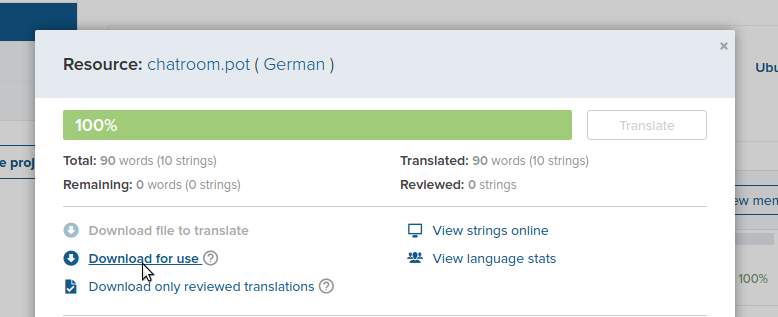
Ok I got to the point of download for use, I'm guessing I will have to rename it like sl.po as right now is for_use_ubuntu-mate-welcome_hellolive_sl.po
But I have no idea how to do that? Or what to do next...
So I have to overwrite the one that I downloaded before (for_use_ubuntu-mate-welcome_hellolive_sl.po)?[quote="lah7, post:7, topic:5060"]
ubuntu-mate-welcome-* directory
[/quote]
I'm not that good with the terminal, where can I find where this is or how to make path to it?
Right-click the archive in the file manager and “extract here”
Enter the folder, it’s named along the lines of ubuntu-mate-welcome-xxxxxxxx.
Enter the folder data → po and/or just po and overwrite those files with the ones you just downloaded. The po files on Transifex are the latest translations for that locale.
Go back to the original ubuntu-mate-welcome-xxxx directory.
Right click an empty area and click “Open in Terminal”
Sorry for so many questions… I got to the empty area in Caja folder and Open terminal ~/ubuntu-mate-ubuntu-mate-welcome-c2e1a1e71128/po$ ./edgar-allan translate-all bash: ./edgar-allan: File or directory with this name doesn't exist
Just one more question, is there a way to get the start of the program or can I also do that during live session as there is a lot of stuff/text to check there too.
I did find it easier to download and check stuff in Pluma, rather then Transifex, as I sported a lot of spaces in the end and few other small mistakes.
Yep! You can check those pages by adding parameters to the end of ./ubuntu-mate-welcome:
--jump-to=
Followed by the name of the page as seen on Transflex. For example:
--jump-to=rpi
--jump-to=hellolive
Welcome is very adaptive, so use --help if you need other parameters to test Welcome in different scenarios. Like the main menu changes in a live session:



 Thanks a lot for all your help Luke!