Well, I took the plunge today, by installing the Nov 19 2025 daily snapshot of UM 26.04 LTS (resolute).
Before attempting that, I disconnected my Primary disk, and only left my Secondary disk, onto which I intended the Distro install.
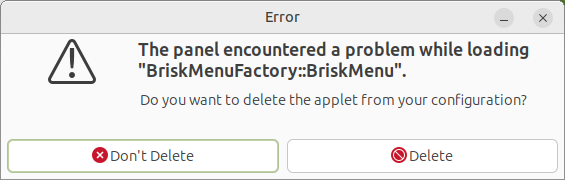
The downloaded ISO is a Live edition, allowing to perform some tasks and then perform the install. When the Live environment first came up, there was a crash of the Brisk Panel App:
I chose the 2nd option to delete the installed UM 20.04 LTS and overwrite with the default installation configuration (something I maybe should not have done, for reasons to be raised here a bit later).
All interractions seemed to progress smoothly ... until the step where it would do the install.
At that point it told me I had no internet, even though my wired connection was solidly in place!!!
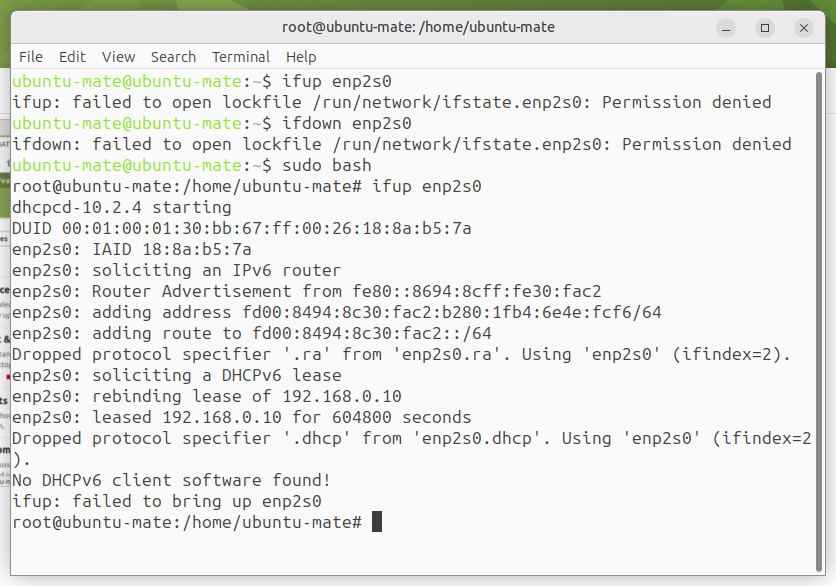
I unfortunately exhausted my usual set of commands to reinitialize my network, only to have those fail.
Presumably I had to do something more to have the computer recognize, and use, the DHCP from my Router/Modem's default port, but I didn' know how to do that, and without access to the internet, I couldn't go looking.
So ... I allowed the install to proceed in isolation, until completion. All seemed to have worked fine, but there was a single error regarding "blueman", which is kind of weird, since my machine has no Bluetooth capability to begin with.
Total time to install: about 45 minutes (off network, no downloads)!
After removing my ISO DVD, I re-booted and found myself the proud new owner of an UbuntuMATE 26.04 LTS installation!
But a few comments about that boot process ...
The MATE splash screen was, initially, displayed as correctly centered, but as if the aspect ratio was off, with the Logo roundel "squished" vertially.
Then, after a while, it did a "blink", then the MATE splash screen was not centered, shifted towards the upper left, by about 1/4 of the distance both horizontally and vertically. This time the Logo roundel was indeed round.
When the login screen itself came up, the Logo roundel was correctly positionned and well-formed at the center of the screen.
My first "probe" was to see if the "Suspend" function would work properly for me, following my recent BIOS changes intended to give me access to that capability. I opened a text editing session, saved some basic text, kept the editing session open, then triggered the Suspend.
- Tah Dah! It worked! Finally!
I looked at the /etc/fstab created by the installation process, and discovered a reference to a 3.6 GB /swap.img file. That was good ... except that I have 4 GB RAM installed!
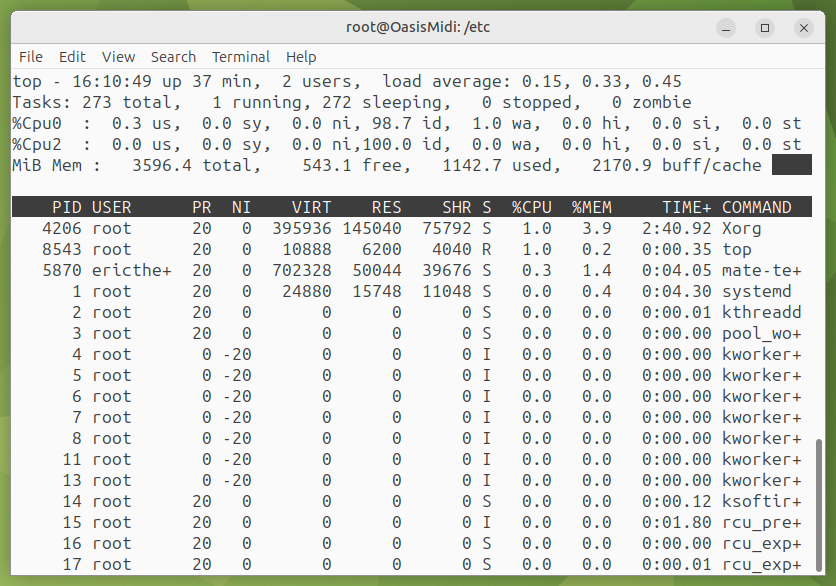
Out of curiosity, I ran top, and it only reported 3.6 GB memory available! I didn't take the time to sort that out right away, but obviously, something has reserved a slice of my RAM, and I will need to determine whether that was a good decision by the install Developpers, or not.
As an aside, that kind of specific resource-consuming configuration should be outlined as part of an Overview Brief regarding the intended operational configuration that the Distro Default will be expecting to apply.
- It is my sense that THAT is required as a matter of transparency on a level intended for End-Users, not Developpers.
Getting back to the Suspend function, there is no easy way to view/change the configuration of the function, regarding whether
- it is purely Suspend,
- purely Hibernate, or
- the hybrid mode of Suspend-then-Hibernate.
The Power Management tool offered in the Control Center doesn't list/offer the various mode options for selection, which is where intuitively go looking for it.
Strangely enough, when I first booted up, the Internet access appeared to be offline, but, after a while (about 10 minutes), it "decided" to "show up"! Not sure what happened there. We'll see if there is a repeat of that when I boot up again from that disk.
Package Management
I like to check 3 packages after a fresh Distro install:
- existence of
inxi - package "vehicle" for
firefox - availability of
synaptic
Thank you to the Developers! inxi is now part of the Distro default package set.
synaptic is still included in the main Distro repository. Creds for keeping it that way!
As for treatment of firefox, I find the situation VERY confusing! If I do an apt search firefox, I get the following:
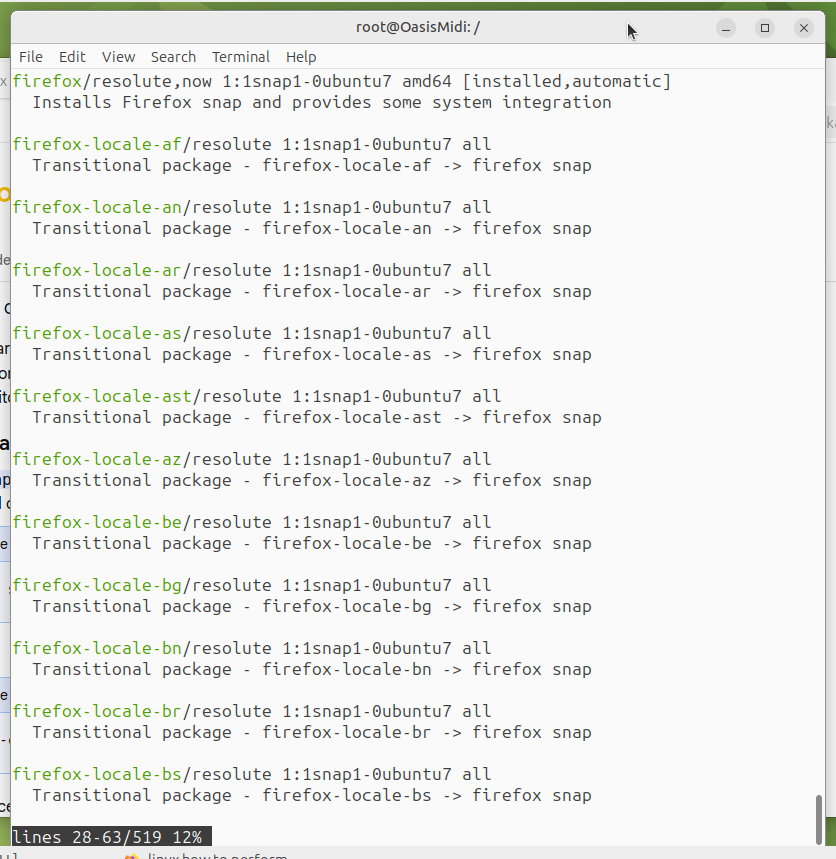
Expecting to see only Debian packages installing in the default Debian tree, I discover that the command is reporting SNAP packages as a Debian package!
- That is, in my view, a distortion and misuse of the Debian packaging system!
I fully expect that apt command to report only "proper" Debian packages for installation into the traditional, NON-SNAP, directory structure! Maybe I am late to this discussion, because I preferred to stay away from the "bleeding edge", but IF there is insistance on distributing a SNAP-oriented package via the Debian packaging system, it should only be as a second package in addition to the traditional non-SNAP package, so that members of the Ubuntu Community do have that proper final choice in regards to how they want their packaging delivered and installed!
So, that's it for my initial tryout of the UM 26.04 LTS.
Final verdict for "Use default configuration":
- 9 out of 10
- final decision for snap/no-snap Firefox should be in End Users control with a selection prompt at installation.
I will come back with an update when I feel brave enough to perform the "Install custom configuration" when I tackle my Primary disk. For that, is there a way to have everything that was done for the "default" configuration, with the conditions that
-
only the specified target partition is erased/overwitten, and
-
all the other partitions on the same disk (both data and swap) are correctly recognized and captured in the newly created fstab (is it possible to have the installer use the existing
/etc/fstabas a starting point for implementing the changes for the fresh Distro install, since my mount points are a non-traditional /site instead of /media, and adding the likes of/swap.imgin support of the Suspend function)?