Touchscreen Utilities

When I installed UM 22.04 on my Lenovo IdeaPad Flex 3 11.6" Touchscreen Notebook back in 2023, I loved how Ubuntu MATE worked on it. Having the same OS on both my laptop and desktop computers is an enormous advantage for me.

The only disadvantage I encountered is that UM does not (IMHO) provide support for a convertible touchscreen laptop, such as the Ideapad Flex 3. After all, if your hardware supports using your touchscreen laptop as a touchscreen tablet, shouldn’t you have the best of both worlds?

So I set off on a long journey to investigate whether I could develop some simple utilities to provide the necessary software support for making my IdeaPad work as both a laptop and a touchscreen tablet. It took quite some time, and wasn’t as simple as I thought, but I’m satisfied with the results. And I’m posting those utilities (scripts, etc.) today in the hope that at least a few others may find them helpful.

Basically, if (1) you have a convertible touchscreen laptop, (2) you’re running Ubuntu MATE, and (3) your laptop responds to touching the screen, then I think it likely you can configure these utilities for your hardware and achieve a satisfying touchscreen tablet experience.

The utilities allow you to:

  • Easily switch between laptop and tablet modes.

  • Use a passive stylus (or your finger) to left-click, right-click, or double-click on menus, hyperlinks, dialog buttons, and other widgets.

  • Use Onboard (the on-screen keyboard) when operating your laptop in tablet mode (and still have Onboard play nice with the lock screen).

  • Display an on-screen panel with buttons that mimic the most-used hotkey symbols on the top row of your laptop's keyboard.

  • Type text snippets or invoke keyboard shortcuts in tablet mode with as few as two stylus taps.

The utilities are designed to work with a Plank dock at the bottom edge of your screen. This may not be everyone’s preference, but in my opinion the dock is a reasonable desktop amenity for using a laptop’s touchscreen in tablet mode. The utilities support multiple workspaces, but not multiple screens/displays/monitors. Also, the utilities include no support for an active stylus, but they may still work with an advanced touchscreen if it responds to touch by finger(s) or by a passive stylus.

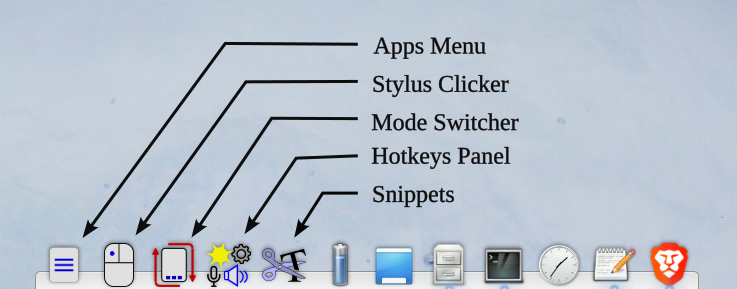
The utilities add five icons to the Plank dock:
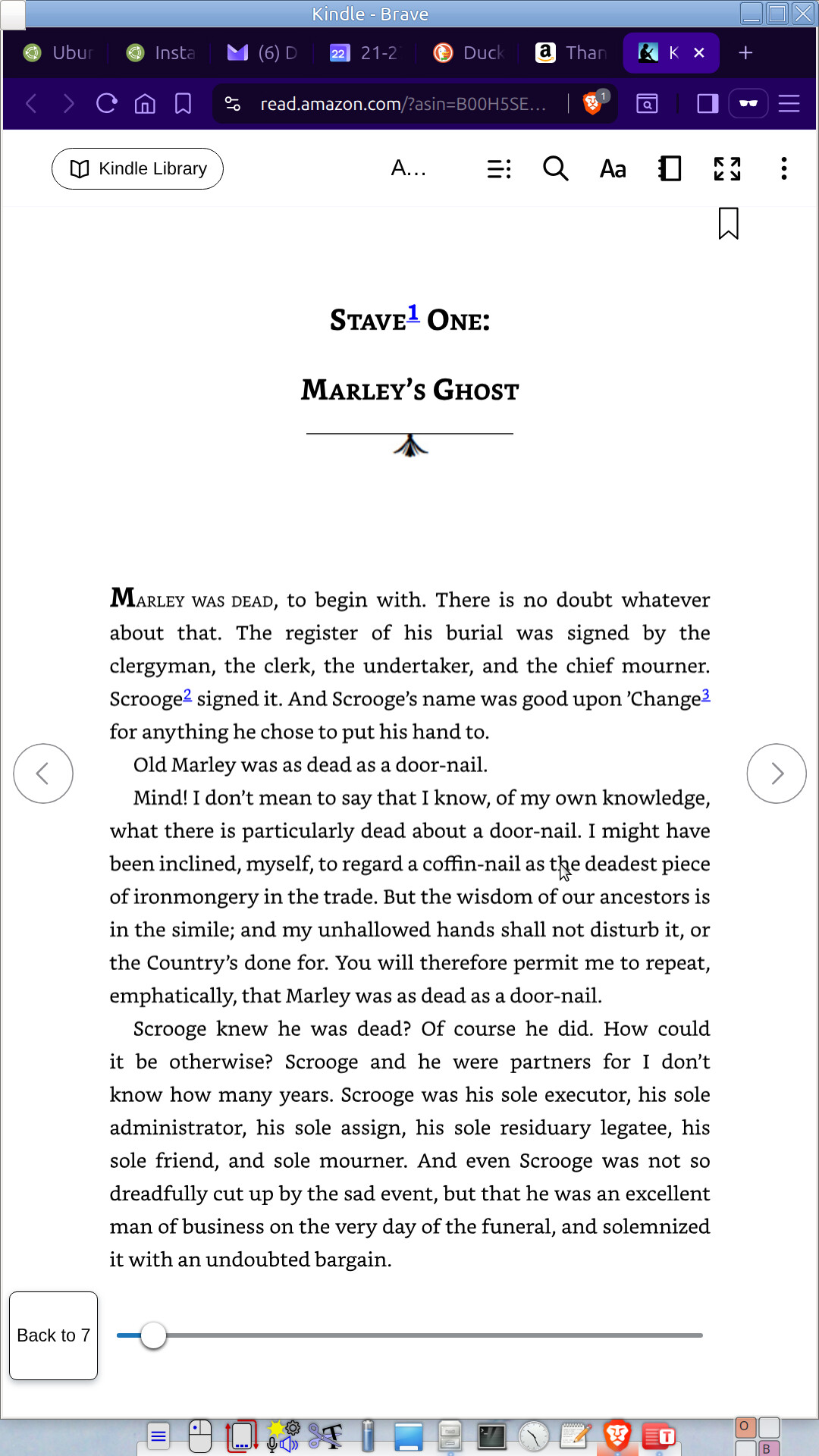
Here’s a screenshot of my laptop in tablet mode, with a Kindle Web e-book open in Brave browser:
If you want to try these utilities for yourself, grab the zip file from this web page: Release Touchscreen Utilities -- Beta Release · PursuableDefiance/Touchscreen-Utilities · GitHub. Inside you’ll find an install.txt file that walks you through the steps to install and configure the utilities for your laptop.

As a point of reference, I’m currently running these utilities on the following system:

Laptop: IdeaPad Flex 3 11ADA05
CPU: AMD Athlon Silver 3050e (4) @ 1.400 GHz
RAM: 3299 MiB
Operating System: Ubuntu MATE 24.04.3 LTS x86_64
Desktop: MATE 1.26.1
Window Manager: Metacity (Marco)
Kernel: 6.8.0-79-generic
Shell: bash 5.2.21
Screen: 1920 x 1080

5 Likes

Thanks for your efforts on behalf of this project, but it makes me wonder. I have a Lenovo Thinkpad Yoga 11e, which is older than the IdeaPad Flex 3. It too, converts from a standard laptop to a tablet. I confess to not using it in tablet orientation much, but I installed Ubuntu MATE 25.04 "Plucky Puffin" on it, and everything touchscreen seems to work.

I notice you're using an older Ubuntu (22.04) so I wonder if the lack of touchscreen support can be traced back to that?

1 Like

No, although I started with UM 22.04 on my laptop, I'm currently using UM 24.04.3, the latest LTS. (Scroll all the way to the end of my post.) And my IdeaPad touchscreen does indeed work. If you tap the screen, it moves the mouse pointer there and generates a left-click. Some apps, such as Pluma and Brave, support flick scrolling on the touchscreen. But that's about all UM does.

What doesn't happen on my IdeaPad: UM doesn't rotate the screen 90 degrees to tablet layout, either automatically by the accelerometer signals or manually, so I wrote the Mode Switcher utility. You wrote about your Lenovo ThinkPad Yoga back in February (in a post titled, "And for my Next Trick"), [quote="OldStrummer, post:4, topic:28935"]
The screen does not auto-rotate, either in portrait mode or in tent mode.
[/quote] I assume that's still true with UM 25.04. My Mode Switcher utility doesn't fix UM's lack of automatic rotation, but at least it offers the user a streamlined way to manually change the orientation.

As far as using a passive stylus, the only app I found that supports "long-press to right-click" is Brave browser, which pops up the right-click context menu on a long-press. So I wrote the Stylus Clicker app to provide the ability to right-click or double-click with a passive stylus.

I wrote the Snippets utility to make it easier to type commonly used text strings when in tablet mode, rather than poking the on-screen keyboard.

The Hotkeys Panel utility does not fulfill a shortcoming of UM, per se. It's just that the hotkey symbols (volume, brightness, etc.) that share the F1 through F12 function keys on a laptop are awfully useful, but they're not available in tablet mode because the keyboard is disabled and folded back.

(And I freely admit I wrote the Airplane Mode dialog mostly because it was fun to learn how to control the radios, but I have used it on several flights.)

Anyway, if you try the utilities and like them, that'll be great. If not, I'm interested in hearing your feedback. For that matter, I'm interested in hearing people's feedback, positive or negative.

As I said in the OP, I'm just offering the utilities in the hope that at least one person benefits.

3 Likes

And again, I thank you for your efforts and for providing these utilities. You are right in that my Yoga does not change the orientation when I shift from landscape to portrait mode. I'm going to check out your programs (I don't think I said anything negative about them). I freely admit that I don't use my Yoga all that much; my primary Ubuntu MATE machine is my home office server.

1 Like

I didn't mean to imply you said anything negative. You didn't. I just wanted to state that I welcome all comments , whether praise or criticism. I always have plenty of room for improvement, and helpful critiques, if any, are the starting point. :slightly_smiling_face:

2 Likes

I edited the original post to add tags, but there wasn't much of a selection. I would have liked to add a "Touchscreen" tag and a "Utilities" tag. Perhaps I don't have the access level to create custom tags for a post.

1 Like

Nicely done! Looking through some of your scripts, I see you’ve done similar things to what I describe in this article. I include it here in case there are some ideas that may help improve your utilities. Run Ubuntu MATE On A 2-in-1 Convertible Laptop · Going Linux

3 Likes

Thank you, Larry.

You may not remember, but you recommended that article to me in 2023 and it was very helpful. I owe you a debt. I learned a lot about coordinate transform matrices from that article. In an early prototype of my Mode Switcher utility, I used your suggestion about killing caja to redraw the desktop background. But I found the downside to that tactic is that it also closes any caja windows the user has open. I cast around for another method for quite a while before I found that we can accomplish the same result by changing caja's background style to a different value, and then after a brief delay, changing it back to the user's original value.

If you (or anyone else, for that matter) installs these utilities, I'd be very interested in hearing about your experience:

  • Was the installation successful?
  • Did you have any difficulty configuring the utilities?
  • And what hardware and UM version did you use?

One more suggestion that may help: It isn't always obvious from the output of the xinput command exactly which device is your touchscreen. If you're not sure, type the command xinput list "SUSPECTED_TOUCHSCREEN_NAME", substituting a device name from the output of your xinput command for SUSPECTED_TOUCHSCREEN_NAME. Examine the output, and if the device is a touchscreen, you should see a line beginning with "Touch mode: ".