SOLVED: CUPS Laser printer woes - Brother HL-L2300D

Please see my final entry here.

Thanks to ALL.

For many years I’ve enjoyed having a Brother HL-5050 laser printer, until recently it would only partially start, emitted a howling sound & lit up all its lights.

Examined it as well as I could - the paper path was totally clear & there was nothing else amiss that I could find, so I concluded that it had worn out after so many years of good service.

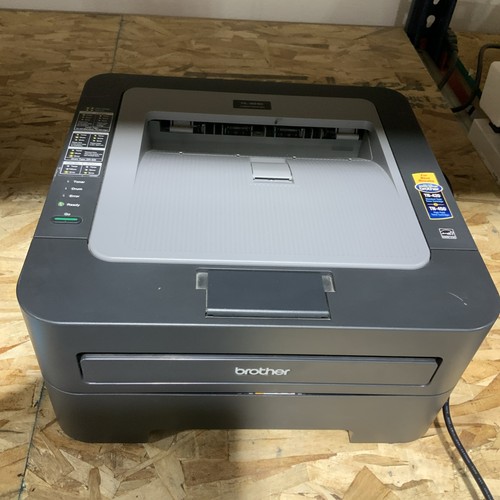
I was able to find a good deal on a Brother HL-L2300D, checked for compatibility & all appeared well.

Got the driver installer for it from Brother’s site, installed it, and…and…nothing.

Lots of time wasted trying all variations & searching & when monitored via CUPS (localhost:631) it would only get as far as saying '"Waiting for printer to become available".

Searching here I found a thread which was about cabling up a a Brother HL-L2400D, but no other helpful info.

This saddens me greatly as I really wish to be able to use this brand new printer & frankly wouldn’t have a clue what to get for another monochrome laser printer if I have to.

Any help will be hugely appreciated !!

Thanks for reading.

If you go to CUPS in the browser, after doing the driver package installs, have you checked to see if the printer is showing here?

If so, then you should try the following:

  • open Control Center
  • (under Administration) click on Printers
  • confirm that your printer is showing there
  • double-click on your printer
  • you should see a "Print Test Page" button enabled if it is on
  • try the Test Page

Working thru from first principles ...

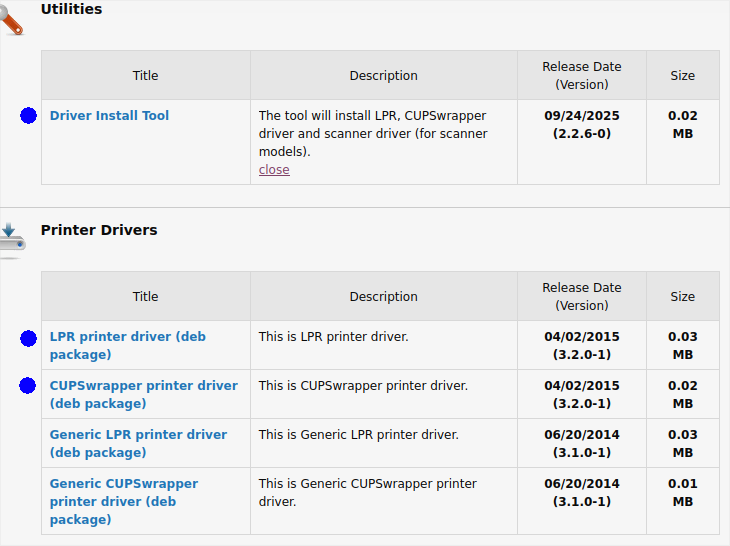
Were you aware of the following Support Page, and have you downloaded and installed the necessary drivers?


Also, please confirm the printer is direct-attached via USB2/3 at computer (printer is, per specs, USB2).


Verify that the USB cable is functional by trying it for another device, or use a different cable to make the connection to see if the printer responds.


You might need to specifically program an IP address, but only if you are on a network, which USB seems to indicate you are not. However, if you want to see some discussion and hints about that possible approach, the following post can give you some insights, even if not directly related to your printer.


For some details on debugging CUPS, the following posts has details about halfway down:

2 Likes

I recommend getting a Brother HL-2240.

Excellent printer.

You can probably find one on Ebay.

I bought a near new one for about $81.

You can buy your own toner for about $10 per bottle.

Brother HL-2240 Standard Laser Printer w DRUM/TONER Less Than 10k Impressions

The seller even supplied a printout of how many pages were printed etc.

Thanks for replying Ericmarceau !!

Yes to all:

I forgot to include in the OP that I tested it with my tiny Asus win7 netbook & driver from Brother using the same cable & it printed immediately with no problems.

@Fixit7, thanks, but:

As stated in the OP - I’m trying to avoid trashing the 2300 or having to buy another model…

Having it stay stuck at "Waiting for printer to become available" with my UM desktop PC seems very odd & I dearly wish there could be a simple fix for that.

Thanks Again Folks !!

PS: Please tell me (if possible…) what might be better about the Brother HL-L2240 or even a Brother HL-L2320 vs the model that I already have ??

2 Likes

What features are important to you ?

Just to have a working & ordinary laser printer that I can depend upon:

Need no special features for my occasional need to print a page or 3.

Thanks.

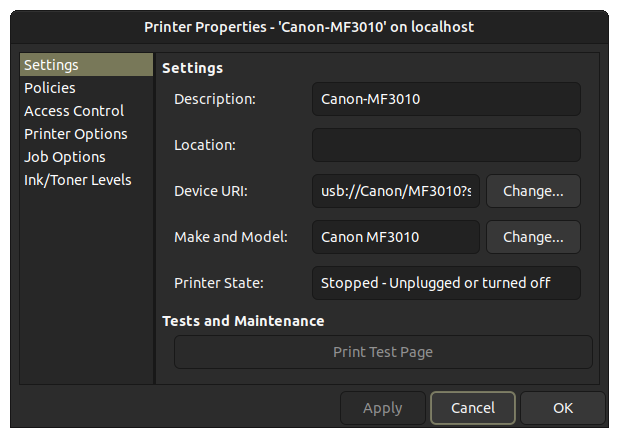
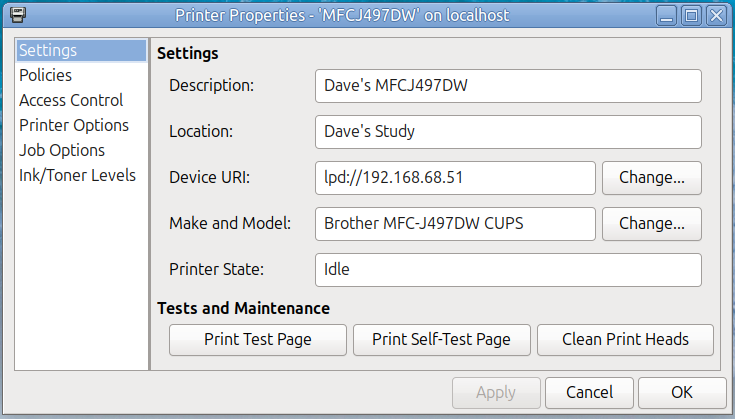
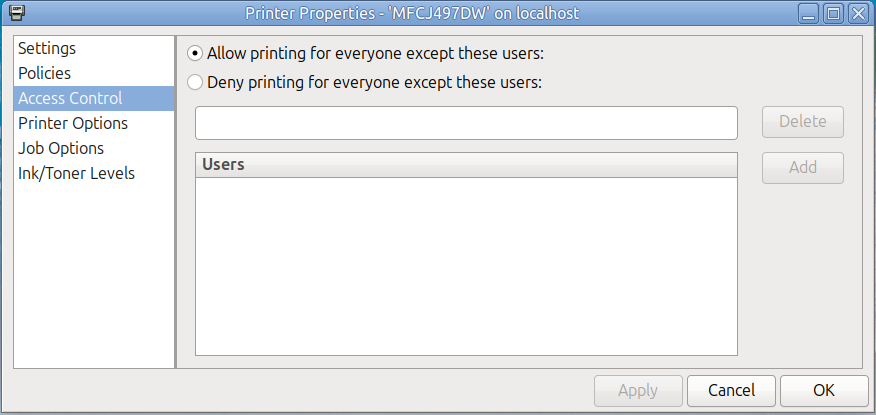
Could you please post a screenshot of the "Settings" pane of your "Printer Settings" dialog? My Brother printer is ink-jet rather than laser, but I recall that after following Brother's driver installation instructions, the printer would not respond. I eventually tried tweaking the URI in this dialog until it worked. Here's my screenshot, as an example:

Also, on the "Policies" pane of that same dialog, make sure that the "Enabled" and "Accepting Jobs" boxes are checked.

You might also review the "Access Control" pane of this dialog to verify that the settings there look sane. For example:

1 Like

To the OP ... your printer is connected via USB2.

  • Please test the usb2 is working.
  • Please test the cable from pc to printer.

does the printer print a test page without connected to anything?
there is a combo of buttons to push.

you've done all the right steps.
Last resort, re-install the drivers. maybe there was a hiccup.

1 Like

Thanks for your fascinating reply DaveHighland !! As it happens, when it refused all attempts…

I removed it all rather than allowing it to clutter up my beloved OS. Your IP address idea would never have occurred to me - wow !!

Yes - the "Enabled" and "Accepting Jobs" boxes were checked & access was allowed - I did check & re-check those items.

Hello Pavlos_kairis & thanks.

My USB2 is used for other things & definitely working.

Yes, that test worked just fine & please note my mention of actually printing with it via win7.

Thank you:

I did that so many times with every permutation from their site & after hours wasted on that & endless searching I had more pressing matters needing my time & efforts.

Sincere Thanks for your replies here Folks !!

1 Like

Do you run a firewall? it could block printing.

Thanks for your thoughts & reply.

I use Opensnitch.

It always prompts & didn’t ask about the printer stuff at all.

Looking in its log there was no mention of it to be found either.

2 Likes

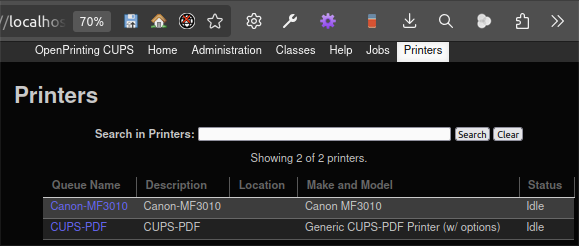
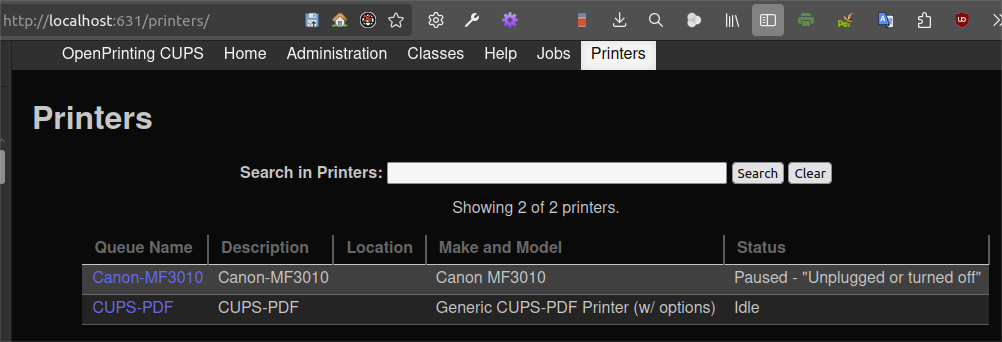
To confirm, where I see "Idle" next to the printer in the following CUPS - Printers tab, you see "Waiting for printer to become available".

Is that correct?


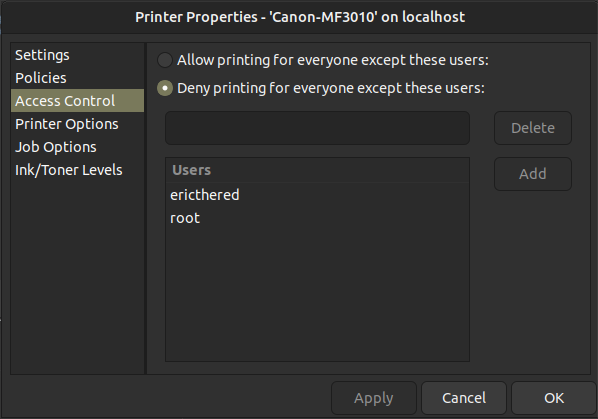
Have you checked to see if there are any restrictions on the Printers "Access Control" tab, seen below?


Can you share with us the output from the following command?

lpstat -t
1 Like

Thanks Again !!

Yes:

Past tense though as it is no longer installed, so in checking=>

lpstat -t
scheduler is running
system default destination: HL5050-parallel
device for bjc80: ipps://127.0.0.1:8000/ipp/print/bjc80
device for HL5050-parallel: parallel:/dev/lp0
bjc80 accepting requests since Mon 20 Oct 2025 12:05:45 AM EDT
HL5050-parallel accepting requests since Thu 09 Oct 2025 07:54:53 PM EDT
printer bjc80 is idle. enabled since Mon 20 Oct 2025 12:05:45 AM EDT
printer HL5050-parallel is idle. enabled since Thu 09 Oct 2025 07:54:53 PM EDT

What is wrong there is the nasty BJC80 - which is long gone & I tried to remove all of it, but it persists somehow.

And in the access control nobody is ‘denied’ it is set to allow all so that list is vacant.

Thanks Again !!

1 Like

For the "bjc80",

sudo lpadmin -x bjc80

That should purge it!

1 Like

Waaah !!

sudo lpadmin -x bjc80
[sudo] password for user:
user@ubu18046:~/Desktop$ lpstat -t
scheduler is running
system default destination: HL5050-parallel
device for bjc80: ipps://127.0.0.1:8000/ipp/print/bjc80
device for HL5050-parallel: parallel:/dev/lp0
bjc80 accepting requests since Mon 20 Oct 2025 04:42:31 PM EDT
HL5050-parallel accepting requests since Thu 09 Oct 2025 07:54:53 PM EDT
printer bjc80 is idle. enabled since Mon 20 Oct 2025 04:42:31 PM EDT
printer HL5050-parallel is idle. enabled since Thu 09 Oct 2025 07:54:53 PM EDT

Sticky, nasty stuff !!

Previously removed it from CUPS and right now it shows…

bjc80 bjc80 Local Raw Printer Idle
HL5050-parallel Brother HL-5050 ubu18046 Brother HL-5050 BR-Script3 Idle

I may be getting another HL-5050 from a friend in the future, so I’ve left it.

1 Like

Is the bjc80 still plugged into your network, or your computer?

The BJC80 went into the dumpster !!

I just removed it AGAIN via CUPS one more time & it appears to be gone - at least for now ?!?

(OK, my coffee break is long over & I must get back to my moving work now…)

Looking for leftovers for bjc80 ...

What is the output from the following commands:

sudo ls -l /etc/cups/ppd/

sudo ls -l /var/cache/cups/

sudo ls -l /var/snap/cups/*/var/cache/

sudo ls -l /var/snap/cups/common/etc/cups/ppd/

Very curious to know if you get anything from this:

sudo ipptool -tv ipp://localhost:631/printers/bjc80 get-printer-attributes.test

Another possibility for bjc80 acting as an unstoppable zombie is that CUPS seems to be deployed as a SNAP now, so there are two separate locations for information:

sudo ls -l /etc/cups/

sudo ls -l /var/snap/cups/common/etc/cups/

IMPORTANT:       Does anyone know if safe to purge /etc/cups if SNAP package is there?

IMPORTANT:       Is there a way to tell whether CUPS binary used by systemd was initiated from SNAP or debian package?

1 Like

OK, here it all comes:

sudo ls -l /etc/cups/ppd/
total 28
-rw-r----- 1 root lp 25599 Jun 6 19:45 HL5050-parallel.ppd

WOW!!
sudo ls -l /var/cache/cups/

total 6660
-rw-r--r-- 1 root root 6 Jun 2 16:18 cups-browsed-local-default-printer
-rw-r--r-- 1 root root 414 Oct 20 00:05 cups-browsed-options-bjc80
-rw-r--r-- 1 root root 410 Jun 3 14:48 [email protected]
-rw-r--r-- 1 root root 468 Nov 7 2022 cups-browsed-options-brother_18
-rw-r--r-- 1 root root 468 Nov 10 2022 cups-browsed-options-Brother_18
-rw-r--r-- 1 root root 405 Nov 11 2024 cups-browsed-options-Canon_MF650C_Series
-rw-r--r-- 1 root root 881 Jan 5 2024 cups-browsed-options-Copier_frontoffice
-rw-r--r-- 1 root root 350 Nov 3 2024 cups-browsed-options-HP_DeskJet_2600_series_4A707A_
-rw-r--r-- 1 root root 529 Jan 5 2024 cups-browsed-options-Kyocera_FS_4200DN_frontoffice
-rw------- 1 lp lp 96981 Jun 3 14:26 help.index
-rw-r--r-- 1 root root 2225 Jun 6 19:45 HL5050-parallel.data
-rw-r----- 1 root lp 3928 Oct 20 00:05 job.cache
-rw-r----- 1 root lp 3928 Oct 19 00:08 job.cache.O
-rw-r--r-- 1 root root 6 Oct 20 00:05 org.cups.cupsd
-rw------- 1 lp lp 6636100 Oct 17 14:54 ppds.dat
-rw-r--r-- 1 root root 308 Oct 17 14:54 ppd-updates
drwxrwxr-x 2 root lp 4096 Apr 24 2020 rss

sudo ls -l /var/snap/cups//var/cache/
ls: cannot access '/var/snap/cups/
/var/cache/': No such file or directory

sudo ls -l /var/snap/cups/common/etc/cups/ppd/
ls: cannot access '/var/snap/cups/common/etc/cups/ppd/': No such file or directory

sudo ipptool -tv ipp://localhost:631/printers/bjc80 get-printer-attributes.test
"/usr/share/cups/ipptool/get-printer-attributes.test":
Get-Printer-Attributes:
attributes-charset (charset) = utf-8
attributes-natural-language (naturalLanguage) = en
printer-uri (uri) = ipp://localhost:631/printers/bjc80
Get printer attributes using Get-Printer-Attributes [FAIL]
RECEIVED: 127 bytes in response
status-code = client-error-not-found (The printer or class does not exist.)
attributes-charset (charset) = utf-8
attributes-natural-language (naturalLanguage) = en
status-message (textWithoutLanguage) = The printer or class does not exist.
EXPECTED: STATUS successful-ok (got client-error-not-found)
status-message="The printer or class does not exist."
EXPECTED: charset-configured
EXPECTED: charset-supported
EXPECTED: compression-supported
EXPECTED: document-format-default
EXPECTED: document-format-supported
EXPECTED: generated-natural-language-supported
EXPECTED: ipp-versions-supported
EXPECTED: natural-language-configured
EXPECTED: operations-supported
EXPECTED: pdl-override-supported
EXPECTED: printer-is-accepting-jobs
EXPECTED: printer-name
EXPECTED: printer-state
EXPECTED: printer-state-reasons
EXPECTED: printer-up-time
EXPECTED: printer-uri-supported
EXPECTED: queued-job-count
EXPECTED: uri-authentication-supported
EXPECTED: uri-security-supported

sudo ls -l /etc/cups/
total 96
-rw------- 1 root lp 108 Oct 17 14:21 classes.conf
-rw------- 1 root lp 108 Jun 2 17:48 classes.conf.O
-rw-r--r-- 1 root root 26949 Sep 30 2024 cups-browsed.conf
-rw-r----- 1 root lp 4413 Jun 3 14:48 cupsd.conf
-rw-r--r-- 1 root root 6158 Jun 3 14:41 cupsd.conf.O
-rw-r--r-- 1 root root 2923 Apr 24 2020 cups-files.conf
drwxr-xr-x 2 root root 4096 Apr 24 2020 interfaces
drwxr-xr-x 2 root lp 4096 Oct 20 16:42 ppd
-rw------- 1 root lp 502 Oct 20 16:49 printers.conf
-rw------- 1 root lp 829 Oct 20 16:43 printers.conf.O
-rw-r--r-- 1 root root 240 Aug 6 2020 raw.convs
-rw-r--r-- 1 root root 211 Aug 6 2020 raw.types
-rw-r--r-- 1 root root 142 Apr 24 2020 snmp.conf
drwx------ 2 root lp 4096 Jun 2 16:27 ssl
-rw-r----- 1 root lp 703 Oct 20 16:49 subscriptions.conf
-rw-r----- 1 root lp 703 Oct 20 16:43 subscriptions.conf.O

sudo ls -l /var/snap/cups/common/etc/cups/
ls: cannot access '/var/snap/cups/common/etc/cups/': No such file or directory

Thanks for making this effort !!

Thassalotta info.

1 Like

Delete every item which you know is related to printers that no longer exist. You should delete at least the following to flush bjc80 references:

cups-browsed-options-bjc80
[email protected]
[email protected]

That apparently says that there is no references found for bjc80 ... but you've mentionned a history of encountering that printer in "zombie" form. :slight_smile:


In that file, CUPS keeps track of all active printers. Be sure to delete the grouping of files which are related to the bjc80 printer.

<Printer   {something related to bjc80}
***
DeviceURI    {something with bjc80}
***
</Printer>

Check under

sudo ls -l /etc/cups/ppd

Purge any *.ppd file related to the bjc80.


That says that your computer has NO snap-based CUPS, only Debian-package based, which is best, in my opinion, (for now).


Have you confirmed that the printer cable is functional, not defective? Have you been able to print on that printer from another computer ... using that same USB cable?


Are you trying to use a USB3 socket on your computer to print? Note that the printer itself has a USB2 interface. If this is the case, you might want to look into the "advice" from Google's AI if you enter the following search strings:

linux problems printing from USB3 on USB2 printers
2 Likes