Adding a due date for a task (local) still crashes the clock.
1 Like
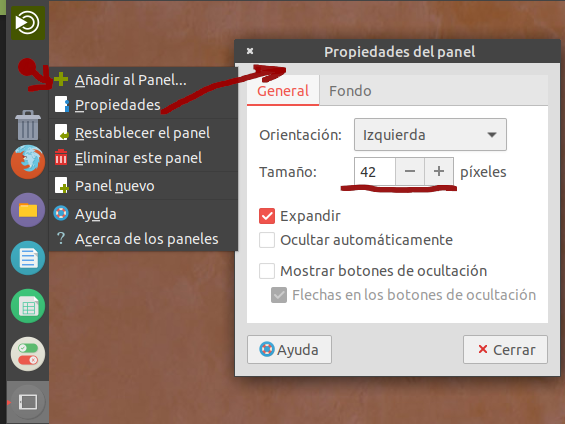
I think you are confusing "Dock prefs" with "Panel prefs". The second one has the option to reduce the size of the panel and since the dock expands to use all space available in the panel, you have to move the dock so that you have a place where you can right click to show the "Panel prefs" dialog.
If I'm wrong, please post a picture were you right click and the config dialog.
I think the dock should show both menus when right click or the "Panel prefs" should be available in the Control center (as in XFCE for example).
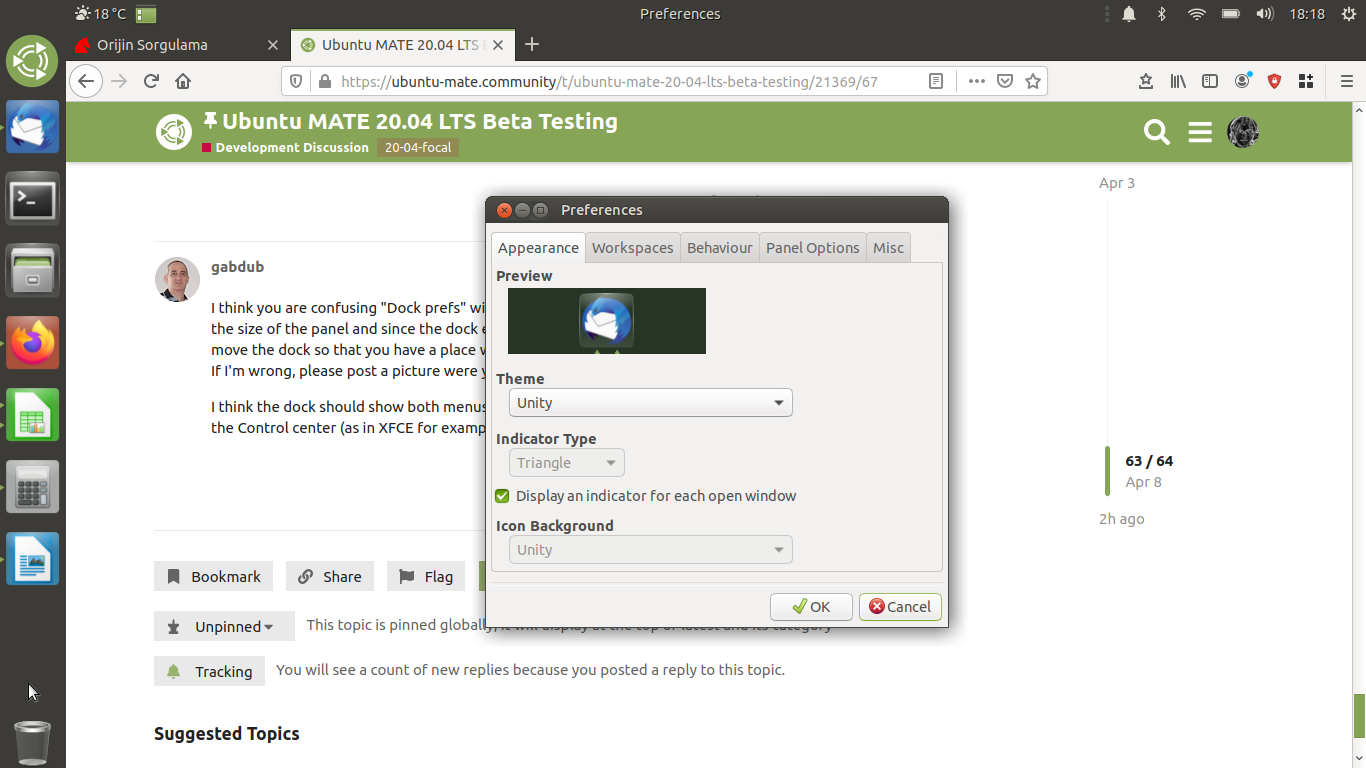
You can't change the size of the panel in that dialog.
See this:
Are you installing this via the Software Boutique?
I just tested and installed Steam again on a fresh install and cannot replicate the issues you are seeing.
I thought you did not like the size of icons on the dock in a Mutiny layout. If I misunderstood your problem, I am truly sorry.
When you switch to Mutiny, the size of the dock (not the top panel) is fixed at 66 px and the default icons are really big. One way to scale them smaller is switch themes (dock themes).
In your screenshot, I do not see a dock proper but a panel imitating a dock.
1 Like
Ok thanks Frank. Maybe I'll re-load 20.04 again tomorrow. Thanks for the help. Dave
I rather think this has already been posted but...
I will try not to be too long winded.
I downloaded the daily build ISO of the standard gnome 3 version, and installed it in a VirtualBox. The host is Linux Mint 19.3, the VBox is current, the install went well, I did the first update and then could log in / reboot about 4 or 5 times and then, it started logging me out after about 15 seconds. After messing around for a while, I deleted it and said Let's try that again tomorrow.
I tried again, and got the same effect.
I tried the next day and went after the Mate version, which is what I wanted anyway. Same result.
I tried the day after, and got the same result.
I just tried the fresh install of 19.10 and ~
sudo do-release-upgrade -d
~ and that seemed to work a treat, but after about five or six reboots, same problem again.
I have tried to login at the black screen moment as root, but I'm simply not quick enough.
I have tried to open a term and go sudo su but it goes black-screen at the password stage, again, I'm not quick enough.
What's causing this I don't know, but it is persistent and it applies to the Mate version and the gnome3 version, and it happens with the downloaded ISO and it also happens with the sudo do-release-upgrade -d upgrade path.
I have Mint as my host, and I have Ub Mate 19.10 as a guest, my 20.04 is a sneak-peek at the future, it's no skin off my nose if it doesn't work, but I thought somebody should be told... This is what beta testing is for.
PS : My email is [email protected]
Ok, all fixed now thank you Bill. Must have gone a bit wonky when I first installed it. Got new ISO and re-installed and Stem and Clementine all up and running.
Thank you
Dave
2 Likes
Minor update. I deleted it all again, downloaded the next daily build, installed...
Had a poke around and found this.
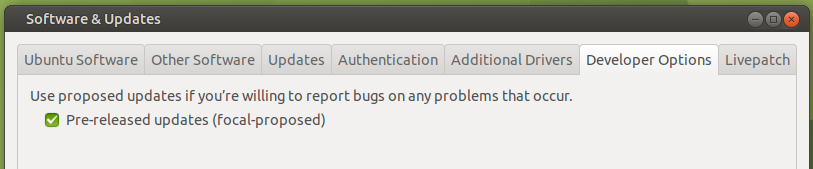
I ticked the box & got warned my software list was out of date, updated, got about 80MB of update, including a new kernel...
5.4.0-23 generic
Whether this has fixed all my problems I don't know. I'm not terribly keen to just sit here and manually reboot the thing ten times and see. So far, it's all behaving quite well.
Follow-up several hours later. That pre-release updates thing seems to have fixed my issue completely. What it was I don't know, but it's fixed.
I do like that background, it's very cool. Speaking of wallpapers, notice what my background is in my Linux Mint host? users of Ubuntu from ten years ago will... I do rather love that picture too, so I've kept it...
https://cdn.netrider.net.au/attachments/upload_2020-4-10_8-27-30-png.309114/
Hello people!
GRUB was updated today and the update caused some problems. The problems occurred on 2 of my computers, both on UEFI boot. When it updates, it tries to install grub-efi-amd64-signed but I'm not using EFI Secure Boot, just EFI partition. So, it gives me an error about "sub-process returned an error code 1".
After this I tried "apt update", doing "dpkg --configure -a" or even "install -f" again. Restarted, on the first computer, it was solved. But the second one is still giving errors on apt.
So, to solve this, I did a little dirty trick:
As sudo caja, I went to /var/lib/dpkg/info/ and removed the 4 files with names starting with "grub-efi*". I executed apt upgrade again and everything will be ok! grub-efi-amd64-signed will be "installed", but will not cause any problems again to you, that, as me, are not using grub signed as Secure Boot.
[EDIT]
The problem was not gone! So I have this problem with my 2 computers.
The way I mentioned to solve this, excluding the 4 files on /var/lib/dpkg/info/ solves the problem.
HOME FOLDER BEING OPENED TWICE...
I changed several keyboard short cut bindings to my preferences (examples being changing the window quadrants to ctrl + alt + keypad corners (1,3,7,9))
I changed my Home Folder opening to Mod4 + E (to mimic the Windows Explorer opening on my work computer - muscle memory and all)... however, whenever I use this combo, it's opening 2 different versions of Caja. This doesn't happen in 19.10.
Not even sure how to investigate this one to provide more info...
Wifi icon disappear in indicator applet after connected to vpn from network-manger 
The package was updated today. I will assume that the bug is gone
1 Like
Im having this problem as well. The only menu with ok icons is Mutiny. All the others not working well.
A way, at this time, to solve this is using this 4 packages:
Just install them and restart your systems, the icons will be back.
It is a problem in MATE.org, not Ubuntu MATE itself.
Not a perfect solution too, some icons still will be missing. But 95% of them will be back!
Please help! I use pulse audio to conrol an additional sound card for my ham radio. This results in two sound icons, one showing the regular Sound . I cannot figure how to eliminate the standard sound applet from the indicator and show only the pulse audio applet. Anyone know?
Hello, all!
I've got a few problems with the available Menu applets in 20.04's MATE beta. My beloved "Main Menu" is gone, and none of the other Menu options answer to mozo in any way. When I tried to add a "Screensaver" option to "Look and Feel" which pointed to xscreensaver-demo rather than the mate-screensaver based option, I get NO Screensaver item under "Look and Feel" no matter what I do.
Is there a way to restore the "Main Menu" as we had it before? All I get from "Brisk Menu" is grief (and I notice I'm not alone in that!). Otherwise, how do I add items to "Control Center" so they work properly?
Thank You -- all of you -- for any help!
Sean
1 Like
You can choose Advance Mate Menu from the "Add to Panel" menu.
If it's not there.... Drop to terminal and install it. "sudo apt install mate-menu"
I'm like you. I don't care much for the Brisk Menu. I've been use to the Main Menu since my Linux Mint days.